
ConvoPipe - Export ChatGPT to PDF, Markdown, Notion & More
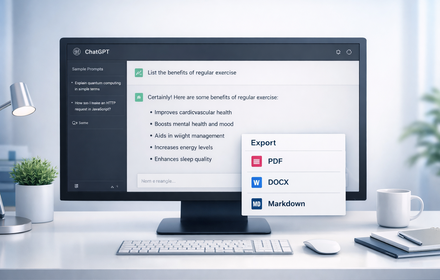
Capture & edit ChatGPT responses, then export as HTML, PDF, Markdown, or publish to Notion. Save prompts, notes, & research easily.
As of June 2026, ConvoPipe - Export ChatGPT to PDF, Markdown, Notion & More has 13 users and a 5.00/5 rating from 3 reviews in the Productivity category.
Usersup 44.4 percent+44.4%
13
13
Ratingno change0%
5.00
3 reviews
Reviewsno change0%
3
Version
1.0.1
Manifest V3
History
8 snapshotsTracking since Apr 1, 2026.
View as table
| Date | Users | Rating | Reviews | Version |
|---|---|---|---|---|
| Apr 1, 2026 | 9 | 5.00 | 3 | 1.0.1 |
| Apr 16, 2026 | 11 | 5.00 | 3 | 1.0.1 |
| Apr 24, 2026 | 10 | 5.00 | 3 | 1.0.1 |
| May 1, 2026 | 11 | 5.00 | 3 | 1.0.1 |
| May 7, 2026 | 10 | 5.00 | 3 | 1.0.1 |
| May 12, 2026 | 13 | 5.00 | 3 | 1.0.1 |
| May 26, 2026 | 12 | 5.00 | 3 | 1.0.1 |
| Jun 5, 2026 | 15 | 5.00 | 3 | 1.0.1 |
| Now | 13 | 5.00 | 3 | 1.0.1 |
Permissions & access
- Permissions
- storagesidePanelscripting
- Host access
- https://chatgpt.com/*, https://api.convopipe.com/*
Screenshots


About
Capture, edit & export your ChatGPT chats — fast, simple, and organized.

ConvoPipe makes it effortless to save, organize and reuse your ChatGPT output. Whether you’re doing research, writing docs, or building with AI — you’ll never lose a good conversation again.

✨ Key Features

Select & export: Grab any ChatGPT response (or part of it), and export as HTML, PDF, or Markdown.

Publish to Notion: One-click push to your Notion workspace — ideal for research, notes, AI-docs, or sharing with teammates.

Zero copy-paste: Skip manual selection, copying and formatting — ConvoPipe handles it all.

Instant & intuitive: Works right inside ChatGPT; no extra setup or complicated UI.

Privacy-first design: Uses minimal permissions (activeTab, storage, sidePanel), no tracking, no analytics — you stay in control of your data.

Who it’s for:

Developers, researchers, students using ChatGPT.

Writers, content creators, or anyone who wants to archive AI chats cleanly.

Teams/documentation-heavy workflows — ideal for saving prompts, examples, AI docs, and knowledge base entries.

Why you’ll love it:

Saves time — no more manual copy/paste.

Keeps your content organized and export-ready.

Integrates with Notion for powerful documentation & collaboration.

Minimal permissions = trusted & lightweight.

Try ConvoPipe today — and turn your ChatGPT chats into polished notes, docs, and knowledge 📚
Technical
- Version
- 1.0.1
- Manifest
- V3
- Size
- 80.7KiB
- Min Chrome
- 114
- Languages
- 1
- Featured
- No
Metadata
- ID
- dfjdadjlijampddpfkgimabhkdaboeai
- Developer ID
- u83e486286eecceacf2254403bb3132e0
- Developer Email
- [email protected]
- Created
- Dec 4, 2025
- Last Updated (Store)
- Feb 13, 2026
- Last Scraped
- Jun 5, 2026
- Website
- —
- Support URL
- https://convopipe.com/contact
- Privacy Policy
- https://convopipe.com/privacy
Similar extensions
Alternatives to ConvoPipe - Export ChatGPT to PDF, Markdown, Notion & More, ranked by description similarity.

ChatExport – Export ChatGPT to PDF, TXT, Markdown & HTML
Export ChatGPT chats to PDF, TXT, Markdown & HTML in one click. Custom fonts, dark mode & instant downloads. Save AI chats.
32

GPT2Notes – Export & Backup ChatGPT to Notion (Batch & Auto Sync)
ChatGPT history downloader & Notion integration – save & back up your conversations to Markdown, HTML & more.
82

ChatGPT to Markdown
Export ChatGPT conversations to Markdown format
20
★ 5.0
ChatGPT Exporter
Export ChatGPT conversations to PDF, Word, Markdown, and Text.
194
★ 1.0

ChatGPT Chats Organizer
Turn Messy ChatGPT Conversations into Organized Knowledge
—

AI Chat Exporter - ChatGPT, Claude, Gemini & DeepSeek to PDF
Export ChatGPT, Claude, Gemini, DeepSeek, Grok to PDF. Batch save chats with code, math & images. Export your AI history.
1.0K
★ 4.5

ChatGPT Copy Markdown
Use ChatGPT Copy Text Extension to quickly copy selected messages from your conversations and export them as clean text or Markdown…
17

ChatGPT PDF Exporter – Download ChatGPT History
Easily save your ChatGPT chats as PDF, Markdown, or other formats—every detail preserved flawlessly.
260
★ 4.4
Data sourced from the Chrome Web Store · last verified Jun 5, 2026.