
TabCarousel
Cycle through your Chrome tabs automatically. Great for monitoring information on a TV with a computer attached.
As of May 2026, TabCarousel has 10,000 users and a 4.39/5 rating from 31 reviews in the Workflow & Planning category.
Usersno change0%
10.0K
10,000
Ratingno change0%
4.39
31 reviews
Reviewsno change0%
31
Version
1.0.3
Manifest V3
History
1 snapshotsTracking since Apr 24, 2026.
View as table
| Date | Users | Rating | Reviews | Version |
|---|---|---|---|---|
| Apr 24, 2026 | 10.0K | 4.39 | 31 | 1.0.3 |
| Now | 10.0K | 4.39 | 31 | 1.0.3 |
Permissions & access
- Permissions
- storageactiveTab
- Host access
- None declared
Screenshots
About
A Chrome extension to help you keep tabs on info you want to monitor. It's great for cycling through tabs on an external display, like a TV.

Authors: Benjamin Oakes, Madhur Ahuja, and Jim Adamson

Tutorial

TabCarousel is simple: open tabs you want to monitor throughout the day, then click the toolbar icon. To stop, click the icon again.

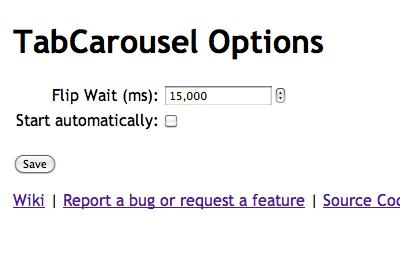
By default, TabCarousel will flip through your tabs every 15 s, reloading them every 5 min. It's great on a unused display or TV. Put Chrome in full-screen mode (F11, or cmd-shift-f on the Mac) and let it go.

If you want to change how often TabCarousel flips through your tabs, right click on the toolbar icon and choose "Options".

New in 1.0.3 (2024-06-21):

* Sponsorship links

New in 1.0.2 (2024-06-19):

* Fix no carouselling when flipWait set to > 30 seconds (Thank you, Jim Adamson!)

New in 1.0.1 (2024-06-10):

* Fixed auto startup (Thank you, Madhur Ahuja!)

New in 1.0.0 (2023-12-26):

* Manifest v3 support (Thank you, Madhur Ahuja!)

New in 0.5.4 (2020-05-14):

* Reduce permissions for Chrome Web Store policies

New in 0.5.3 (2012-08-21):

* Bug fixes

New in 0.5.2 (2011-07-06):

* Added an option to start Carousel automatically, by request from a user
* Tabs that have previously failed to reload now reload correctly
* Carousel now only flips through tabs in the window in which it was started

Example Uses

On a computer that has an external display (like an HDTV), try opening:

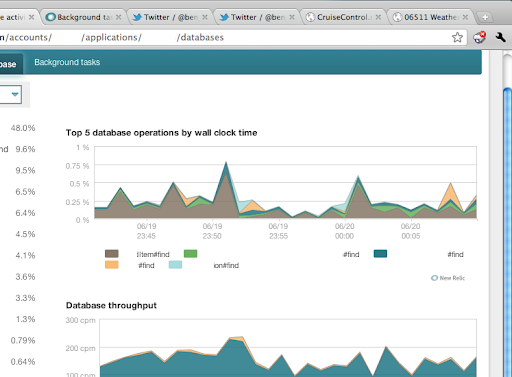
* NewRelic - Open as many tabs as you want for your apps -- don't forget to turn on "kiosk mode"
* Twitter - Make a list of services you use, for example, and open it
* Status sites:
    * GitHub
    * Heroku
* Monitor your CI service
* Packages with tracking information
* Anything else that's on the web that you want to monitor

The TabCarousel wiki on GitHub has more: https://github.com/TabCarousel/TabCarousel/wiki

TabCarousel is open source software.  Contributions are welcome, as are suggestions and bug reports.  Check the project out at https://github.com/TabCarousel/TabCarousel
Technical
- Version
- 1.0.3
- Manifest
- V3
- Size
- 49.21KiB
- Min Chrome
- 88
- Languages
- 1
- Featured
- Yes
Metadata
- ID
- ddldimidiliclngjipajmjjiakhbcohn
- Developer ID
- u1704b148be43aff83ef9cd3a2a84f4b3
- Developer Email
- [email protected]
- Created
- Jun 20, 2011
- Last Updated (Store)
- Jun 24, 2024
- Last Scraped
- May 19, 2026
- Website
- —
- Privacy Policy
- —
Similar extensions
Alternatives to TabCarousel, ranked by description similarity.

TabCycle - Auto-Rotate Tabs for Dashboards and Wallboard Displays
Automatically cycles through browser tabs like a slideshow.
1.0K
★ 5.0

Tab Split
Forces each browser start page to open in a new browser window across multiple monitors.
3.0K
★ 1.0

FreeTabSwitcher
Tab rotator with multi-window control, auto-refresh, hotkeys, auto-start, and profiles. Perfect for dashboards.
2.0K
★ 4.5

Tabs Rotator / Slideshow
Rotates through a set of URLs at specified intervals. Preloads pages in the background and automatically switches between tabs.
3.0K
★ 4.5

Refreshing Tab Slideshow
Automatically cycles through open browser tabs in multiple windows with optional background refresh.
66
★ 5.0

BoardTab – Visual Kanban Tab Manager with Tab Analytics
Visual Order for Tab Hoarders
81
★ 5.0

PurposeTab
New tab dashboard with goals, habits, calendar, and daily focus.
1.0K
★ 5.0

Vertically Listed Tabs
Manage your tabs vertically and browse quicker!
865
★ 4.3
Data sourced from the Chrome Web Store · last verified May 19, 2026.