
Vertically Listed Tabs
Manage your tabs vertically and browse quicker!
As of May 2026, Vertically Listed Tabs has 865 users and a 4.31/5 rating from 16 reviews in the Workflow & Planning category.
Usersup 10.9 percent+10.9%
865
865
Ratingno change0%
4.31
16 reviews
Reviewsno change0%
16
Version
0.11.0
Manifest V3
History
2 snapshotsTracking since Apr 24, 2026.
View as table
| Date | Users | Rating | Reviews | Version |
|---|---|---|---|---|
| Apr 24, 2026 | 780 | 4.31 | 16 | 0.11.0 |
| May 19, 2026 | 823 | 4.31 | 16 | 0.11.0 |
| Now | 865 | 4.31 | 16 | 0.11.0 |
Permissions & access
- Permissions
- tabstabGroupsfaviconstoragesystem.display
- Host access
- None declared
Screenshots

About
Before you begin...

• Outside of Chrome, Brave, and Edge, I cannot guarantee this will work. Please DO NOT review the extension unless you are using Chrome or Brave browsers. Other browsers that supposedly support chrome extensions can be added if you submit a GitHub issue or by emailing [email protected].
• Please submit a support request (by email, Github issue, or through the Chrome Web Store support feature) before providing a less than 5 star review. I will immediately fix whatever it is that prevents you from using the extension so that you can provide a 5 star review. Thanks!

============
= The Problem

Lots of horizontal tabs at the top of the browser pile up and become tiny. If they have the same favicon, or even with similar site titles, they become painful to search through quickly. This is a massive time waster for multitaskers like you!

============
= Our Solution

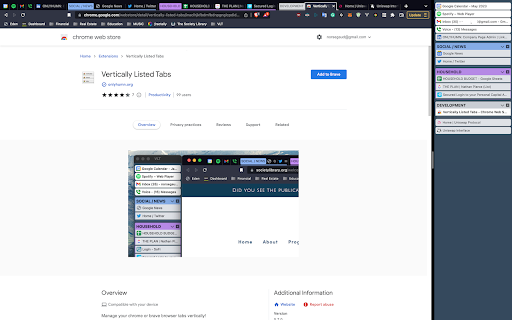
We open and attach a panel ("VLT") window to the left of your normal browser window and inside of it vertically list tabs, groups, etc. This should allow for large number of tabs to be visible at once and maintain the width of tab titles, increasing visual scanning and targeting speed for a specific tab.

==============
= Getting Started

1. Install the extension.
2. Click the puzzle piece button in the top right of the browser, exposing the available extensions.
3. Pin the Vertically Listed Tabs extension, which exposes its icon right next to the puzzle piece at the top right.
4. Click on the VLT button (the one next to the puzzle piece). Note: If it's a maximized/fullscreen window, we will downsize the window so the VLT panel can be attached to the left side.
5. In the list, hover over the tab's icon (the small image on the left) to expose the toolbar, allowing closing, grouping, pinning, etc.

==============
= Features

• The VLT window with vertical tabs opens and sits on the left or right of your browser window (under options) and, if you resize it, will automatically adjust. Note: Windows 10/11/etc has an invisible border around browser windows and will look different from macOS and the screenshots I take.
• Right click the extension icon and open Options, allowing you to control Background Color, Default Width, etc.
• Click tabs to focus them in the main window.
• Click, hold for 1 second, and then drag tabs to reorganize.
• Hover over the icon for the tab on the left side to expose a toolbar, including features like Tab Close, Group, Pin, and Pause.
• Groups are color coated!
• Group collapsing and bulk pausing or closing.
• Rename group titles from the VLT window.
• Detach the VLT window from the main window and move it to a different monitor.
• Support for Windows "snap" and MacOS "tile" features, allowing VLT to be shown along side of a full screened Window. Example image: https://i.imgur.com/Nwg2h6z.png
• Unfocusing on the browser to use another app, and then clicking on either the VLT or primary window will bring both the VLT and primary window to front.

=============
= Release Notes
0.11.0: Hover over title to expand and show the full thing + counter in toolbar showing count of tabs open. Thank you Stuart for the wonderful feedback!
0.10.4: quick fix for collapsing groups
0.10.3: ability to see what tabs have audio and then mute/unmute
0.10.2: fixed resizing when the root window is too big
0.10.1: supports multiple browser windows each having their own VLT
0.9.10: Ability to fix the VLT window to the right of the main browser window.
0.9.9: fullscreening is fixed + Options open on first load (you can disable in options) + usage guide
0.9.8: styling fixes
0.9.7: fixed toolbar attachment status icons
0.9.6: properly handle auto-discarded tabs + styling fixes
0.9.5: Options (gear) button in top left/toolbar.
0.9.4: New styling options and default style. Also several stability fixed
0.9.3: Major rewrite. Lots of bug fixes. Little rough around the edges, but functional.

============
= Development

The project tracker showing all current pending or in process dev items can be found at https://github.com/users/NorseGaud/projects/1/views/1

This software is provided by ONLYHUMN LLC (https://onlyhumn.org).
Technical
- Version
- 0.11.0
- Manifest
- V3
- Size
- 279KiB
- Min Chrome
- 88
- Languages
- 1
- Featured
- Yes
Metadata
- ID
- inaclhjkfbdmfbdnpgnglcpdiddmacbh
- Developer ID
- ua6bd2237781ad7e7d85caf63ab2bea9d
- Developer Email
- [email protected]
- Created
- Sep 15, 2022
- Last Updated (Store)
- Sep 9, 2024
- Last Scraped
- May 19, 2026
- Website
- onlyhumn.org
- Privacy Policy
- —
Similar extensions
Alternatives to Vertically Listed Tabs, ranked by description similarity.

Vertical Tabs - Tabybara
Display and manage your tabs vertically in side panel.
360
★ 4.9

Tab Resize - split screen layouts
The ORIGINAL Tab Resize. Split Screen made easy. Resize the CURRENT tab and tabs to the RIGHT into layouts on separate windows.
1.0M
★ 4.3

Super Vertical Tabs
A vertical tab management extension with grouping, search, and customization features.
4

tabVertikal - vertical tabs
Manage tabs & tabGroups vertically in side panel. Advanced auto tab grouping. Switch workspaces. Auto suspend tab
4.0K
★ 4.3

TabMerge
Auto-group tabs by topic. Collapse clutter. Breathe again.
32
★ 5.0

VertiTab – Vertical Tab Manager | Sessions, AI Groups & Bookmark Sync
Manage all your tabs & bookmarks from a sidebar. Tree view, workspaces, one-click save & restore, organize everything across devices
20.0K
★ 4.7

Vertical Tabs | Quick Tabs Management
Management your tabs with sidebar, easy to do quick search, pin, group, drag, close your tabs.
—

Group My Tabs
Group tabs by domain in Chrome with one click, enhancing built-in functionality for organized browsing.
26
★ 5.0
Data sourced from the Chrome Web Store · last verified May 19, 2026.