
Tab Split
Forces each browser start page to open in a new browser window across multiple monitors.
As of May 2026, Tab Split has 3,000 users and a 1.00/5 rating from 2 reviews in the Workflow & Planning category.
Usersno change0%
3.0K
3,000
Ratingno change0%
1.00
2 reviews
Reviewsno change0%
2
Version
1.1.3
Manifest V3
History
1 snapshotsTracking since Apr 30, 2026.
View as table
| Date | Users | Rating | Reviews | Version |
|---|---|---|---|---|
| Apr 30, 2026 | 3.0K | 1.00 | 2 | 1.1.3 |
| Now | 3.0K | 1.00 | 2 | 1.1.3 |
Permissions & access
- Permissions
- storage
- Host access
- None declared
Screenshots
About
Tab Split 1.1.3
Author: Jonathan "Acetolyne" Langlois
@cetolyne

OVERVIEW
Tab Split is a Chrome extension that makes your homepage tabs open in different windows and across multiple screens.
How it is different from other extensions is that you are not required to click a button, instead this extension runs when the browser is started which helps with automated startups for monitoring through websites.

SHOULD YOU USE THIS EXTENSION
If you are not setting up dashboards for monitoring then this extension is probably not for you!

PREREQUISITES
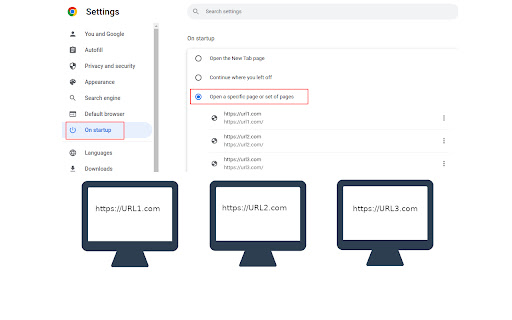
Before Tab Split will work you must first setup some websites to open when you start Chrome browser. To do this go to settings, choose the "On Startup" tab on the left, the choose "Open a specific page or set of pages". Add a new page for each page you would like to open when Chrome starts.
These are the websites that will be spread out across your screens as Chrome windows when Chrome first starts.
NOTE: pressing the reload button in the extensions section will not make Tab Split trigger, it will only trigger when the browser is first opened, to test please close all your browser windows and reopen the browser.

OPERATION
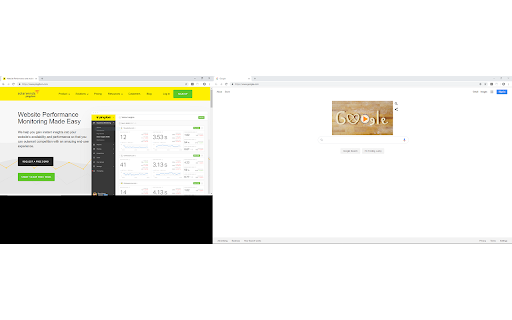
When Chrome Browser opens it will cause each startup tab to move to a new window. Each window is moved to the next display.
This is useful for setting up automated monitoring in multi-headed environments.
It will trigger each time Chrome is opened. This allows you to keep the ability to open new tabs without them being moved to a new window when you open them if you need to open tabs temporarily.

FEATURES
The extension now has the ability to choose between maximized screen and fullscreen, simply click the extension icon and choose which you would like and choose save. This will be your new default, change the option anytime you want.

LIMITATIONS:
The extension opens windows horizontally and will not open in a vertical manner, meaning monitors must be setup in a horizontal fashion to display correctly. It will work with monitors of different sizes though.

SUPPORT:
For best support please raise issues or questions on the Github page at https://github.com/Acetolyne/TabSplit/issues Chrome store will not send an email when you raise an issue or question on the Chrome Webstore so I may not see your issue or questions right away if you post there.

ADDITIONAL INFO:
The extension will open as many windows as you have tabs on startup. This setting is found under Chrome settings >> On Startup.
Choose "open specific pages when Chrome starts" then specify the pages you want to open automatically when Chrome browser is started.
For typical dashboard setups you can then set Chrome to start with the computer, Chrome will open and the websites defined in the "On Startup"
section of the settings page will then be spread across your multiple monitors.

To change which screen the tab opens on, change the order of homepages on the Chrome settings page.

If you have more tabs set to open than you have screens then the extra tabs will open on the last monitor all in the same window.

If you use this extension I would appreciate if you would take a minute to leave a review on the Chrome Webstore so other users can have valid feedback.
Technical
- Version
- 1.1.3
- Manifest
- V3
- Size
- 143KiB
- Min Chrome
- 88
- Languages
- 1
- Featured
- Yes
Metadata
- ID
- anijodnfcgfofmacdpgonkncimndaeba
- Developer ID
- ub07c4c559404fe953bdeffbdfbef744e
- Developer Email
- [email protected]
- Created
- Apr 8, 2018
- Last Updated (Store)
- Jun 30, 2022
- Last Scraped
- May 28, 2026
- Website
- —
- Support URL
- https://github.com/Acetolyne/TabSplit/issues
- Privacy Policy
- —
Similar extensions
Alternatives to Tab Split, ranked by description similarity.

SplitView — Split Screen & Side by Side Tabs for Multi Window Browsing
Split screen extension — tile browser windows side by side in one click. 6 layouts, multi-monitor, keyboard shortcuts, instant undo.
653
★ 5.0

Tab Splitter
Split your browser tab into two panes
—
★ 1.0

Tabsplit
Tabsplit can convert multiple tabs into one page containing original websites in frames.
You can create you own pages containing…
23

TabCarousel
Cycle through your Chrome tabs automatically. Great for monitoring information on a TV with a computer attached.
10.0K
★ 4.4

Close duplicate tab
Close duplicate tab on current window.
5.0K
★ 4.5

Tab Resize - split screen layouts
The ORIGINAL Tab Resize. Split Screen made easy. Resize the CURRENT tab and tabs to the RIGHT into layouts on separate windows.
1.0M
★ 4.3

tabExtend - Easy Tab manager
Transform your new tab into a powerful dashboard. Add notes, set reminders, and sync across devices to boost productivity.
30.0K
★ 4.6

Dual Windows (Updated)
Dual monitor in one machine. 💻
573
★ 5.0
Data sourced from the Chrome Web Store · last verified May 28, 2026.