
Instant Multilingual PDF/HTML/TXT Dictionary
Define word(s) on PDF/HTML/TXT pages in just two clicks, even on local docs. Now with ChatGPT support.
As of June 2026, Instant Multilingual PDF/HTML/TXT Dictionary has 1,000 users and a 5.00/5 rating from 7 reviews in the Workflow & Planning category.
Usersno change0%
1.0K
1,000
Ratingno change0%
5.00
7 reviews
Reviewsno change0%
7
Version
2.4.0
Manifest V3
90-day change · In the last 90 days this extension 1 version update.
History
2 snapshotsTracking since Apr 18, 2026.
View as table
| Date | Users | Rating | Reviews | Version |
|---|---|---|---|---|
| Apr 18, 2026 | 1.0K | 5.00 | 7 | 2.3.1 |
| Jun 3, 2026 | 1.0K | 5.00 | 7 | 2.3.1 |
| Now | 1.0K | 5.00 | 7 | 2.4.0 |
Changelog
- Jun 3, 2026description
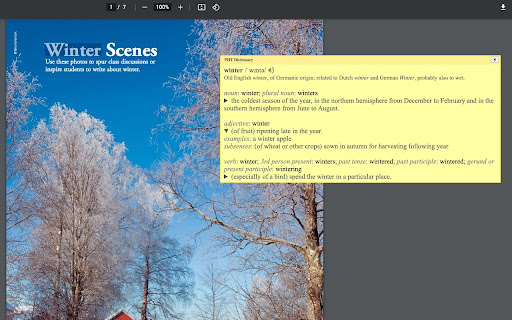
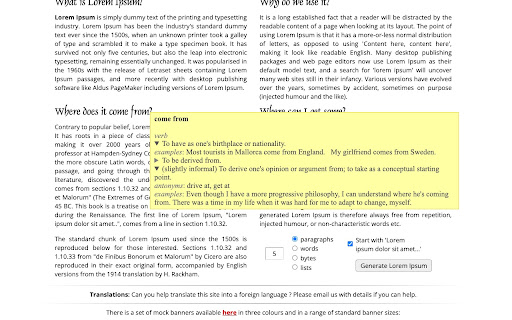
🔍 Enhance your reading experience with our extension. Easily obtain definitions by selecting a word or phrase. Click the floating icon, use the Alt+Shift+Z shortcut, or right-click to choose 'Define [your selected word(s)]'.

🆕 Now with robust PDF support: If tooltips cannot be shown in PDFs, the extension automatically opens a popup window for definitions, ensuring a seamless experience even in Chrome's built-in PDF viewer.

🔑 Key Options:
- 🎛️ Customize Shortcuts: Tailor a shortcut that complements your workflow.
- 📚 Definition Providers: Choose your primary definition provider. We now feature the versatile ChatGPT, supporting languages including Arabic, Brazilian Portuguese, Bulgarian, Chinese (Simplified), Chinese (Traditional), Czech, Danish, Dutch, English (UK/US), Finnish, French, German, Greek, Hebrew, Hindi, Hungarian, Indonesian, Italian, Japanese, Korean, Norwegian, Polish, Portuguese, Romanian, Russian, Slovak, Spanish, Swedish, Thai, Turkish, Ukrainian, and Vietnamese.
- 🖼️ Popup Window Configuration: Personalize the popup window's appearance and functionality.
- 🔗 Web Search Link: Easily access extended information with a 'Search the web' link.
- 💡 ChatGPT Backup: Utilize ChatGPT as an additional source for definitions (register at chatgpt.com if required).

🌟 Special Feature: Enable word pronunciation on Content Security Policy (CSP) protected pages like github.com with our 'CSP Page Pronunciation' option. This feature is initially disabled 🔒 and can be activated based on site policies.

⚠️ Note: Our extension is compatible with native PDF formats (including Chrome's built-in PDF viewer) and now automatically falls back to a popup window if tooltips cannot be displayed. Protected or scanned documents are not supported. For local document access, enable the 'Allow access to file URLs' option on the chrome://extensions page.

📃 Changelog Highlights:
-- 🎯 Version 2.3.0: Added Selection Icon for instant translation, increased popup font size for better readability, and improved overall reliability.
-- 🪟 Version 2.2.146: Enhanced popup window system with keyboard shortcut support for recursive lookups within definitions, resizable fallback windows with position memory across sessions, and improved reliability with context menu duplicate error fix.
-- 🔧 Version 2.1.142: Enhanced code quality and user support experience. Fixed tooltip reuse logic to prevent stale "thinking..." text, improved tooltip visibility on complex pages, added direct support hub link in Options for faster issue resolution, and modernized keyboard event handling.
-- 🚀 Version 2.0.140: Major update! PDF support is now robust—when tooltips cannot be rendered (e.g., in Chrome's PDF viewer), the extension automatically opens a popup window for definitions. Popup window creation and positioning have been overhauled for reliability and user experience.
-- 🌍 Version 1.3.120: ChatGPT added as a definition provider, expanding our language support and enhancing definition accuracy.
🔍 Enhance your reading experience with our extension. Easily obtain definitions by selecting a word or phrase. Click the floating icon, use the Alt+Shift+Z shortcut, or right-click to choose 'Define [your selected word(s)]'.

🆕 Now with robust PDF support: If tooltips cannot be shown in PDFs, the extension automatically opens a popup window for definitions, ensuring a seamless experience even in Chrome's built-in PDF viewer.

🔑 Key Options:
- 🎛️ Customize Shortcuts: Tailor a shortcut that complements your workflow.
- 📚 Definition Providers: Choose your primary definition provider. We now feature the versatile ChatGPT, supporting languages including Arabic, Brazilian Portuguese, Bulgarian, Chinese (Simplified), Chinese (Traditional), Czech, Danish, Dutch, English (UK/US), Finnish, French, German, Greek, Hebrew, Hindi, Hungarian, Indonesian, Italian, Japanese, Korean, Norwegian, Polish, Portuguese, Romanian, Russian, Slovak, Spanish, Swedish, Thai, Turkish, Ukrainian, and Vietnamese.
- 🖼️ Popup Window Configuration: Personalize the popup window's appearance and functionality.
- 🔗 Web Search Link: Easily access extended information with a 'Search the web' link.
- 💡 ChatGPT Backup: Utilize ChatGPT as an additional source for definitions (register at chatgpt.com if required).

🌟 Special Feature: Enable word pronunciation on Content Security Policy (CSP) protected pages like github.com with our 'CSP Page Pronunciation' option. This feature is initially disabled 🔒 and can be activated based on site policies.

⚠️ Note: Our extension is compatible with native PDF formats (including Chrome's built-in PDF viewer) and now automatically falls back to a popup window if tooltips cannot be displayed. Protected or scanned documents are not supported. For local document access, enable the 'Allow access to file URLs' option on the chrome://extensions page.

📃 Changelog Highlights:
-- 📜 Version 2.4.0: Added Search History functionality to easily view and retrieve your past definitions.
-- 🎯 Version 2.3.0: Added Selection Icon for instant translation, increased popup font size for better readability, and improved overall reliability.
-- 🪟 Version 2.2.146: Enhanced popup window system with keyboard shortcut support for recursive lookups within definitions, resizable fallback windows with position memory across sessions, and improved reliability with context menu duplicate error fix.
-- 🔧 Version 2.1.142: Enhanced code quality and user support experience. Fixed tooltip reuse logic to prevent stale "thinking..." text, improved tooltip visibility on complex pages, added direct support hub link in Options for faster issue resolution, and modernized keyboard event handling.
-- 🚀 Version 2.0.140: Major update! PDF support is now robust—when tooltips cannot be rendered (e.g., in Chrome's PDF viewer), the extension automatically opens a popup window for definitions. Popup window creation and positioning have been overhauled for reliability and user experience.
Permissions & access
- Permissions
- activeTabcontextMenusdeclarativeNetRequestfontSettingsnotificationsoffscreenscriptingstoragewebNavigationwebRequest
- Host access
- <all_urls>
Screenshots



About
🔍 Enhance your reading experience with our extension. Easily obtain definitions by selecting a word or phrase. Click the floating icon, use the Alt+Shift+Z shortcut, or right-click to choose 'Define [your selected word(s)]'.

🆕 Now with robust PDF support: If tooltips cannot be shown in PDFs, the extension automatically opens a popup window for definitions, ensuring a seamless experience even in Chrome's built-in PDF viewer.

🔑 Key Options:
- 🎛️ Customize Shortcuts: Tailor a shortcut that complements your workflow.
- 📚 Definition Providers: Choose your primary definition provider. We now feature the versatile ChatGPT, supporting languages including Arabic, Brazilian Portuguese, Bulgarian, Chinese (Simplified), Chinese (Traditional), Czech, Danish, Dutch, English (UK/US), Finnish, French, German, Greek, Hebrew, Hindi, Hungarian, Indonesian, Italian, Japanese, Korean, Norwegian, Polish, Portuguese, Romanian, Russian, Slovak, Spanish, Swedish, Thai, Turkish, Ukrainian, and Vietnamese.
- 🖼️ Popup Window Configuration: Personalize the popup window's appearance and functionality.
- 🔗 Web Search Link: Easily access extended information with a 'Search the web' link.
- 💡 ChatGPT Backup: Utilize ChatGPT as an additional source for definitions (register at chatgpt.com if required).

🌟 Special Feature: Enable word pronunciation on Content Security Policy (CSP) protected pages like github.com with our 'CSP Page Pronunciation' option. This feature is initially disabled 🔒 and can be activated based on site policies.

⚠️ Note: Our extension is compatible with native PDF formats (including Chrome's built-in PDF viewer) and now automatically falls back to a popup window if tooltips cannot be displayed. Protected or scanned documents are not supported. For local document access, enable the 'Allow access to file URLs' option on the chrome://extensions page.

📃 Changelog Highlights:
-- 📜 Version 2.4.0: Added Search History functionality to easily view and retrieve your past definitions.
-- 🎯 Version 2.3.0: Added Selection Icon for instant translation, increased popup font size for better readability, and improved overall reliability.
-- 🪟 Version 2.2.146: Enhanced popup window system with keyboard shortcut support for recursive lookups within definitions, resizable fallback windows with position memory across sessions, and improved reliability with context menu duplicate error fix.
-- 🔧 Version 2.1.142: Enhanced code quality and user support experience. Fixed tooltip reuse logic to prevent stale "thinking..." text, improved tooltip visibility on complex pages, added direct support hub link in Options for faster issue resolution, and modernized keyboard event handling.
-- 🚀 Version 2.0.140: Major update! PDF support is now robust—when tooltips cannot be rendered (e.g., in Chrome's PDF viewer), the extension automatically opens a popup window for definitions. Popup window creation and positioning have been overhauled for reliability and user experience.
Technical
- Version
- 2.4.0
- Manifest
- V3
- Size
- 216KiB
- Min Chrome
- 88
- Languages
- 4
- Featured
- Yes
Metadata
- ID
- damjcgmdlgdphbhnihdbmgbbjjjmmmhf
- Developer ID
- ucceb3ea77759b7c8f115c1f289cbf7ed
- Developer Email
- [email protected]
- Created
- Jan 9, 2023
- Last Updated (Store)
- Jun 1, 2026
- Last Scraped
- Jun 12, 2026
- Website
- —
- Support URL
- —
- Privacy Policy
- —
Similar extensions
Alternatives to Instant Multilingual PDF/HTML/TXT Dictionary, ranked by description similarity.

Instant Multilingual PDF/HTML/TXT Translator
Translate text on PDF/HTML/TXT in two clicks, even for local docs. Now with ChatGPT support.
30.0K
★ 3.1

ChatGPT Exporter - ChatGPT to PDF, MD, and more
Download ChatGPT convos as PDF, Markdown, Text, etc. Download Chat GPT results to PDF. Easily convert ChatGPT to beautiful PDF.
100.0K
★ 4.8

Free AI Dictionary - Context Explain & Translate
AI popup dictionary with context-aware definitions & translations for web and PDFs. Highlight text, get instant explanations.
51
★ 5.0

ChatGPT Augment
Enhance chat with ChatGPT-Augment: auto-continue, macros, token count, prompts, JSON format.
155
★ 3.0

Chinese-English Dictionary (Purple Culture)
Talking Chinese-English Dictionary by Purple Culture
661
★ 4.0

Enigma, ChatGPT Sidebar
Enigma is an AI assistant sidebar. It brings the power of AI into your hands. Access ChatGPT everywhere.
119
★ 3.7
ChatGPT Optimizer - Boost Your AI Workflow
Enhance the Chat GPT interface and bring GPT trough all the web!
20.0K
★ 3.9

Definio - Multi-Source Definitions
A better alternative to Google Definitions. 450K+ words from Definio, Oxford & Wikipedia with pronunciation and search history.
28
★ 5.0
Data sourced from the Chrome Web Store · last verified Jun 12, 2026.