
Instant Multilingual PDF/HTML/TXT Translator
Translate text on PDF/HTML/TXT in two clicks, even for local docs. Now with ChatGPT support.
As of June 2026, Instant Multilingual PDF/HTML/TXT Translator has 30,000 users and a 3.12/5 rating from 189 reviews in the Workflow & Planning category.
Usersno change0%
30.0K
30,000
Ratingno change0%
3.12
189 reviews
Reviewsno change0%
189
Version
4.8.1
Manifest V3
History
1 snapshotsTracking since Apr 21, 2026.
View as table
| Date | Users | Rating | Reviews | Version |
|---|---|---|---|---|
| Apr 21, 2026 | 30.0K | 3.12 | 189 | 4.8.1 |
| Now | 30.0K | 3.12 | 189 | 4.8.1 |
Permissions & access
- Permissions
- activeTabcontextMenusfontSettingsnotificationsoffscreenscriptingstoragewebNavigation
- Host access
- <all_urls>
Screenshots



About
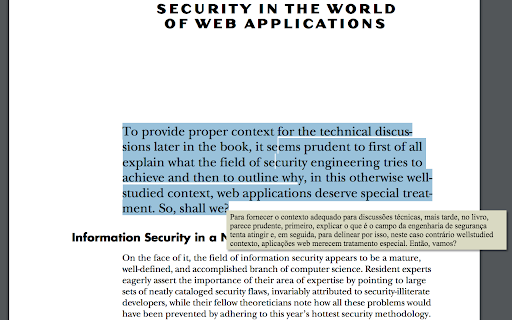
📖 Usage: Select text within any document and press Alt+Shift+A for an immediate translation (except for local PDF documents), or right-click on the text and choose 'Translate <your selected text>'. You can also enable the Selection Icon in Options — a floating icon appears when you select text, allowing instant translation with a single click. The translation will appear directly under your selection. With the integration of ChatGPT, Microsoft Translator, and Google API, the extension provides more accurate and context-aware translations, catering to an even broader range of language preferences.

🔍 Interactive Features: Clicking the extension button opens a popup window, allowing you to edit your selection. The extension features intelligent popup window management - when translating PDFs or when inline tooltips cannot be displayed, a smart popup window automatically appears with your translation. This popup remembers your preferred position across sessions and can be reused for multiple translations. Customize your experience by setting shortcuts, enabling the Selection Icon, choosing languages (supported by Google API, Microsoft Translator, and ChatGPT), configuring the popup window, and adding a 'Search the web' link for detailed information. The triple translation providers ensure a robust and versatile translation experience.

🌐 Compatibility: This extension works seamlessly with native PDF formats but is not compatible with protected or scanned documents. To translate local documents (PDF, TXT, HTML, etc.), enable the "Allow access to file URLs" option on the chrome://extensions page.

⚙️ Recent Updates and Improvements:
- v4.8.0: Added Selection Icon for instant translation — a floating icon appears when selecting text (enable in Options), increased popup font size for better readability, improved messaging reliability.
- v4.7.136: Enhanced popup window with keyboard shortcuts support (Alt+Shift+A works inside popup), automatic size and position memory, and context-aware styling.
- v4.6.135: Added Chrome Web Store support hub link in Options, enhanced PDF translation reliability with improved accessibility detection.
- v4.5.132: Enhanced PDF translation with intelligent popup window system — automatic fallback for PDF viewers, position memory, and multi-monitor support.
- v4.4.129: Added Google API as a new translation provider.
- v4.3.115: Integrated ChatGPT for context-aware translations.
- Ongoing improvements in response time, API support, and overall functionality.
Technical
- Version
- 4.8.1
- Manifest
- V3
- Size
- 201KiB
- Min Chrome
- 88
- Languages
- 4
- Featured
- Yes
Metadata
- ID
- fcbnhmalionocfajdkpnlhmekghnmbii
- Developer ID
- ucceb3ea77759b7c8f115c1f289cbf7ed
- Developer Email
- [email protected]
- Created
- Dec 2, 2015
- Last Updated (Store)
- Dec 1, 2025
- Last Scraped
- Jun 5, 2026
- Website
- —
- Support URL
- —
- Privacy Policy
- —
Similar extensions
Alternatives to Instant Multilingual PDF/HTML/TXT Translator, ranked by description similarity.

Instant Multilingual PDF/HTML/TXT Dictionary
Define word(s) on PDF/HTML/TXT pages in just two clicks, even on local docs. Now with ChatGPT support.
1.0K
★ 5.0

Quick Translate
This extension provides quick translation of selected texts
30.0K
★ 3.7

XTranslateAI - Translate All
Best translator powered by GPT AI, Google Translate and Microsoft Translator. It can translate to 100+ languages for any tones!
459
★ 3.9

ScTranslator - Translator, Page Translator, Dictionary
Translate selected text with multiple sources, Webpage translating that have 3 display modes... An all-in-one translation extension.
20.0K
★ 4.9

Translator - Select to Translate
Translate words and phrases while browsing the web using the Google Translator. Full page translator.
60.0K
★ 4.2
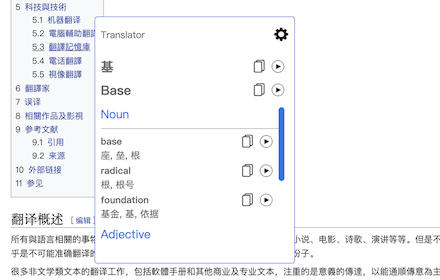
Translator
Translate words and phrases while browsing the web, using Google translator.
60.0K
★ 4.1

Input Translator
Translate your input text with AI.
2.0K
★ 4.9

Enigma, ChatGPT Sidebar
Enigma is an AI assistant sidebar. It brings the power of AI into your hands. Access ChatGPT everywhere.
119
★ 3.7
Data sourced from the Chrome Web Store · last verified Jun 5, 2026.