Highlight Emails in Gmail by cloudHQ
Highlight Email Rows in Gmail
As of June 2026, Highlight Emails in Gmail by cloudHQ has 8,000 users and a 4.15/5 rating from 13 reviews in the Accessibility category.
Usersno change0%
8.0K
8,000
Ratingup 6.4 percent+6.4%
4.15
13 reviews
Reviewsup 30.0 percent+30.0%
13
Version
1.0.1.23
Manifest V3
History
3 snapshotsTracking since Apr 18, 2026.
View as table
| Date | Users | Rating | Reviews | Version |
|---|---|---|---|---|
| Apr 18, 2026 | 8.0K | 3.90 | 10 | 1.0.1.23 |
| May 24, 2026 | 8.0K | 3.90 | 10 | 1.0.1.23 |
| Jun 3, 2026 | 8.0K | 4.27 | 15 | 1.0.1.23 |
| Now | 8.0K | 4.15 | 13 | 1.0.1.23 |
Permissions & access
- Permissions
- scriptingstoragebackgroundtabs
- Host access
- https://mail.google.com/, https://www.cloudhq.net/
Screenshots


About
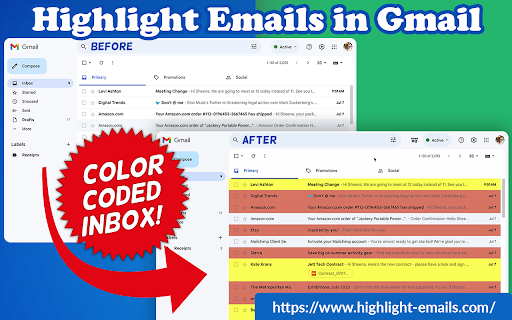
Color code email rows in Gmail to visually organize them.

✅ Select from a choice of calming or bright colors.
✅ Adjust background color based on email status, such as read/unread or selected.
✅ Customize the background color highlight depending on the sender’s email domain.
✅ Focus mode minimizes distractions, specifically designed to assist individuals with neurodevelopmental disorders to more easily navigate, read, and concentrate.

In short, with this extension you can inbox customization through color-coding, allowing users to visually categorize emails. For example, assigning the color red to emails from security domains like [email protected] enhances the ability to quickly spot and prioritize critical alerts or notifications, streamlining inbox management and efficiency.

Imagine having all your emails from clients, vendors, or internal company emails neatly color-highlighted. It's like having a personalized filing system right in your inbox. You'll easily spot emails that need your attention, while also decluttering your digital workspace. This is a  game changer for anyone dealing with heaps of emails daily. This app isn't just about managing your inbox; it's about managing your time and focus too.

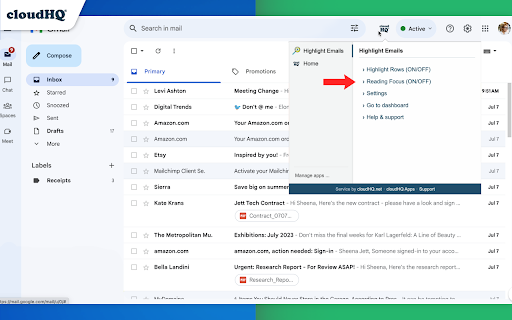
There's even a unique "Focus Mode" that works when you hover over an email. That email stands out while everything else recedes into the background. All other emails gray out, removing distractions and letting you zero in on that single email. It's the visual equivalent of noise-canceling headphones for your inbox. This way, you can devote your full attention to each email in turn, without missing any important details. Perfect for anyone who needs a little help focusing amidst the constant barrage of incoming emails. Focus Mode is more than a feature, it's a way to reclaim control over your digital environment.

~~~~ Instructions for Use ~~~~

1. Install the extension.
2. You can get started now by clicking on:
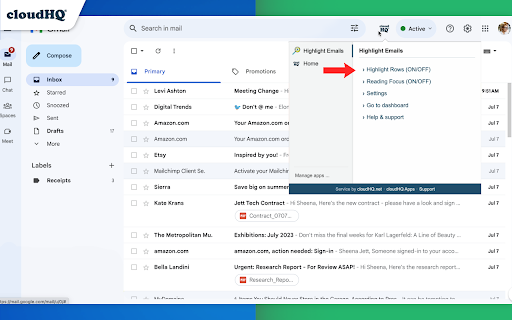
- The cloudHQ log on the top of your Gmail inbox
- Click on "Highlight Emails"
- Click on "Highlight Rows (ON/OFF)" to toggle the feature on and off
3. To activate the "Focus Mode," just toggle "Reading Focus (ON/OFF)" to enable distraction-free reading.
4. To disable, toggle the feature off.


cloudHQ website: https://www.cloudhq.net/
App website: https://www.highlight-emails.com
Pricing: https://www.highlight-emails.com/pricing
Support page: https://support.cloudhq.net/category/browser-extensions/highlight-emails/
FAQ page: https://support.cloudhq.net/highlight-emails-faq-frequently-asked-questions/
Blog: https://blog.cloudhq.net

Gmail, Google Calendar, and  Google Workspace are trademarks of Google LLC. Use of these trademarks is subject to Google Permissions.

cloudHQ is trademark of cloudHQ LLC. https://www.cloudhq.net/trademark
Technical
- Version
- 1.0.1.23
- Manifest
- V3
- Size
- 1.23MiB
- Min Chrome
- 88
- Languages
- 1
- Featured
- Yes
Metadata
- ID
- cnolfepmniiiapbenelaofkgcfoaenih
- Developer ID
- u9999076a1cee8608be24fd86bc3000b6
- Developer Email
- [email protected]
- Created
- Jul 4, 2023
- Last Updated (Store)
- Dec 15, 2025
- Last Scraped
- Jun 3, 2026
- Privacy Policy
- https://www.cloudhq.net/privacy
Similar extensions
Alternatives to Highlight Emails in Gmail by cloudHQ, ranked by description similarity.

monomail
Gmail, but fewer shades of blue. Take back your focus with MonoMail.
If your job involves using Gmail all day, you absolutely NEED…
—

Gmail Dark Mode
Gmail Dark Mode allows you quickly to enable a dark theme for Gmail.
10.0K
★ 3.9

Email reader view
Display emails in a more readable format
471
★ 5.0
Email Zoom Text Reader by cloudHQ
Gmail magnification and reading program tailored for low-vision users
3.0K
★ 4.5

Gmail External Sender Warning Variator
Randomizes font/color/size of Gmail's external warning banner to prevent desensitization.
1

Gmail Line Enlarger
Enlarge the size of email lines in Gmail for better readability
—

Gmail Accessibility Checker
Inspects Gmail compose window for WCAG 2.1 AA accessibility issues and provides visual feedback.
130
★ 5.0

HighlightCursor
Makes your highlight big and allows you to change its size.
37
Data sourced from the Chrome Web Store · last verified Jun 3, 2026.