Notebook Web Clipper – Sticky Notes & Save Articles
Clear the clutter. Clip the web. Save to Notebook.
As of June 2026, Notebook Web Clipper – Sticky Notes & Save Articles has 70,000 users and a 4.18/5 rating from 1,007 reviews in the Workflow & Planning category.
Usersno change0%
70.0K
70,000
Ratingdown 0.2 percent−0.2%
4.18
1.0K reviews
Reviewsup 0.1 percent+0.1%
1.0K
Version
3.3.9
Manifest V3
90-day change · In the last 90 days this extension 2 version updates.
History
5 snapshotsTracking since Apr 5, 2026.
View as table
| Date | Users | Rating | Reviews | Version |
|---|---|---|---|---|
| Apr 5, 2026 | 70.0K | 4.19 | 1.0K | 3.3.7 |
| Apr 14, 2026 | 70.0K | 4.18 | 1.0K | 3.3.8 |
| May 5, 2026 | 70.0K | 4.18 | 1.0K | 3.3.8 |
| May 16, 2026 | 70.0K | 4.18 | 1.0K | 3.3.8 |
| Jun 4, 2026 | 70.0K | 4.18 | 1.0K | 3.3.8 |
| Now | 70.0K | 4.18 | 1.0K | 3.3.9 |
Permissions & access
- Permissions
- tabsstoragecookiescontextMenuswebNavigationdeclarativeNetRequest
- Host access
- <all_urls>
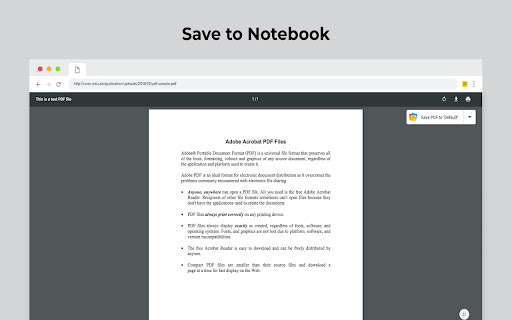
Screenshots

About
What's New:

Introducing 'Meeting Notes'. Taking notes during an online meeting is now a breeze with Notebook extension on Chrome. When you're on an online meeting using Zoom,  Cisco Webex , Zoho Meeting, and Zoho Showtime, you can see a a popped out Notebook icon which helps you to take quick notes. If you have not logged into your Zoho account in the browser, you can export your meeting notes as a .txt file. You can choose a notebook and associate tags before you save your meeting notes to Zoho Notebook.

Notebook Web Clipper

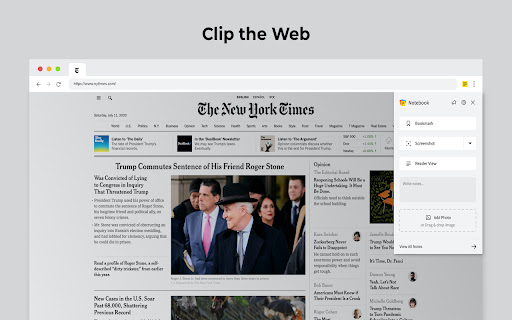
Clip content from the web to your Notebook with Web Clipper. Clipped content, saved as Note Cards, are immediately synced across your devices. Please download Notebook apps from Google PlayStore(https://play.google.com/store/apps/details?id=com.zoho.notebook) or Apple AppStore(https://itunes.apple.com/us/app/notebook-take-notes-sync-across-devices/id973801089?ls=1&mt=8). You can also view your notes from https://notebook.zoho.com.

What can you clip?

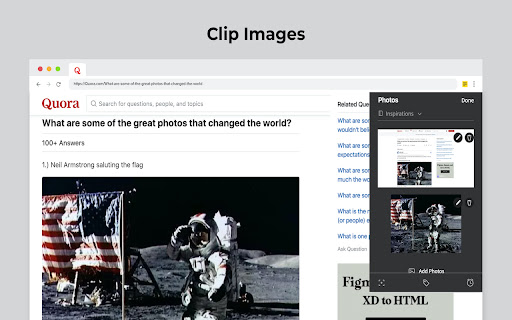
* Be it a new recipe you want to try or the next place you want to visit, clip text, images, or links into a note card, and save to a specific notebook.
* Want to save an article for future reference? With Clean View, you can save the entire article as a note card, minus the ads.
* Need to quickly grab a screenshot of a web page? The 'Screenshot’ option quickly saves the screenshot as a Photo Card.
* Convert any link to Smart Cards. Refer https://www.zoho.com/notebook/smart-card.html for more details on Smart Cards.
* Annotate images / screenshots before you add those in Notebook. We've added a complete annotation tool to edit your images.
* Use Meeting Notes to take quick notes on an online meeting using Zoom, Cisco Webex, Zoho Meeting and Zoho Showtime.

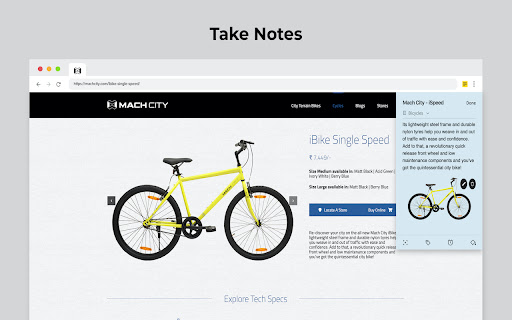
Web Clipper can also be used to create note cards.

Have a quick thought you want to note without leaving your browser? Create a quick note from scratch right from your browser. You can also add photos directly from your computer to Web Clipper.

Write your feedback to [email protected]

zoho.com/notebook
Technical
- Version
- 3.3.9
- Manifest
- V3
- Size
- 2.77MiB
- Min Chrome
- 88
- Languages
- 47
- Featured
- Yes
Metadata
- ID
- cneaciknhhaahhdediboeafhdlbdoodg
- Developer ID
- u503df942febfd9bc15e4ba9391526472
- Developer Email
- [email protected]
- Created
- Oct 4, 2016
- Last Updated (Store)
- May 30, 2026
- Last Scraped
- Jun 25, 2026
- Website
- https://zoho.com/
- Support URL
- https://help.zoho.com
- Privacy Policy
- https://www.zoho.com/privacy.html
Similar extensions
Alternatives to Notebook Web Clipper – Sticky Notes & Save Articles, ranked by description similarity.

SwipeNote
Work Smart. Organize. Collaborate. Succeed.
392
★ 4.1

Bluedot: AI notetaker & Meeting Recorder
Bot-free AI note taker & AI meeting notes for Google Meet, Zoom & Teams meetings.
80.0K
★ 4.7

NewNote
A Chrome extension for making notes
212
★ 5.0

Take Note - Boost your productivity
Take Note is a chrome extension that allows you to take notes and manage your notes with ease.
8
Zoho Annotator
The most elegant and efficient annotation tool.
20.0K
★ 4.7

Notta: AI Meeting Notetaker & Audio Transcription
Instantly capture and transcribe audio from any browser tab or Google Meet into accurate, actionable text with Notta.
100.0K
★ 2.9

Notes Online
The in-page notepad for taking notes online directly on any web page. No login, autosave, 1-click install, and full privacy
5.0K
★ 4.3

SnapMemo - Quick Note-Taking
Quick, Simple Note-Taking Right in Your Browser. No sign-up required!
94
★ 5.0
Data sourced from the Chrome Web Store · last verified Jun 25, 2026.