
SoqAlbum: Share iPhone/Android Files/Cameras
SoqAlbum directly links your smartphone(iPhone/Android) to chrome, allowing you to transfer and share files and photos via the link.
As of May 2026, SoqAlbum: Share iPhone/Android Files/Cameras has 1,000 users and a 4.50/5 rating from 2 reviews in the Workflow & Planning category.
Usersno change0%
1.0K
1,000
Ratingno change0%
4.50
2 reviews
Reviewsno change0%
2
Version
0.7
Manifest V3
Permissions & access
- Permissions
- tabsstoragedownloadsdownloads.shelf
- Host access
- None declared
Screenshots


About
RECENT CHANGES

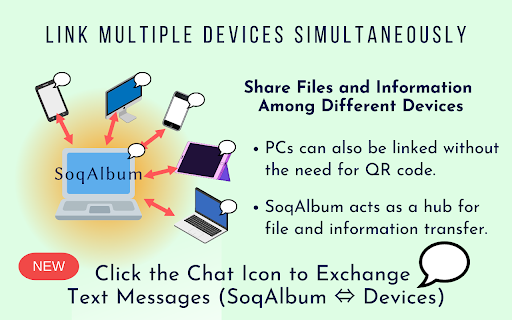
(NEW) Added a simple chat feature. You can now exchange text messages between Chrome and your smartphone.

(NEW) Introduced Manual Link ID, which allows devices to be linked without using QR codes. This makes it easy to exchange files between PCs without cameras.

(NEW) Added "Send Memo" and "Send Voice" tools to SoqTools. You can edit text or record audio on the fly, and send it directly to Chrome.


SoqAlbum links your smartphone and chrome directly via P2P. The link is completed in just two easy steps: click on the extension icon to launch SoqAlbum, and then use your smartphone to read the QR code there.

Using a simple tool on the smartphone app (SoqTools), you can easily transfer files from your smartphone to the chrome side.  By selecting the camera tool, photos taken with a smartphone can be saved directly to the chrome side and viewed on the large screen display of the PC. It is also easy to send files from the chrome side to the smartphone. SoqAlbum provides advanced collaboration between smartphone and PC.

Multiple smartphones can be linked to SoqAlbum at the same time. This allows you to transfer and share files across multiple devices, using chrome as a hub for file sharing. File exchange in SoqAlbum is done via P2P and does not go through the cloud, so there is no need to worry about file leaks from the cloud or censorship.

We have offered "Adaptive Download Shelf" as an extension option, which allows you to disable the download shelf only when using SoqAlbum. This can make the full screen display of SoqAlbum more comfortable.

SoqAlbum is a universal app supporting Win/Mac/Linux/ChromeOS/iPhone/Android. Even in situations where AirDrop or Nearby Share are not available, SoqAlbum can still transfer files. You can use this free app right now just in your browser, without creating an account. With this extension, enjoy the freedom of file sharing without the need to be aware of platform differences.
Technical
- Version
- 0.7
- Manifest
- V3
- Size
- 451KiB
- Min Chrome
- 88
- Languages
- 2
- Featured
- No
Metadata
- ID
- cmcggkbbiapnpemadkojjbnopmipfldd
- Developer ID
- u7b40be3e52b9c699d8dffc21f5bf8411
- Developer Email
- [email protected]
- Created
- Oct 12, 2022
- Last Updated (Store)
- Aug 11, 2023
- Last Scraped
- May 27, 2026
- Website
- yagiful.com
- Support URL
- —
- Privacy Policy
- —
Similar extensions
Alternatives to SoqAlbum: Share iPhone/Android Files/Cameras, ranked by description similarity.

QR Code Generator
QuickQR: Effortlessly Transfer URLs Across Devices
Description:
QuickQR is a powerful yet simple Chrome extension designed to make…
5

@Voice Connector
Open the current article in @Voice Aloud Reader Android app, or add it to reading list.
5.0K
★ 3.5

Omnibox QR Code Generator
Generate QR codes for URLs to easily share them to mobile devices.
13

ClipShare – Share Selected Text Instantly (Link & QR Code)
Instantly share selected text via link or QR code. Right-click any text and access it on another device.
17
★ 5.0
QR Code Scanner and Generator
A simple QR Code Scanner and Generator extension to scan, generate and save
145
★ 4.0
Notebook Web Clipper – Sticky Notes & Save Articles
Clear the clutter. Clip the web. Save to Notebook.
70.0K
★ 4.2

Vollume Sampler
Sample and edit any sound, right from your browser.
5.0K
★ 4.4

Cross Copy
A simple application to instantly share media and text across platforms.
50
★ 5.0
Data sourced from the Chrome Web Store · last verified May 27, 2026.