
ClipShare – Share Selected Text Instantly (Link & QR Code)
Instantly share selected text via link or QR code. Right-click any text and access it on another device.
As of June 2026, ClipShare – Share Selected Text Instantly (Link & QR Code) has 17 users and a 5.00/5 rating from 1 reviews in the Workflow & Planning category.
Usersup 466.7 percent+466.7%
17
17
Ratingno change0%
5.00
1 reviews
Reviewsno change0%
1
Version
1.0.1
Manifest V3
History
11 snapshotsTracking since Apr 1, 2026.
View as table
| Date | Users | Rating | Reviews | Version |
|---|---|---|---|---|
| Apr 1, 2026 | 3 | — | — | 1.0.1 |
| Apr 16, 2026 | 5 | — | — | 1.0.1 |
| Apr 22, 2026 | 8 | — | — | 1.0.1 |
| Apr 27, 2026 | 11 | — | — | 1.0.1 |
| May 4, 2026 | 14 | 5.00 | 1 | 1.0.1 |
| May 10, 2026 | 16 | 5.00 | 1 | 1.0.1 |
| May 15, 2026 | 13 | 5.00 | 1 | 1.0.1 |
| May 21, 2026 | 15 | 5.00 | 1 | 1.0.1 |
| May 27, 2026 | 18 | 5.00 | 1 | 1.0.1 |
| Jun 3, 2026 | 15 | 5.00 | 1 | 1.0.1 |
| Jun 9, 2026 | 18 | 5.00 | 1 | 1.0.1 |
| Now | 17 | 5.00 | 1 | 1.0.1 |
Permissions & access
- Permissions
- contextMenusstoragescriptingactiveTabnotifications
- Host access
- <all_urls>
Screenshots

About
ClipShare is a lightweight browser extension that lets you quickly share selected text between devices using a temporary link, QR code, or share code.
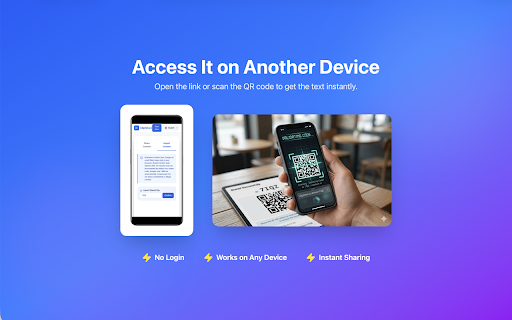
Simply highlight text on any webpage, right-click, and choose “Share via ClipShare”. A share link, QR code, and share code will be generated instantly, allowing you to access the content on another device.
ClipShare is designed for fast cross-device text sharing without requiring accounts, installations, or complicated setup.

FEATURES
Right-click to share text
Select any text on a webpage and instantly create a share link.

Multiple ways to access shared content
You can retrieve shared content by:
• Opening the share link
• Scanning the QR code
• Entering the share code on the ClipShare website

Temporary share links
Shared content is available through a temporary link that automatically expires after 10 minutes.

QR code access
Scan the QR code with your phone to quickly access the shared content.

Share code access
You can also open the ClipShare website on another device and enter the generated share code to retrieve the text.

No login required
ClipShare works instantly without accounts or sign-ups.

Cross-device text sharing
Easily move text between devices such as:
• Desktop → Phone
• Laptop → Tablet
• Work computer → Personal device

Lightweight extension
ClipShare runs locally in your browser and does not affect browsing performance.

HOW IT WORKS
Select text on any webpage
Right-click and choose “Share via ClipShare”
A share link, QR code, and share code will be generated
On another device you can:
- open the link
- scan the QR code
- enter the share code on the ClipShare website
Access the text instantly

COMMON USE CASES
Send text from your computer to your phone
Working on your computer but want to read something on your phone later?
Select the text, share it, and open it instantly on your phone.

Copy AI responses to your phone
If you are using AI tools like ChatGPT on your computer, you may want to keep useful answers for later.
ClipShare lets you send AI-generated responses to your phone in seconds.

Share links between devices
Found an interesting article or resource on your computer?
Generate a share link or QR code and open it on your phone instantly.

Transfer notes or quick ideas
Sometimes you just need to move a quick note from one device to another.
ClipShare makes it easy without sending messages to yourself.

Send code snippets between devices
Developers often need to copy small pieces of code from one device to another.
ClipShare lets you move code snippets quickly.

Move content between work and personal devices
Need to move text from your work computer to your personal phone?
ClipShare helps you do it quickly without logging into accounts.

Quickly save something for later
When you find something useful on your computer but want to check it later on your phone, just share it with ClipShare.

Temporary sharing for quick tasks
Because shared content expires automatically after 10 minutes, ClipShare is perfect for quick and temporary sharing.

PRIVACY
ClipShare only processes the text that you explicitly choose to share.
The extension:
• Does not track browsing activity
• Does not collect personal information
• Does not access unrelated webpage content
• Only sends the selected text when you generate a share link
For privacy protection, shared content automatically expires after 10 minutes.
Technical
- Version
- 1.0.1
- Manifest
- V3
- Size
- 87.0KiB
- Min Chrome
- 88
- Languages
- 3
- Featured
- No
Metadata
- ID
- abkgbbnkmaobkocgpfgimnbookhffpao
- Developer ID
- u35ffe177cffc10b3c16b82b0ac3ed85f
- Developer Email
- [email protected]
- Created
- Mar 16, 2026
- Last Updated (Store)
- Mar 25, 2026
- Last Scraped
- Jun 9, 2026
- Website
- clipshare.cc
- Support URL
- https://clipshare.cc/browser-extension
- Privacy Policy
- https://clipshare.cc/privacy
Similar extensions
Alternatives to ClipShare – Share Selected Text Instantly (Link & QR Code), ranked by description similarity.

Cross-Device Clipboard Sync
Cross-Device Clipboard Sync: save text & URLs to a synced clipboard history and copy/paste between devices in Chrome.
180
★ 1.7

Pure Copy
Smart clipboard manager: Save text snippets, copy without formatting, track history. Perfect for productivity.
21

Clipper
Easy click to copy & pase text clips from extension, dedicated 'Email' button. Create notes, bookmarks, email templates, etc.
5.0K
★ 4.2

ClipSnap
Clip text and links with one click.
2

DustpanPaste
Create shareable text links and save to Instapaper with one click
1

Clipboard Manager and Text Expander - Clipboard History Pro
Save, organize & instantly access clipboard history in Chrome. Sync across devices, create text snippets & boost productivity
100.0K
★ 4.0

Text Snippet Manager
Save and manage your favorite text snippets locally. Copy with one click. Organize with custom categories.
77
★ 4.7

CopyClip - Clipboard History Management Side Panel
A clipboard history tool that allows you to copy and paste from your clipboard history.
1.0K
★ 4.2
Data sourced from the Chrome Web Store · last verified Jun 9, 2026.