Play in VLC™
Detect streamable video and audio sources and offer to play them in VLC multimedia player
As of May 2026, Play in VLC™ has 10,000 users and a 4.14/5 rating from 21 reviews in the Workflow & Planning category.
Usersno change0%
10.0K
10,000
Ratingno change0%
4.14
21 reviews
Reviewsno change0%
21
Version
0.2.0
Manifest V3
Permissions & access
- Permissions
- webRequestscriptingstoragenotificationsnativeMessagingcontextMenus
- Host access
- *://*/*
Screenshots
About
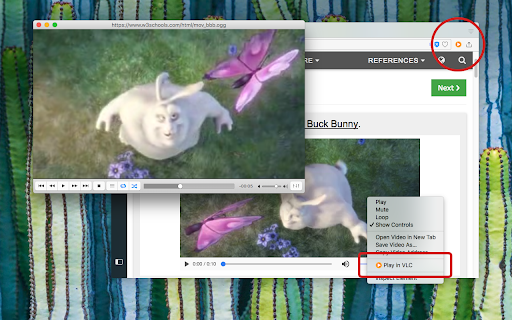
"Play in VLC" is a browser extension to send all detectable video and audio sources to the well-known VLC multimedia player. The extension detects all the media for the current page and displays the total number of the detected media sources in the badge area. You can left-click on the toolbar button to send these media sources to the VLC player. Also, the extension has right-click context menu item for video and audio elements to send them directly to the VLC player.

You can use the right-click context menu item over the toolbar button to copy the detected media sources to the clipboard.

Note: This extension needs a native-client to be able to communicate with the VLC player. This native-client is available for Windows, Linux, and Mac OS. There is no support for other operating systems.

--- Legal
VLC is a trademark of  VideoLAN non-profit organization, registered in the U.S. and other countries. This extension is an independent project and has no relationship to VLC team or VideoLAN organization.
Technical
- Version
- 0.2.0
- Manifest
- V3
- Size
- 73.58KiB
- Min Chrome
- 88
- Languages
- 1
- Featured
- No
Metadata
- ID
- cjjiafgjjkoonchbncbebpghoojakbgm
- Developer ID
- u7feba4b844efc05c66dc61c318b30c89
- Developer Email
- [email protected]
- Created
- Apr 4, 2018
- Last Updated (Store)
- Mar 9, 2024
- Last Scraped
- May 19, 2026
- Website
- —
- Support URL
- https://github.com/Emano-Waldeck/play-in/
- Privacy Policy
- —
Similar extensions
Alternatives to Play in VLC™, ranked by description similarity.

Open in VLC Media Player™
Easily open desired links in the VLC (VideoLAN) media player!
20.0K
★ 3.8

Video Player
Video and audio player with speed control, playlist, shuffle, and volume-boosting
6.0K
★ 3.7

Video Dominator
Hover over any video, hold the right mouse button down, and use mouse wheels or buttons to seek, adjust volume, speed, and more.
1.0K
★ 4.7

MediaPlayer - Video and Audio Player
A powerful media player built on top of the video.js project with HTTP Live Streaming (HSL), speed control, and playlist support
100.0K
★ 3.9
Audio Player
FFmpeg-based audio player that supports a wide range of audio codecs
30.0K
★ 4.0

Video Player
Video Player is a Chrome extension that offers a comprehensive video player when you open a video in a browser.
8.0K
★ 3.9

Custom Video Controls
Video playback controls via a popup, keyboard shortcuts, or your phone as a remote control.
425
★ 4.7

Lucky Downloader
one-click download video and image from any website, such as facebook instagram tiktok twitter pinterest linkedin weibo viemo tumblr
747
★ 2.8
Data sourced from the Chrome Web Store · last verified May 19, 2026.