
Video Dominator
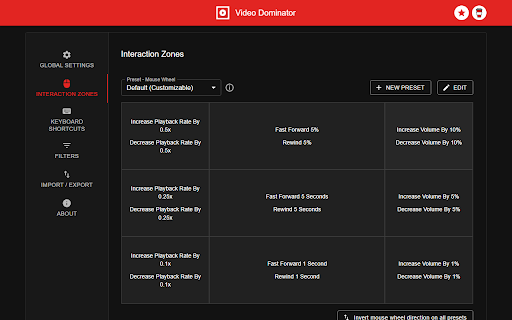
Hover over any video, hold the right mouse button down, and use mouse wheels or buttons to seek, adjust volume, speed, and more.
As of May 2026, Video Dominator has 1,000 users and a 4.65/5 rating from 43 reviews in the Workflow & Planning category.
Usersno change0%
1.0K
1,000
Ratingno change0%
4.65
43 reviews
Reviewsno change0%
43
Version
2.8.0
Manifest V3
History
1 snapshotsTracking since Apr 25, 2026.
View as table
| Date | Users | Rating | Reviews | Version |
|---|---|---|---|---|
| Apr 25, 2026 | 1.0K | 4.65 | 43 | 2.8.0 |
| Now | 1.0K | 4.65 | 43 | 2.8.0 |
Permissions & access
- Permissions
- activeTabstorage
- Host access
- None declared
Screenshots


About
Hover over different areas of any video, hold the activation key down (right mouse button by default), and use mouse wheels or buttons to perform an unlimited number of custom actions such as:

- play/pause the video
- seek by, seek to (units available: second, frame, %)
- adjust or set playback rate (0x to 16x)
- adjust or set volume
- toggle mute
- toggle picture-in-picture mode
- toggle custom player

On some websites, you can also:

- take a video snapshot (save or copy to clipboard)
- open video in new tab
- download video (requires "Downloads" permission)

------------------------------------------------
Control Modes
------------------------------------------------

Overlay Element
- hover over a video, hold the activation key down and use mouse wheels or buttons
- activation key can be the Right Mouse Button, Ctrl, Alt, or Shift
- available on almost any website

Video Element
- hover over a video and use mouse wheels or buttons
- works only when the video is a top-most element (on websites such as YouTube, Odysee, Nebula, CuriosityStream)

------------------------------------------------
Action Info Overlay
------------------------------------------------

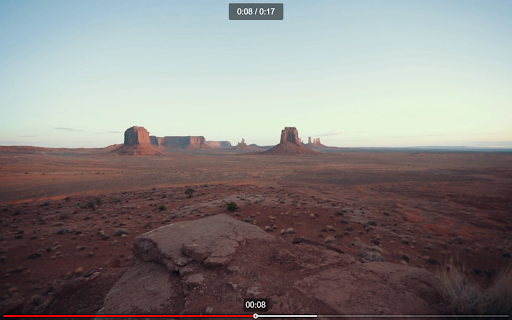
- customizable overlay temporarily shows you info depending on the last action, such as:
  - volume
  - playback rate
  - current time, current time / duration, remaining time
- time can be based on the current playback rate

------------------------------------------------
Custom Player
------------------------------------------------

- a full window or full screen player with minimalist UI and no popups or any other distractions
- you don't need to hold the activation key down while using mouse controls
- unlimited number of custom keyboard shortcuts
- customizable progress bar

------------------------------------------------
Filters
------------------------------------------------

- none - the extension will run on all domains
- blacklist - the extension will not run on listed domains
- whitelist - the extension will run only on listed domains

------------------------------------------------
Permissions
------------------------------------------------

Storage - for storing extension settings
Downloads (optional) - for downloading media files

------------------------------------------------
Privacy Policy
------------------------------------------------

This extension does not collect personal data from users, and it does not send any user data to a remote server. The only data it collects are extension settings, and this is stored locally on your PC.
Technical
- Version
- 2.8.0
- Manifest
- V3
- Size
- 477KiB
- Min Chrome
- 88
- Languages
- 1
- Featured
- Yes
Metadata
- ID
- npmegcnbapicebebajligpkjdjjbempo
- Developer ID
- u81f0ede34cb888094b6a87449532b738
- Developer Email
- [email protected]
- Created
- Jun 9, 2020
- Last Updated (Store)
- Oct 29, 2024
- Last Scraped
- May 21, 2026
- Website
- inzk.dev
- Support URL
- —
- Privacy Policy
- —
Similar extensions
Alternatives to Video Dominator, ranked by description similarity.

Custom Video Controls
Video playback controls via a popup, keyboard shortcuts, or your phone as a remote control.
425
★ 4.7

Tweaks for YouTube
Seek, control volume, speed, and more with mouse and keyboard. Adjust player controls, progress bar, UI elements, process audio...
70.0K
★ 4.6

YouTube Video Control
Control YouTube videos with play, pause, seek, and floating window features seamlessly
74
★ 5.0

Playback Controls
Skip YouTube ads / Control video playbacks using keyboard shortcuts
497
★ 4.6

Video Speed Controller
Control video playback speed with configurable increments.
58
★ 4.7

Video Player
Video Player is a Chrome extension that offers a comprehensive video player when you open a video in a browser.
8.0K
★ 3.9

Picture-in-Picture Floating Video Player
Allows users to watch videos in Picture-in-Picture video player.
2.0K
★ 4.9

Video Mouse Hider
Hides your mouse when idle over videos.
964
★ 5.0
Data sourced from the Chrome Web Store · last verified May 21, 2026.