
MediaPlayer - Video and Audio Player
A powerful media player built on top of the video.js project with HTTP Live Streaming (HSL), speed control, and playlist support
As of June 2026, MediaPlayer - Video and Audio Player has 100,000 users and a 3.88/5 rating from 141 reviews in the Workflow & Planning category.
Usersno change0%
100.0K
100,000
Ratingdown 0.3 percent−0.3%
3.88
141 reviews
Reviewsdown 0.7 percent−0.7%
141
Version
0.4.9
Manifest V3
History
2 snapshotsTracking since Apr 18, 2026.
View as table
| Date | Users | Rating | Reviews | Version |
|---|---|---|---|---|
| Apr 18, 2026 | 100.0K | 3.89 | 142 | 0.4.9 |
| May 7, 2026 | 100.0K | 3.89 | 142 | 0.4.9 |
| Now | 100.0K | 3.88 | 141 | 0.4.9 |
Permissions & access
- Permissions
- storagecontextMenusnotificationsdeclarativeNetRequestWithHostAccess
- Host access
- None declared
Screenshots
About
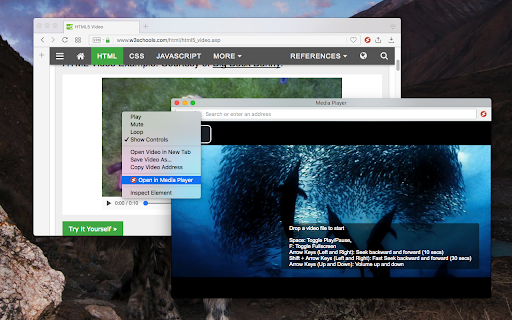
The "Media Player" is a browser extension to play music and video files either locally or from online sources. This project aims to bring a VLC-liked media playing experience using native HTML5 technology. The add-on is built on top of the well-known "video.js" project by applying a few custom plug-ins to enhance the user experience. This player supports media boosting, speed control, playlist media selection, fullwidth-progress bar, HTTP-streaming (M3U8), cast to a remote device, and wave surfer visual for audio files.

How to Use (local resources):
Open the interface and drop the media link to it
How to Use (remote resources):
Open a video page like https://www.w3schools.com/html/html5_video.asp
Right-click on the player and select "Open in Media Player"

You can start watching an offline video file by dragging and dropping the video file into the player or pressing the big play button. To have the player load subtitle make sure to drop both video and subtitle files together (The dropped subtitle should have the same name as the file and needs to be in SRT or VTT format). Also, you can add a subtitle file later using the "+CC" button. This button appears when there is no subtitle found for the current track.

Extra Features:
1. Video casting: right-click on the player. If your browser supports this feature, you can transfer the media to a remote device.
2. Take a screenshot: Press the "screenshot" button on the player
3. 2x volume-boosting: Like VLC, you can boost the audio by 200%. Use the boosting feature when the volume is not loud enough.
4. Media Capturing: The player can optionally detect media files in the current tab and transfer them to the media player
5. Play in a separate window or inside a browser tab
6. Supports media keys even if the player is not focused
7. Supports native context menu on Chrome OS. You can right-click on the finder window (explorer) and use this player to open media files.

You can use your keyboard to control the following playback options:
1. "F" key: This will toggle the fullscreen mode on and off
2. "Space" key: This will toggle the playing state of the player
3. "Key Up" and "key Down": Increase or decrease volume.
4. "Key Left" and "Key Right": Seek backward and forward for 10 seconds.
5. "U" key: Shuffle playlist
6. "R" key: Toggle repeat, repeat one, and no-repeat
7. "S" key: Take s screenshot
8. "B" key: Boost volume (2x or 200%)
9. "O" key: Open network URLs

Change Log:
0.1.2:
1. Media Player now supports history (it will save the current track position and retrieves it after a restart)
2. Media player now supports global keyboard shortcuts for toggle pause and play state, moving to the previous track and moving to the next track
0.1.3:
1. Better playlist!
0.1.4:
1. For audio tracks, a seek-able wave-surfer is replaced with the old poster image
2. playback rate is now adjustable.
0.1.7:
1. Supports live stream (m3u8)
2. Supports folder drop and recursive media file search
0.2.3
1. Partial support for MKV video container
0.2.5
1. Better support for video/mkv format
Technical
- Version
- 0.4.9
- Manifest
- V3
- Size
- 1.14MiB
- Min Chrome
- 88
- Languages
- 12
- Featured
- Yes
Metadata
- ID
- mgmhnaapafpejpkhdhijgkljhpcpecpj
- Developer ID
- u8ee2081420839f8ca083ce6a3c8751ca
- Developer Email
- [email protected]
- Created
- Oct 29, 2017
- Last Updated (Store)
- Dec 10, 2025
- Last Scraped
- Jun 3, 2026
- Website
- —
- Privacy Policy
- https://add0n.com/policies/inb.cor.txt
Similar extensions
Alternatives to MediaPlayer - Video and Audio Player, ranked by description similarity.

Video Player
Video and audio player with speed control, playlist, shuffle, and volume-boosting
6.0K
★ 3.7
Audio Player
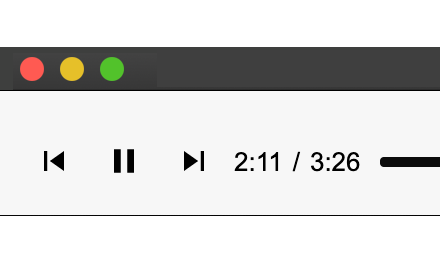
FFmpeg-based audio player that supports a wide range of audio codecs
30.0K
★ 4.0

HTML5 Video Player
A Chrome extension for HTML5 video player supporting .m3u8 format
2.0K

Video Player
Video Player is a Chrome extension that offers a comprehensive video player when you open a video in a browser.
8.0K
★ 3.9

M3U8 Player
Enjoy M3U8 Player extension for online streaming. Play m3u8 files and HLS content in your browser easily.
3.0K
★ 5.0

Media Converter and Muxer - Audio Tools
Easy to use video and audio converter and muxer based on FFmpeg multimedia command-line tool.
4.0K
★ 3.2

IPTV Player - Player for HLS, M3U8, MP4, DASH and TS Streams
Play IPTV Live streams like HLS, M3U8, MP4, DASH and TS directly on your browser
4.0K
★ 4.0
Tweaks for YouTube
Seek, control volume, speed, and more with mouse and keyboard. Adjust player controls, progress bar, UI elements, process audio...
80.0K
★ 4.7
Data sourced from the Chrome Web Store · last verified Jun 3, 2026.