
Focus Frame
Capture and view a section of the screen in a quick and accessible way.
As of May 2026, Focus Frame has 30 users and a 5.00/5 rating from 2 reviews in the Productivity category.
Usersdown 11.8 percent−11.8%
30
30
Ratingno change0%
5.00
2 reviews
Reviewsno change0%
2
Version
1.0
Manifest V3
History
3 snapshotsTracking since Apr 1, 2026.
View as table
| Date | Users | Rating | Reviews | Version |
|---|---|---|---|---|
| Apr 1, 2026 | 34 | 5.00 | 2 | 1.0 |
| May 1, 2026 | 31 | 5.00 | 2 | 1.0 |
| May 30, 2026 | 35 | 5.00 | 2 | 1.0 |
| Now | 30 | 5.00 | 2 | 1.0 |
Permissions & access
- Permissions
- activeTabscriptingstorage
- Host access
- None declared
Screenshots

About
Are you tired of constantly switching between different tabs and screens to reference important information while you work? Say goodbye to distractions and hello to seamless productivity with “Focus Frame,” your go-to Chrome extension for lightning-fast and effortless multitasking.

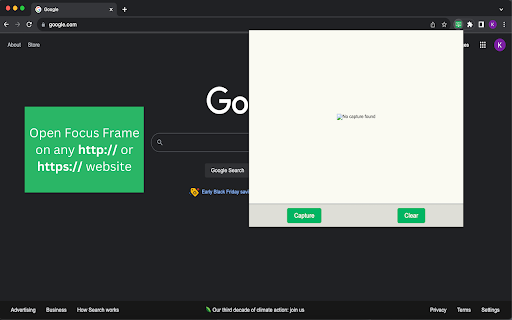
Focus Frame is a tool that allows you to quickly capture an area of your screen and view it in the extension window as often as you need WITHOUT having to save the image to any place on your computer. When you no longer need the capture, simply press the Clear button and the image is gone!

Key Features:
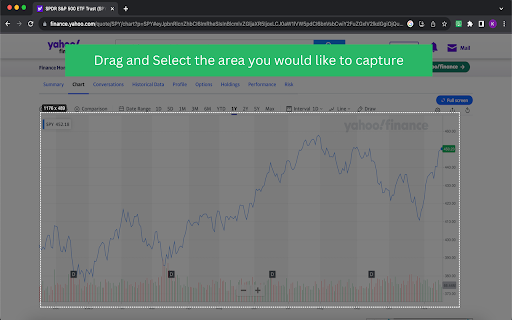
1. Capture with Ease: With the press of the “Capture” button, Focus Frame allows you capture any selected area of your screen using an intuitive drag-to-select method.
2. Stay in the Zone: Keep your workflow uninterrupted by quickly referring back to your captured content without switching tabs or screens. Simply reopen the Focus Frame extension and your capture is ready to be viewed.
3. Lightweight and Low Risk: Similar to whiteboards, Focus Frame is designed to allow you to clear the capture just as quickly as you can take it. Enjoy the freedom to experiment and capture without commitment. With Focus Frame, your workspace is as agile as your thoughts.
4. Privacy and Security: Your captures are only stored locally within the Chrome browser on your device, ensuring sensitive information stays private and secure.
5. Boost Productivity: Focus Frame is not only an extension; it’s a productivity enhancer. Streamline your tasks, save time, and stay in the flow with this essential tool.

How to Use:
1. Install Focus Frame from the Chrome web store
2. Pin it to your Chrome extension bar for quick access
3. Use the “Capture” button to select an area of your screen
4. Open the extension once the image has loaded to view your capture
5. Press the “Clear” button to delete your capture when it is no longer needed
6. Boost your productivity and stay in the zone

Elevate your work experience, reduce distractions, and maximize your productivity with Focus Frame. It’s the ultimate companion for professionals, students, and anyone looking to work smarter, not harder.

Simplify your workflow and unlock your true potential with Focus Frame. Try it today and experience a new level of productivity!
Technical
- Version
- 1.0
- Manifest
- V3
- Size
- 16.08KiB
- Min Chrome
- 88
- Languages
- 1
- Featured
- Yes
Metadata
- ID
- chkjjiiclmphmohkdkpbnpciebemepep
- Developer ID
- u113c31ffb59c23e2d151592177b1b6d4
- Developer Email
- [email protected]
- Created
- Nov 20, 2023
- Last Updated (Store)
- Mar 7, 2024
- Last Scraped
- May 30, 2026
- Website
- —
- Support URL
- —
- Privacy Policy
- —
Similar extensions
Alternatives to Focus Frame, ranked by description similarity.

Clip a Frame
Save video screenshots to your clipboard effortlessly
120

Scrsht Screen Recorder
Screen Recorder is a software that allows you to capture and record your computer screen right in the browser!
189
★ 4.6

CleanFrame
Capture pixel-perfect full-page screenshots. Supports PNG and WebP formats with seamless scroll-and-stitch technology.
36
★ 5.0

Image Editor Pro
A beautiful and powerful image editor for Chrome with advanced editing capabilities including filters, cropping, and more
216
★ 5.0

SnapCapture
Take snapshots of selected areas in Chrome for user to either save them or copy them to clipboard to be pasted.
6

Simple Screen Capture Tool
Capture a screenshot of the current active tab.
38
★ 5.0

PixelPerfect Capture
Capture ultra high-resolution screenshots
15

Screen Capture and Screen Recorder
Screen capture and screen recorder tool to record screen. Get more out of your screen captures! Take screenshots for free.
50.0K
★ 4.5
Data sourced from the Chrome Web Store · last verified May 30, 2026.