
Scrsht Screen Recorder
Screen Recorder is a software that allows you to capture and record your computer screen right in the browser!
As of May 2026, Scrsht Screen Recorder has 189 users and a 4.64/5 rating from 11 reviews in the Productivity category.
Usersup 6.2 percent+6.2%
189
189
Ratingno change0%
4.64
11 reviews
Reviewsno change0%
11
Version
1.0.4
Manifest V3
History
3 snapshotsTracking since Apr 1, 2026.
View as table
| Date | Users | Rating | Reviews | Version |
|---|---|---|---|---|
| Apr 1, 2026 | 178 | 4.64 | 11 | 1.0.4 |
| Apr 30, 2026 | 187 | 4.64 | 11 | 1.0.4 |
| May 27, 2026 | 176 | 4.64 | 11 | 1.0.4 |
| Now | 189 | 4.64 | 11 | 1.0.4 |
Permissions & access
- Permissions
- notificationsactiveTab
- Host access
- None declared
Screenshots
About
Capture, Download, and Share Your Screen with Ease
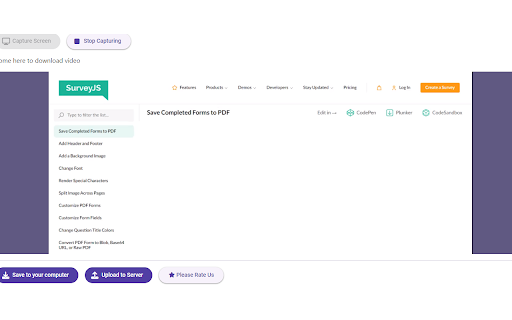
Introducing the ultimate screen capture solution for Chrome users! Our powerful Chrome extension is designed to help you capture your entire screen, specific tabs, or application windows effortlessly. Whether you're a professional, educator, or everyday user, our extension simplifies screen capturing, saving, and sharing.

Key Features:
Versatile Capture Options:

Entire Screen: Capture everything on your screen with a single click.
Specific Tabs: Select and capture individual browser tabs for focused content.
Application Windows: Capture specific application windows to highlight your workflow.
Easy Download:

Save your captures directly to your computer in high-quality formats.
Choose between popular image formats like PNG and JPEG.
For video captures, save in the widely compatible WEBM format.
Seamless Upload and Share:

Upload to Server: Instantly upload your captures to our secure server.
Sharable Link: Get a shareable link to your uploaded captures, making it easy to share with colleagues, friends, or on social media.
Privacy and Security: Rest assured that your uploads are stored securely with robust privacy measures.
Convert to MP4:

Convert your video captures from WEBM to MP4 for broader compatibility and easier sharing.
Use our built-in conversion tool to ensure your videos can be viewed on any device or platform.
User-Friendly Interface:

Intuitive Design: Our extension is designed with simplicity in mind, ensuring a seamless user experience.
Quick Access: Easily access capture options from the extension icon in your browser toolbar.
Real-Time Preview: Preview your captures before saving or uploading to ensure accuracy.
Enhanced Productivity:

Annotations and Markers: Add annotations, highlights, and markers to your captures for clearer communication.
Clipboard Support: Quickly copy captures to your clipboard for immediate use in documents and presentations.
Customizable Settings: Adjust capture settings to fit your specific needs, including resolution and format options.
Integration and Compatibility:

Cloud Integration: Option to save captures directly to popular cloud storage services.
Cross-Platform Support: Works seamlessly on Windows, macOS, and Linux.
Browser Compatibility: Fully compatible with the latest versions of Chrome.
Support and Updates:

Regular Updates: We continuously improve our extension with new features and enhancements.
Dedicated Support: Our support team is always ready to assist you with any questions or issues.
Why Choose Our Extension?
Efficiency: Streamline your workflow with quick and easy screen captures.
Flexibility: Capture, save, and share your screen in multiple ways.
Reliability: Trust our secure server and robust features to handle your screen captures.
How It Works:
Install the Extension: Add our extension to your Chrome browser from the Chrome Web Store.
Select Capture Mode: Choose to capture your entire screen, a specific tab, or a window.
Capture and Save: Capture the screen and save it directly to your computer or upload it to our server.
Share or Convert: Get a shareable link for your upload or convert your video to MP4 format.
Testimonials:
John D.: "This extension has transformed how I share information with my team. The upload and share feature is a game-changer!"
Sarah K.: "I love how easy it is to capture specific tabs and windows. The MP4 conversion makes sharing videos so much simpler."
Get Started Today!
Don’t miss out on the most efficient and user-friendly screen capture solution for Chrome. Install our extension now and start capturing, saving, and sharing your screen with ease.

Download the Extension Today

Need Help?  contact us directly.
Technical
- Version
- 1.0.4
- Manifest
- V3
- Size
- 1.12MiB
- Min Chrome
- 88
- Languages
- 40
- Featured
- No
Metadata
- ID
- njfalnkngflpodcniomgljfkopmnedma
- Developer ID
- u95180fd859fa0992c8d208a4d4a7fc5c
- Developer Email
- [email protected]
- Created
- Jul 15, 2024
- Last Updated (Store)
- Dec 3, 2024
- Last Scraped
- May 27, 2026
- Website
- https://scrsht.com/
- Support URL
- https://way2enjoy.com
- Privacy Policy
- https://way2enjoy.com/privacy1.html
Similar extensions
Alternatives to Scrsht Screen Recorder, ranked by description similarity.

Screen Capture and Screen Recorder
Screen capture and screen recorder tool to record screen. Get more out of your screen captures! Take screenshots for free.
50.0K
★ 4.5

Simple Screen Capture Tool
Capture a screenshot of the current active tab.
38
★ 5.0

Screenshot Editor
Create beautiful screenshots with gradients, shadows, and rounded corners
96
★ 5.0

Chrome Screenshot
Use Chrome Screenshot: smart screenshot chrome extension! Capture, edit, save any page. Explore how to screenshot on chrome browser
2.0K
★ 4.6

Screen Recorder for Chrome
Use this Chrome extension to record your screen, window and download the video for later use.
18

Full Page Screenshot
Capture full page screenshots and edit with powerful image editor
7

Screen and Audio Capture Extension
Capture your screen and audio and save it as a .mp4 file.
3.0K
★ 4.5

Chrome Capture - Screenshot & GIF
All-in-one screenshot + GIF capture! Take screenshots (area, full page), record screen & edit instantly.
300.0K
★ 4.7
Data sourced from the Chrome Web Store · last verified May 27, 2026.