
Screen Capture and Screen Recorder
Screen capture and screen recorder tool to record screen. Get more out of your screen captures! Take screenshots for free.
As of May 2026, Screen Capture and Screen Recorder has 50,000 users and a 4.52/5 rating from 972 reviews in the Productivity category.
Usersno change0%
50.0K
50,000
Ratingno change0%
4.52
972 reviews
Reviewsup 0.7 percent+0.7%
972
Version
1.8
Manifest V3
History
4 snapshotsTracking since Apr 21, 2026.
View as table
| Date | Users | Rating | Reviews | Version |
|---|---|---|---|---|
| Apr 21, 2026 | 50.0K | 4.52 | 965 | 1.8 |
| May 6, 2026 | 50.0K | 4.52 | 965 | 1.8 |
| May 17, 2026 | 50.0K | 4.52 | 969 | 1.8 |
| May 31, 2026 | 50.0K | 4.52 | 971 | 1.8 |
| Now | 50.0K | 4.52 | 972 | 1.8 |
Permissions & access
- Permissions
- downloadsstorageunlimitedStoragetabCapturedesktopCapturescripting
- Host access
- <all_urls>
Screenshots

About
Introducing the Ultimate Screen Capture and Screen Recording Extension for Chrome!

Are you tired of the limited screenshot and screen recording capabilities of your browser? Look no further! Our Chrome browser extension is here to revolutionize your online experience. With an array of powerful features designed to cater to all your screen capture and recording needs, this simple yet versatile extension is completely free, giving you the tools you need without breaking the bank.

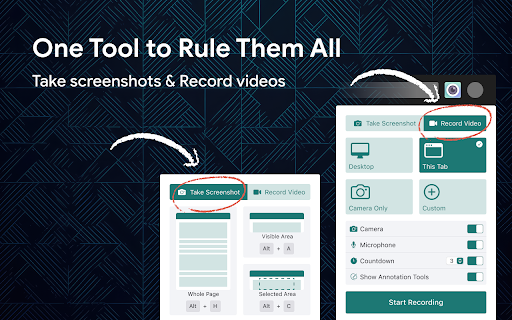
📷  Capture Your Screen

✔  Whole Page
Say goodbye to tedious scrolling and stitching! Our extension allows you to capture entire web pages in a single, seamless screenshot. Whether it's a lengthy article, a captivating webpage, or an extensive document, you can capture it all with ease.

✔  Visible Area
Sometimes, you don't need the whole page. Our extension lets you snap a screenshot of just the visible area on your screen, saving you time and ensuring you get exactly what you need.

✔  Selected Area
Precision matters. Select and capturing a specific area of your screen, is perfect for highlighting important information or showcasing a particular part of a webpage.

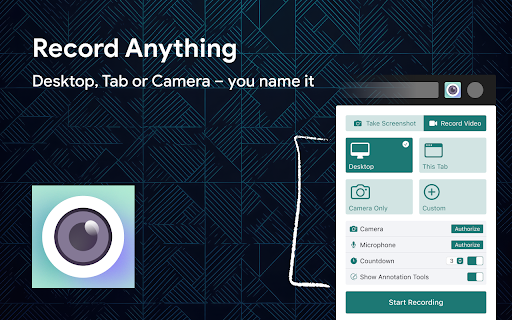
🎥  Record Your Screen Like a Pro

✔  Desktop
Bring your screen to life! Record your entire desktop to create comprehensive tutorials, presentations, or demonstrations.

✔  Current Tab
Focus on what matters most! Capture only the content within the current browser tab. Ideal for recording webinars, video conferences, or gameplay without distractions.

✔  Record Yourself
Personalize your content! With the option to record yourself via your device's camera, you can add a personal touch to your screen recordings. Perfect for vlogs, video messages, or commentary.

Our extension is not only feature-rich but also incredibly user-friendly. You'll be capturing screenshots and recording your screen like a pro in no time. Best of all, it's completely free, so there are no hidden costs or subscriptions to worry about.

Whether you're a student, a professional, or just someone who loves to share content online, our Chrome browser extension is your go-to tool for all your screen capture and screen recording needs. Elevate your online presence, streamline your workflow, and unlock new possibilities today!
Technical
- Version
- 1.8
- Manifest
- V3
- Size
- 1.18MiB
- Min Chrome
- 88
- Languages
- 17
- Featured
- Yes
Metadata
- ID
- imopknpgdihifjkjpmjaagcagkefddnb
- Developer ID
- u78a34c038f0d705ed0f71ee80e0260fa
- Developer Email
- [email protected]
- Created
- Feb 28, 2021
- Last Updated (Store)
- Jun 19, 2025
- Last Scraped
- May 31, 2026
- Website
- scrncapture.com
- Support URL
- —
- Privacy Policy
- https://scrncapture.com/privacy-policy
Similar extensions
Alternatives to Screen Capture and Screen Recorder, ranked by description similarity.

Scrsht Screen Recorder
Screen Recorder is a software that allows you to capture and record your computer screen right in the browser!
189
★ 4.6

Screen Buddy - Free Screenshot & Screen recorder with live annotation
World-class free 4k screen recording with live annotation and screenshot extension with professional tools.Free Forever
55
★ 5.0

CapturePro Screen Recorder
A simple free screen recorder. Records screen with audio (tab and mic). Saves in WebM or MP4. No internet needed.
230
★ 3.0

Screen Recorder for Chrome
Use this Chrome extension to record your screen, window and download the video for later use.
18

Chrome Capture - Screenshot & GIF
All-in-one screenshot + GIF capture! Take screenshots (area, full page), record screen & edit instantly.
300.0K
★ 4.7

Screenshot Entire Webpage
Capture a full page screenshot easily with the Screenshot Entire Webpage extension. Perfect for whole page screen capture.
30.0K
★ 4.7

Full Page Screenshot
Capture full page screenshots and edit with powerful image editor
7

Screen Shot
Capture web pages with "Screen shot" — the ultimate snipping tool for full page screenshot and screen capture of selected areas.
10.0K
★ 4.2
Data sourced from the Chrome Web Store · last verified May 31, 2026.