
Wide GPT
Expand ChatGPT's screen instantly with 'Wide GPT' Chrome extension! No clicks needed, free and easy to install. Get more space now!
As of June 2026, Wide GPT has 10,000 users and a 4.55/5 rating from 129 reviews in the Workflow & Planning category.
Usersno change0%
10.0K
10,000
Ratingdown 0.2 percent−0.2%
4.55
129 reviews
Reviewsup 2.4 percent+2.4%
129
Version
1.0.8
Manifest V3
90-day change · In the last 90 days this extension 1 version update.
History
3 snapshotsTracking since Apr 18, 2026.
View as table
| Date | Users | Rating | Reviews | Version |
|---|---|---|---|---|
| Apr 18, 2026 | 10.0K | 4.56 | 126 | 1.0.7 |
| May 9, 2026 | 10.0K | 4.57 | 127 | 1.0.8 |
| May 25, 2026 | 10.0K | 4.57 | 128 | 1.0.8 |
| Now | 10.0K | 4.55 | 129 | 1.0.8 |
Changelog
- Apr 18, 2026description
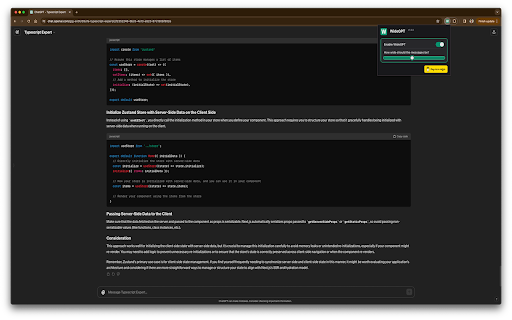
You'll have more room to see and interact with your content with "Wide GPT," whether you're reading a story, writing code for your next big idea, or talking to AI. This extension is great for people who want to make the most of their workspace and avoid eye strain by not having to constantly scroll horizontally or resize their browser window.

Simple to set up: just add "Wide GPT" to your Chrome browser, and you're good to go! You don't have to click any buttons or do anything else. The extension works in the background without being noticed and instantly makes ChatGPT's screen as big as it can be.

As soon as you start, you'll be able to browse in a bigger and more immersive way.

The best part? You can use "Wide GPT" for free.

Why wait then? Get "Wide GPT" right now and start easily making the most of your screen space!

Release log:
1.0.7
- Fix the project page that was shrinking in the middle of the screen, now that page is ignored, no wide-screen will be applied to it.

1.0.5
- Fixed an issue with the enable/disable switch.
- New version to try clearing the cache for Windows users who reported that the extension stopped working.

1.0.4
 - Fixed the selectors to capture messages and make it wide again.

1.0.3
 - Fixed the manifest.json to apply the extension on top of new ChatGPT URL.
 - Fixed the selectors to capture the prompt element textarea.

1.0.2
 - Fixed manifest.json file to limit content access to https://chat.openai.com/ and cease requesting permission to access content on all websites.

1.0.1
 - Enhanced element selector stability to prevent the extension from breaking when CSS classes are modified

1.0.0
 - Added popup with preferences to:
  - Toggle the primary feature of the extension either inactive or active
  - Choose the width of the messages and prompt text input.
  - Buy me a coffee button.
You'll have more room to see and interact with your content with "Wide GPT," whether you're reading a story, writing code for your next big idea, or talking to AI. This extension is great for people who want to make the most of their workspace and avoid eye strain by not having to constantly scroll horizontally or resize their browser window.

Simple to set up: just add "Wide GPT" to your Chrome browser, and you're good to go! You don't have to click any buttons or do anything else. The extension works in the background without being noticed and instantly makes ChatGPT's screen as big as it can be.

As soon as you start, you'll be able to browse in a bigger and more immersive way.

The best part? You can use "Wide GPT" for free.

Why wait then? Get "Wide GPT" right now and start easily making the most of your screen space!

Release log:
1.0.8
- Update the component selectors to follow the changes made by ChatGPT web interface.

1.0.7
- Fix the project page that was shrinking in the middle of the screen, now that page is ignored, no wide-screen will be applied to it.

1.0.5
- Fixed an issue with the enable/disable switch.
- New version to try clearing the cache for Windows users who reported that the extension stopped working.

1.0.4
 - Fixed the selectors to capture messages and make it wide again.

1.0.3
 - Fixed the manifest.json to apply the extension on top of new ChatGPT URL.
 - Fixed the selectors to capture the prompt element textarea.

1.0.2
 - Fixed manifest.json file to limit content access to https://chat.openai.com/ and cease requesting permission to access content on all websites.

1.0.1
 - Enhanced element selector stability to prevent the extension from breaking when CSS classes are modified

1.0.0
 - Added popup with preferences to:
  - Toggle the primary feature of the extension either inactive or active
  - Choose the width of the messages and prompt text input.
  - Buy me a coffee button.
Permissions & access
- Permissions
- storage
- Host access
- None declared
Screenshots


About
You'll have more room to see and interact with your content with "Wide GPT," whether you're reading a story, writing code for your next big idea, or talking to AI. This extension is great for people who want to make the most of their workspace and avoid eye strain by not having to constantly scroll horizontally or resize their browser window.

Simple to set up: just add "Wide GPT" to your Chrome browser, and you're good to go! You don't have to click any buttons or do anything else. The extension works in the background without being noticed and instantly makes ChatGPT's screen as big as it can be.

As soon as you start, you'll be able to browse in a bigger and more immersive way.

The best part? You can use "Wide GPT" for free.

Why wait then? Get "Wide GPT" right now and start easily making the most of your screen space!

Release log:
1.0.8
- Update the component selectors to follow the changes made by ChatGPT web interface.

1.0.7
- Fix the project page that was shrinking in the middle of the screen, now that page is ignored, no wide-screen will be applied to it.

1.0.5
- Fixed an issue with the enable/disable switch.
- New version to try clearing the cache for Windows users who reported that the extension stopped working.

1.0.4
 - Fixed the selectors to capture messages and make it wide again.

1.0.3
 - Fixed the manifest.json to apply the extension on top of new ChatGPT URL.
 - Fixed the selectors to capture the prompt element textarea.

1.0.2
 - Fixed manifest.json file to limit content access to https://chat.openai.com/ and cease requesting permission to access content on all websites.

1.0.1
 - Enhanced element selector stability to prevent the extension from breaking when CSS classes are modified

1.0.0
 - Added popup with preferences to:
  - Toggle the primary feature of the extension either inactive or active
  - Choose the width of the messages and prompt text input.
  - Buy me a coffee button.
Technical
- Version
- 1.0.8
- Manifest
- V3
- Size
- 110KiB
- Min Chrome
- 88
- Languages
- 1
- Featured
- Yes
Metadata
- ID
- ceddkenhchmiajgmnlelcnackpeihohk
- Developer ID
- uafe3f1a42bfbb692cf96e08661ebb395
- Developer Email
- [email protected]
- Created
- Mar 2, 2023
- Last Updated (Store)
- Apr 3, 2026
- Last Scraped
- Jun 14, 2026
- Website
- —
- Support URL
- —
- Privacy Policy
- —
Similar extensions
Alternatives to Wide GPT, ranked by description similarity.
ChatGPT Optimizer - Boost Your AI Workflow
Enhance the Chat GPT interface and bring GPT trough all the web!
20.0K
★ 3.9

ChatGPT Auto-Continue & Token Counter
Experience ChatGPT like never before with these features: Auto Full Mode, Automated 'Continue Generating', and Token Counter.
2.0K
★ 3.7

ChatGPT Extention for Chrome
Interact with ChatGPT in Google Search results page
637
★ 2.0

aiPromptPal
aiPromptPal makes using ChatGPT easy in search engines, to write emails, and on any website
122
★ 5.0

ChatGPT Page Settings
Sets up ChatGPT page with specific settings
5

ChatGPT in Side Panel
Access ChatGPT directly in Chrome's side panel with seamless login and chat history synchronization.
165
★ 5.0

ChatGPT Assistant Plus
Maximize Your ChatGPT: Search Integration, Run from the Context Menu, Talk with LLM in the Popup
30.0K
★ 4.3
ChatGPT UI Settings
Chrome extensions for configuring and improving the usability of the ChatGPT user interface.
92
★ 5.0
Data sourced from the Chrome Web Store · last verified Jun 14, 2026.