
Peardeck Drawing Bot
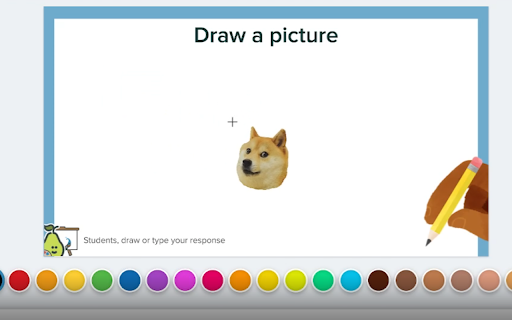
Drag and drop and image an onto the peardeck canvas, then left-click, and it will be drawn.
As of May 2026, Peardeck Drawing Bot has 1,000 users and a 3.00/5 rating from 2 reviews in the fun category.
Usersno change0%
1.0K
1,000
Ratingno change0%
3.00
2 reviews
Reviewsno change0%
2
Version
1.0
Manifest V3
Permissions & access
- Permissions
- scripting
- Host access
- https://app.peardeck.com/student/*
Screenshots
About
This extension lets you draw almost realistic images onto pear-deck. I recommend you use images with a low amount of colors and pixels in them so that they're drawn faster. Note that, although the drawing may seem finished on your screen, it may not have loaded as fast on the teacher's view.
Technical
- Version
- 1.0
- Manifest
- V3
- Size
- 43.11KiB
- Min Chrome
- 88
- Languages
- 1
- Featured
- No
Metadata
- ID
- cdiccnnjppbhelmolainpkjkjjlepmhc
- Developer ID
- u0051fda598aa72e40619a459953c1e73
- Developer Email
- [email protected]
- Created
- Jan 31, 2023
- Last Updated (Store)
- Jan 31, 2023
- Last Scraped
- May 29, 2026
- Website
- —
- Support URL
- —
- Privacy Policy
- —
Similar extensions
Alternatives to Peardeck Drawing Bot, ranked by description similarity.
AutoDraw for skribbl.io
Auto draws images in pictionary game skribbl.io.
200.0K
★ 3.5

Paint - Easy Drawings
Use the paint extension for easy drawings. This drawing tool allows you to illustrate on-screen and capture with the screenshot…
20.0K
★ 4.6

the cutest chrome extension ever
add the cutest stuff to websites
13

Web Paint Tool - draw online
Draw rectangle, circle, lines and others shapes or add text on any web pages, then make screenshot the result.
100.0K
★ 4.5

TinySketch
Create and save quick drawings at the click of a button - by AIO.com.ai
—

Artist Tools for Gartic Phone
Enhance the gartic phone experience with additional colors
10.0K
★ 4.5

Web paint
Add text, draw shapes, paint lines, paint curves, make notes, draw arrows on pages in real time make a screenshot / share / print
50.0K
★ 4.9

DrawOnline
Open images or even the entire page to drawing with one click!
5
Data sourced from the Chrome Web Store · last verified May 29, 2026.