
Web paint
Add text, draw shapes, paint lines, paint curves, make notes, draw arrows on pages in real time make a screenshot / share / print
As of June 2026, Web paint has 50,000 users and a 4.89/5 rating from 1,264 reviews in the fun category.
Usersdown 16.7 percent−16.7%
50.0K
50,000
Ratingno change0%
4.89
1.3K reviews
Reviewsno change0%
1.3K
Version
1.4.14
Manifest V3
90-day change · In the last 90 days this extension lost 10.0K users.
History
3 snapshotsTracking since Apr 18, 2026.
View as table
| Date | Users | Rating | Reviews | Version |
|---|---|---|---|---|
| Apr 18, 2026 | 60.0K | 4.89 | 1.3K | 1.4.14 |
| May 8, 2026 | 60.0K | 4.89 | 1.3K | 1.4.14 |
| Jun 3, 2026 | 60.0K | 4.89 | 1.3K | 1.4.14 |
| Now | 50.0K | 4.89 | 1.3K | 1.4.14 |
Permissions & access
- Permissions
- tabsstorageactiveTab
- Host access
- *://*/*
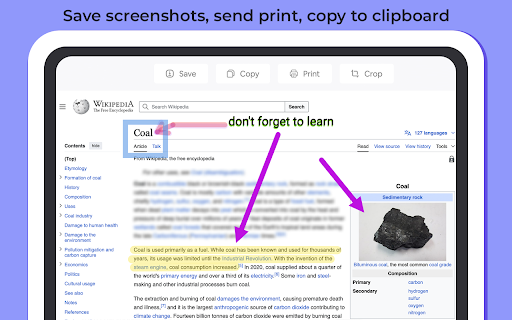
Screenshots



About
Paint on Web (Web Paint) provides a set of easy-to-use drawing tools that let you create drawings on any webpage. This extension web paint is enhances your Chrome browser experience by offering multifunctional features for sketching, painting, and annotation. With Paint on Web, you can effortlessly highlight text or areas on a page, add notes and suggestions, draw pictures, create shapes, and more. Once you’ve finished, simply save the screenshot for future use.

Paint is a free online platform for digital painting that allows users to create freestyle drawings directly from their computers. This drawing tool is perfect for kids and adults learning to navigate computers and control a mouse. Additionally, it’s ideal for artists, designers, and students who need to create quick sketches, drafts, and illustrations.

It’s also an excellent choice for anyone looking to unleash their creativity without traditional materials. Let your imagination run wild and create beautiful drawings using popular tools like brushes, pencils, markers, or erasers without wasting paper.

Web Paint is incredibly user-friendly, enabling you to start painting instantly. Whether you’re a beginner exploring your creative side or an experienced artist looking for a digital alternative, Paint Something is the perfect choice. Customize your creations with a wide variety of colors, line sizes, and drawing tools such as airbrushes and textured brushes. Then save or print your masterpiece with ease. Start drawing today and discover the artist within!

Paint on Web (web paint) provides you next features:

✏️ Pencil tool - draw custom lines
🖊️ Highlighter tool - highlight necessary in the text
🌈 Color picker tool - choose color webpage to use in your paint
🔤 Text - add annotation
💧 Blur tool - Hide things you don't want to show
➖ Straight line - put start and end point to paint straight line
➰ Curve line - set start and end point move mouse to set curvature
🔝 Arrow line - paints as straight line, difference in arrow on the end
〰 Custom shape tool - same as curve line with double curvatures
⭕ Circle shape tool - draw round shapes circle ovals and others
🔲 Square shape tool - create rectangles and squares
↖️ Cursor tool - switch of paint tools, to scroll up or down webpage
🧼 Eraser tool - remove unnecessary parts on the screen
🎨Paint bucket - fill shapes and drawn with any color from palette

Web Paint additional features:
▶ Picking a transparent colour or setting different brush sizes in a couple of clicks.
▶ Setting to create fast hotkeys for the option you are using the most.
▶ Autosave of process for each web paint page
▶ Screenshot maker allows saving result in PN or JPG
▶ Crop tool to catch only a certain part of the image you need.
     and much more

Here is another unique option – set your own shortcuts for all the web paint features. Isn’t that useful? So don’t hesitate, install this addon and you won’t be disappointed. Paint on web in simple manner and without any difficulties. Draw online with our new and absolutely free extension for chrome browser.

Note!

Extension is Not working on system Chrome webpages like
//settings
//history
etc.

Do Page Reload if paint didn't work immediately after install.
Add web paint to your chrome right NOW!! And start using paint tool in seconds!
Technical
- Version
- 1.4.14
- Manifest
- V3
- Size
- 468KiB
- Min Chrome
- 88
- Languages
- 4
- Featured
- Yes
Metadata
- ID
- ejllkedmklophclpgonojjkaliafeilj
- Developer ID
- u79960781e6e00f82ce0c176b25ab4500
- Developer Email
- [email protected]
- Created
- Sep 21, 2020
- Last Updated (Store)
- Dec 10, 2025
- Last Scraped
- Jun 3, 2026
- Website
- paintonweb.com
- Support URL
- —
- Privacy Policy
- —
Similar extensions
Alternatives to Web paint, ranked by description similarity.

Web Paint Tool - draw online
Draw rectangle, circle, lines and others shapes or add text on any web pages, then make screenshot the result.
100.0K
★ 4.5

Paint Online - Drawing Tool
Sketch fun drawings directly on web pages using the paint tool. Capture your art with a quick screenshot.
50.0K
★ 4.5
Web Paint
Web Paint can draw shapes and add texts to any website. Take screenshot using Web Paint!
30.0K
★ 2.2
Sketch and Paint Plus!
Draw, paint, doodle, add text and emojis on browser tabs. Then save your creative art and decorations to share later.
924
★ 5.0

Paint - Easy Drawings
Use the paint extension for easy drawings. This drawing tool allows you to illustrate on-screen and capture with the screenshot…
20.0K
★ 4.6

Doodle Pad
Doodle Pad - Draw in your browser!
110
★ 5.0

We Are All Banksy
Draw and share graffiti on any website - Express yourself freely on the web!
6

TinySketch
Create and save drawings at the click of a button.
100.0K
★ 4.1
Data sourced from the Chrome Web Store · last verified Jun 3, 2026.