
SPOI Filter
Control the way you read RSS news online.
As of June 2026, SPOI Filter has 42 users and a 2.50/5 rating from 8 reviews in the Workflow & Planning category.
Usersdown 8.7 percent−8.7%
42
42
Ratingno change0%
2.50
8 reviews
Reviewsno change0%
8
Version
1.8.68
Manifest V3
90-day change · In the last 90 days this extension 1 version update.
History
7 snapshotsTracking since Apr 1, 2026.
View as table
| Date | Users | Rating | Reviews | Version |
|---|---|---|---|---|
| Apr 1, 2026 | 46 | 2.50 | 8 | 1.8.67 |
| Apr 18, 2026 | 49 | 2.50 | 8 | 1.8.67 |
| Apr 28, 2026 | 48 | 2.50 | 8 | 1.8.67 |
| May 10, 2026 | 48 | 2.50 | 8 | 1.8.67 |
| May 22, 2026 | 44 | 2.50 | 8 | 1.8.67 |
| May 29, 2026 | 35 | 2.50 | 8 | 1.8.68 |
| Jun 5, 2026 | 41 | 2.50 | 8 | 1.8.68 |
| Now | 42 | 2.50 | 8 | 1.8.68 |
Permissions & access
- Permissions
- activeTabalarmsstoragetabswebNavigationwebRequest
- Host access
- https://lazlo.spoi.com/*, https://*.theoldreader.com/*, https://*.spoi.com/*, https://fonts.bunny.net/*, https://*.feedly.com/*
Screenshots
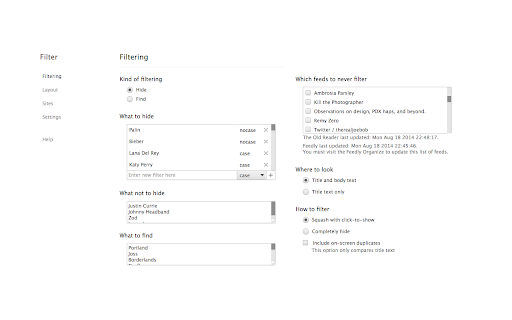

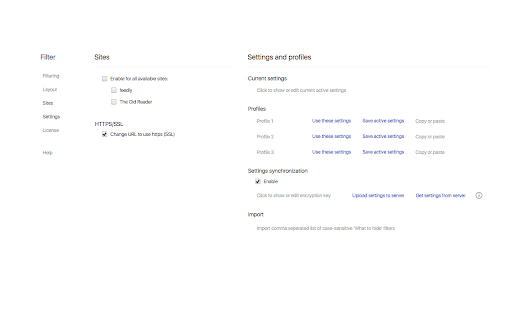

About
SPOI Filter - lets you hide and highlight RSS news items in feedly and The Old Reader by keyword or regular expression.

Filter is based on a paid subscription model.  Licensed users will be billed $0.99 monthly.  Six month and twelve month subscriptions are also available, as is a trial license.

We all like to use our new readers to get our RSS news, and we all subscribe to the feeds that we want, but sometimes we get tired of reading about the same vapid celebrities or the same iPhone killer.  Using SPOI Filter, you input a name or a word, and BLAM any news item that contains it is reduced to a fancy coloured bar that you can scroll on by or click on to reveal the hidden gem.  Or you can completely hide it and your life will be all the better.  You can even choose filter based on text found in the body and the subject, or in the subject line only.  Filtering logic includes case-sensitive, not case-sensitive, and regular expressions (regex/regexp).  Tired of duplicate items?  You can make them never exist!  Think that a particular feed should never be filtered?  Add them to an exempt list!  Want to highlight specific words, you can do that too!

Want to only read news that has your keywords and skip everything else?  Done.

Want to securely sync all your settings and filter between different browsers on different machines?  Even more done.

There is a handy popup menu to enter new filters or highlights on-the-fly as you are reading.  You can also use it to un-hide or re-hide all hidden news items, hide the header, and hide the navigation pane sidebar.

And do not forget about the Layout tweaks.  Hide all sorts of stuff around the page and fix some spacing while you are at it.  You can even change the font.

Please see the "Extension support" link for responses to comments and emails.

Do not host, archive, or distribute SPOI Filter without permission from smart people on ice, LLC. (spoi).

https://spoi.com/filter/EULA
Technical
- Version
- 1.8.68
- Manifest
- V3
- Size
- 423KiB
- Min Chrome
- 109
- Languages
- 1
- Featured
- No
Metadata
- ID
- ccklmambcfmhahigkfmpmcafjlbjnnha
- Developer ID
- u48b8f8507d50005ab812ba229a895643
- Developer Email
- [email protected]
- Created
- Jun 18, 2015
- Last Updated (Store)
- May 20, 2026
- Last Scraped
- Jun 11, 2026
- Website
- spoi.com
- Support URL
- https://spoi.com/filter/manual
- Privacy Policy
- https://spoi.com/PRIVACY.txt
Similar extensions
Alternatives to SPOI Filter, ranked by description similarity.

Feed Filter
Detects and filters corporate jargon, humblebragging, and BS from your LinkedIn feed.
—

News Guardian
Block news articles containing specified keywords.
17
★ 5.0

Push to Kindle
Send web articles to your Kindle
50.0K
★ 4.7

Filter Everything Online
Take control of what you see online. Hide spoilers, profanity, politics, and distractions by keyword, site, and schedule.
48
★ 5.0

FeedHole
User-configurable feed filtering for LinkedIn
6

Sprint Reader - Speed Reading Extension
Speed reading made easy, train yourself to read 1800+ words per minute. Rapid serial visual presentation (RSVP) at its best!
20.0K
★ 4.4

LinkedIn Feed Customizer
Filter, categorize, and customize your LinkedIn feed to focus on high-value content and connections
12
★ 5.0

Prompt Anything Pro - Select Text & Prompt Any AI
Select any text, prompt AI instantly. BYOK (OpenAI, Anthropic, Google). Save prompts, build your library. Privacy-first.
19
★ 5.0
Data sourced from the Chrome Web Store · last verified Jun 11, 2026.