
Filter Everything Online
Take control of what you see online. Hide spoilers, profanity, politics, and distractions by keyword, site, and schedule.
As of June 2026, Filter Everything Online has 48 users and a 5.00/5 rating from 2 reviews in the Workflow & Planning category.
Usersup 17.1 percent+17.1%
48
48
Ratingno change0%
5.00
2 reviews
Reviewsno change0%
2
Version
1.1.2
Manifest V3
90-day change · In the last 90 days this extension 3 version updates, changed permissions.
History
9 snapshotsTracking since Apr 1, 2026.
View as table
| Date | Users | Rating | Reviews | Version |
|---|---|---|---|---|
| Apr 1, 2026 | 41 | 5.00 | 2 | 1.0.1 |
| Apr 19, 2026 | 43 | 5.00 | 2 | 1.0.1 |
| Apr 29, 2026 | 43 | 5.00 | 2 | 1.0.1 |
| May 6, 2026 | 47 | 5.00 | 2 | 1.1.0 |
| May 11, 2026 | 47 | 5.00 | 2 | 1.1.1 |
| May 17, 2026 | 53 | 5.00 | 2 | 1.1.1 |
| May 23, 2026 | 69 | 5.00 | 2 | 1.1.2 |
| May 30, 2026 | 63 | 5.00 | 2 | 1.1.2 |
| Jun 13, 2026 | 46 | 5.00 | 2 | 1.1.2 |
| Now | 48 | 5.00 | 2 | 1.1.2 |
Changelog
- May 6, 2026permissions
storage, tabs, favicon
storage, tabs, favicon, identity
- Apr 29, 2026description
Filter Everything Online (FEO) lets you filter anything, everywhere. Block keywords, profanity, and unwanted content across YouTube, Reddit, Twitter, and virtually any website.
It is a powerful browser extension that gives you full control over the content you see online. Whether you want to avoid spoilers, stay productive, or just block annoying keywords, Filter Everything Online is your all-in-one solution for a cleaner, distraction-free web experience.

Problem it solves:
- Need to block distracting keywords on social media?
- Want to filter profanity for family-safe browsing?
- Looking to remove unwanted content across all websites?

Key Features:
✅ Unlimited Custom Keywords: Filter any words or phrases you want to hide or replace.
✅ Scheduled Keyword Filtering: Set filtering rules for specific days or times.
✅ Site-Specific Exceptions: Customize filters for specific websites.
✅ Hide or Replace Content: Choose to completely remove or creatively replace filtered content.
✅ Scheduled Full-Site Blocking: Block entire sites during work hours or study sessions.
✅ Active Filtering Count: Stay aware of how much content is being filtered.
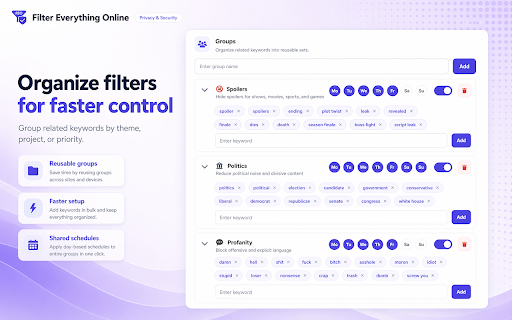
✅ Organize with Keyword Groups: Group keywords for faster, more targeted filtering.
✅ Import and Export Settings: Easily back up and transfer your filter lists.
✅ Filter Usage Statistics: Get insights into your filtering habits.
(More features coming soon, check our website!)

Use cases:
1. Productivity: Block distracting keywords during work hours
2. Family Safety: Filter profanity and inappropriate content
3. Mental Health: Remove triggering content from your feed
4. Focus: Eliminate time-wasting content across the internet

Perfect for:
- Parents wanting safe browsing for kids
- Professionals needing distraction-free browsing
- Anyone wanting to customize their online experience

Compatibility:
Works on Chrome, Edge, and Brave. Firefox support coming soon.


v.1.0.1. (20.11.2025):
- added specific support for Bluesky
Take control of what you see online.

Filter Everything Online helps you hide or replace spoilers, profanity, politics, distractions, triggering topics, and any custom content across the web — by keyword, site, schedule, and mode.

Whether you want a cleaner feed, a calmer browsing experience, better focus while working, or safer browsing for kids, Filter Everything Online gives you flexible control over what appears on the websites you use every day.

Perfect for:
- blocking spoilers before they ruin shows, movies, games, or sports
- filtering profanity and inappropriate content
- hiding stressful, triggering, or unwanted topics
- reducing distractions during work or study
- blocking specific websites completely
- shaping the web around your preferences

Features:
✔️ Custom keyword filtering for words, phrases, names, and topics
✔️ Automatic keyword variations for plural, possessive, and related forms
✔️ Day-based scheduling so filters run only on the days you choose
✔️ Site-specific keyword exceptions for more precise control on each website
✔️ Hide or replace content modes based on how you want filtered content handled
✔️ Scheduled full-site blocking for domains you want to avoid at certain times
✔️ Keyword groups to organize filters more efficiently
✔️ Blocked site management for domain-level filtering
✔️ Import settings to restore or transfer your setup
✔️ Export settings to back up and reuse your configuration
✔️ Filter usage statistics to track what is being blocked over time
✔️ Active filtering count for quick visibility into what is running
✔️ Account sync across devices to keep your setup consistent everywhere

Filter Everything Online combines a keyword filter, spoiler blocker, profanity filter, distraction blocker, and site blocker in one clean extension.

Create a cleaner, calmer, safer, and more intentional web experience.
- Apr 29, 2026permissions
storage, tabs
storage, tabs, favicon
- Apr 29, 2026short_description
Remove or replace unwanted content from websites.
Take control of what you see online. Hide spoilers, profanity, politics, and distractions by keyword, site, and schedule.
- Apr 29, 2026category
productivity/tools
productivity/workflow
Permissions & access
- Permissions
- storagetabsfaviconidentity
- Host access
- *://*/*
Screenshots



About
Take control of what you see online.

Filter Everything Online helps you hide or replace spoilers, profanity, politics, distractions, triggering topics, and any custom content across the web — by keyword, site, schedule, and mode.

Whether you want a cleaner feed, a calmer browsing experience, better focus while working, or safer browsing for kids, Filter Everything Online gives you flexible control over what appears on the websites you use every day.

Perfect for:
- blocking spoilers before they ruin shows, movies, games, or sports
- filtering profanity and inappropriate content
- hiding stressful, triggering, or unwanted topics
- reducing distractions during work or study
- blocking specific websites completely
- shaping the web around your preferences

Features:
✔️ Custom keyword filtering for words, phrases, names, and topics
✔️ Automatic keyword variations for plural, possessive, and related forms
✔️ Day-based scheduling so filters run only on the days you choose
✔️ Site-specific keyword exceptions for more precise control on each website
✔️ Hide or replace content modes based on how you want filtered content handled
✔️ Scheduled full-site blocking for domains you want to avoid at certain times
✔️ Keyword groups to organize filters more efficiently
✔️ Blocked site management for domain-level filtering
✔️ Import settings to restore or transfer your setup
✔️ Export settings to back up and reuse your configuration
✔️ Filter usage statistics to track what is being blocked over time
✔️ Active filtering count for quick visibility into what is running
✔️ Account sync across devices to keep your setup consistent everywhere

Filter Everything Online combines a keyword filter, spoiler blocker, profanity filter, distraction blocker, and site blocker in one clean extension.

Create a cleaner, calmer, safer, and more intentional web experience.
Technical
- Version
- 1.1.2
- Manifest
- V3
- Size
- 16.66MiB
- Min Chrome
- 88
- Languages
- 31
- Featured
- No
Metadata
- ID
- phgnmcajgcoehlblkboapbkdknhhhfcp
- Developer ID
- u0962d26581107bbaba0a70f102ef5a1b
- Developer Email
- [email protected]
- Created
- Aug 25, 2025
- Last Updated (Store)
- May 12, 2026
- Last Scraped
- Jun 13, 2026
- Website
- unlimitive.com
- Support URL
- —
- Privacy Policy
- https://filter-everything-online.com/privacy.html
Similar extensions
Alternatives to Filter Everything Online, ranked by description similarity.

FocusFilter
Block Sites and their elements
1
Filter Anything Everywhere
Filter feeds, lists and comment sections on all websites at the same time with this universal keyword blocker.
5.0K
★ 4.4

SafeSearch - Web Filter for Safe Browsing & Search
A web filter extension for safe browsing and search in Chrome.
289
★ 4.7

FilterTube
Restore peace of mind to your digital video experience.
1.0K
★ 4.5

Benevolent Blocker
Block distractions with customizable presets, point-and-click element hiding, and password-protected willpower locks.
8
★ 5.0

DeTrumper
Content filter that removes posts containing specified keywords from Reddit, YouTube, and LinkedIn to curate your online experience.
—

UTubeFilter: Block Channels, Shorts & Watched
Block/hide search results and Shorts from channels you blacklist on YouTube.
30

Feed Blocker
Block YouTube's feed and recommendations. Replace the feed with a synced to-do list. Schedule blocking or snooze anytime.
10
★ 5.0
Data sourced from the Chrome Web Store · last verified Jun 13, 2026.