
Hide Tabs (Panic Button)
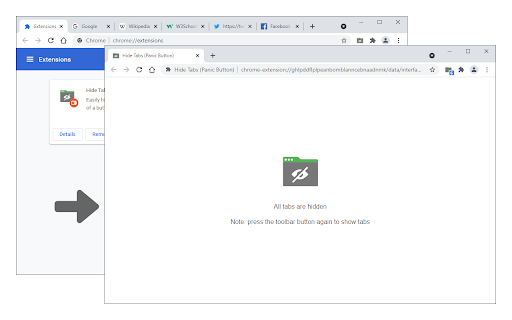
Easily hide and restore all open tabs with the click of a button!
As of June 2026, Hide Tabs (Panic Button) has 8,000 users and a 1.85/5 rating from 26 reviews in the Productivity category.
Usersno change0%
8.0K
8,000
Ratingno change0%
1.85
26 reviews
Reviewsno change0%
26
Version
0.1.7
Manifest V3
90-day change · In the last 90 days this extension 1 version update.
History
2 snapshotsTracking since May 16, 2026.
View as table
| Date | Users | Rating | Reviews | Version |
|---|---|---|---|---|
| May 16, 2026 | 8.0K | 1.85 | 26 | 0.1.6 |
| May 30, 2026 | 9.0K | 1.85 | 26 | 0.1.6 |
| Now | 8.0K | 1.85 | 26 | 0.1.7 |
Permissions & access
- Permissions
- storagesessions
- Host access
- None declared
Screenshots

About
Hide Tabs (Panic Button) is an extension that lets you easily hide and restore all tabs.

To hide (close) all tabs, please press the toolbar button once. Next time, when you click on the toolbar button again, all hidden tabs are restored to the previous state (session). To adjust the settings (i.e., show a blank hide tabs page, show badge icon text, etc.), please visit the options page and mark the desired item(s). Moreover, to hide and restore tabs, you can use the keyboard shortcut (Alt+Shift+A) instead of the toolbar button.

To report bugs, please fill out the bug report form on the addon's homepage (https://mybrowseraddon.com/hide-tabs.html).
Technical
- Version
- 0.1.7
- Manifest
- V3
- Size
- 40.32KiB
- Min Chrome
- 88
- Languages
- 1
- Featured
- No
Metadata
- ID
- cbaflamlbiffgoclkalmhboabeohfoke
- Developer ID
- u1cbcb78579a2f3402c48ebe9334f7465
- Developer Email
- [email protected]
- Created
- Feb 11, 2018
- Last Updated (Store)
- May 18, 2026
- Last Scraped
- Jun 14, 2026
- Website
- —
- Support URL
- https://mybrowseraddon.com/hide-tabs.html
- Privacy Policy
- —
Similar extensions
Alternatives to Hide Tabs (Panic Button), ranked by description similarity.

Tab Panic
Save your tabs, close everything instantly, and restore your full session anytime.
9
★ 5.0

Save Tabs
Save and restore all tabs from toolbar popup!
7.0K
★ 2.8

Undo Closed Tabs Button
Easily undo closed tabs via your browser's toolbar popup!
30.0K
★ 4.4

Mute Tab
Easily mute all tabs with just one click!
10.0K
★ 3.5

Panic Button Extension
Privacy-focused extension with emergency button to instantly close all tabs and redirect to a safe default page.
7

TabVanish
Instantly hide and restore all tabs with one click. Perfect panic button for privacy! by AIO.com.ai
4

Tab Manager
Easily organize all your open tabs in multiple windows from toolbar popup!
1.0K
★ 3.6

Panic Button - Privacy Protector
Instantly close all tabs and switch to a safe page. Perfect for privacy protection.
241
★ 5.0
Data sourced from the Chrome Web Store · last verified Jun 14, 2026.