
Screenshot Lens
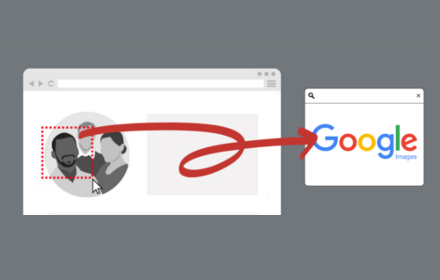
One-click screenshot capture with instant Google Image Search. Click extension, drag to select, release to search.
As of June 2026, Screenshot Lens has 57 users in the Productivity category.
Usersup 307.1 percent+307.1%
57
57
Ratingno change0%
—
— reviews
Reviewsno change0%
—
Version
1.0.2
Manifest V3
History
6 snapshotsTracking since Apr 7, 2026.
View as table
| Date | Users | Rating | Reviews | Version |
|---|---|---|---|---|
| Apr 7, 2026 | 14 | — | — | 1.0.2 |
| Apr 19, 2026 | 19 | — | — | 1.0.2 |
| May 7, 2026 | 25 | — | — | 1.0.2 |
| May 13, 2026 | 41 | — | — | 1.0.2 |
| May 22, 2026 | 46 | — | — | 1.0.2 |
| Jun 9, 2026 | 54 | — | — | 1.0.2 |
| Now | 57 | — | — | 1.0.2 |
Permissions & access
- Permissions
- activeTabscriptingoffscreen
- Host access
- https://*.google.com/*
Screenshots


About
The fastest way to search screenshots on Google Images.

Screenshot Search streamlines the screenshot-to-search workflow into a single, fluid motion. No more saving files, opening tabs, or dragging images—just click, select, and search.

How It Works

1. Click the extension icon
2. Drag to select any region on your screen
3. Release to instantly search on Google Images

That's it! Your screenshot is automatically uploaded and search results appear immediately.

Perfect For:
- Shopping: Find products from images
- Research: Identify objects, logos, or artwork
- Design: Discover similar styles or sources
- Education: Look up visual content quickly

Privacy & Security

Screenshot Search respects your privacy:
- No data collection or tracking
- No external servers (only Google Images)
- All processing happens locally
- No analytics or telemetry

Your screenshots are only sent to Google Images when you complete a selection, using Google's standard upload mechanism.

---

Transform your workflow: Before: ⌘+Shift+4 → save → open Google → drag file → delete file
After: Click → drag → done!
Technical
- Version
- 1.0.2
- Manifest
- V3
- Size
- 22.72KiB
- Min Chrome
- 88
- Languages
- 1
- Featured
- No
Metadata
- ID
- caffgijlpgnacnamabfhadoadooancdp
- Developer ID
- ufc7cc1a0b83c6da551fde46edb3cb4d9
- Developer Email
- [email protected]
- Created
- Dec 29, 2025
- Last Updated (Store)
- Jan 21, 2026
- Last Scraped
- Jun 9, 2026
- Website
- —
Similar extensions
Alternatives to Screenshot Lens, ranked by description similarity.
Screenshot Search
select and capture any area on a web page, then effortlessly perform reverse image searches on Google Images
3.0K
★ 3.7

Google Image Downloader | Futoo
Download HD images from Google Image Search with one click. Batch download, format conversion, and size filtering.
44

Select & Search - Capture Screen and Search Instantly
Select any area on screen and instantly search it across 40+ engines.
90
★ 5.0

Screen Search - Search Screen with Google Lens
Search anything on your screen with Google Lens. Instant visual search, translations, and product info at your fingertips.
10.0K
★ 4.6

ScreenScan - Instant Screenshot Search
Instantly capture, search, and explore any image, video or text on the web with a click and discover more with Google Lens.
569
★ 3.8

Fast Screenshot - One Click Capture
Capture full-page screenshots instantly with just one click. Simple, fast and lightweight tool for quick screen captures.
122

Google Lens ImageSearcher
Search images using Google Lens directly from the context menu
20.0K
★ 4.3

Save Search Results
Easily save Google search results URLs with a single click!
Simple Search Saver is a lightweight and efficient Chrome extension…
1.0K
★ 4.7
Data sourced from the Chrome Web Store · last verified Jun 9, 2026.