
IFS Aurena Insight
Chrome Add-On to get more insights of IFS Aurena pages. THIS IS NOT AN IFS OFFICIAL ADD-ON
As of June 2026, IFS Aurena Insight has 2,000 users and a 5.00/5 rating from 13 reviews in the Workflow & Planning category.
Usersno change0%
2.0K
2,000
Ratingno change0%
5.00
13 reviews
Reviewsno change0%
13
Version
0.3.1
Manifest V3
90-day change · In the last 90 days this extension 3 version updates, changed permissions.
History
5 snapshotsTracking since Apr 4, 2026.
View as table
| Date | Users | Rating | Reviews | Version |
|---|---|---|---|---|
| Apr 4, 2026 | 2.0K | 5.00 | 13 | 0.2.8 |
| Apr 16, 2026 | 2.0K | 5.00 | 13 | 0.2.9 |
| Apr 26, 2026 | 2.0K | 5.00 | 13 | 0.2.9 |
| May 18, 2026 | 2.0K | 5.00 | 13 | 0.2.9 |
| May 23, 2026 | 2.0K | 5.00 | 13 | 0.3.0 |
| Now | 2.0K | 5.00 | 13 | 0.3.1 |
Changelog
- May 27, 2026description
Tools for IFS Aurena client.

This tool helps the consultants to retrieve the advanced details from any IFS Aurena page.

Compatible with App 10 and IFS Cloud versions.

Current features include:
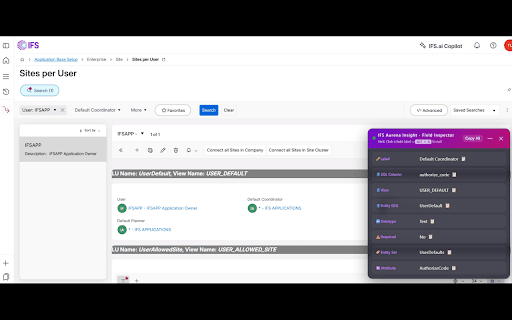
1. Displays any page data applying the aggregates of users choice and get the SQL Column name of the fields. *ALT+A to toggle Field Inspector
2. Chrome DevTools → IFS Inspector tab to trace structured DB Calls, OData requests, view waterfall & server timings
3. Tag Environments to visually distinguish the environments to reducing the risk of making changes in the wrong one..
4. Get the list of client elements and their entity details in single page with attribute and command button information.
5. Displays the LU and view name associated with any element on the page.
6. Add Blur effect to the fields on page to take screenshot.
7. Displays the home page of the entity searched
8. See the roles granted to the users.
9. See the roles that grants the access to a selected page.
10. Displays the list of screens visited by date
11. Expand all the collapsed groups on the selected page
12. Collapse all the expanded groups on the selected page

**************************************************************************************
Disclaimer:

Please note that the Chrome extension developed for the IFS ERP Aurena client is provided "as is" without any warranties or guarantees of any kind. The developer is not liable for any damages, losses, or other consequences that may arise from the use of this extension.

The developer does not collects any data though this extension.

Furthermore, it is important to note that the developer has no affiliation or connection with IFS company.

By using this Chrome extension, you acknowledge and agree to the terms and conditions stated above.
⚠️ Important Notice - Language Requirement:
• Some features(LU name, SQL Columns) currently require your browser language to be set to English (US) or English (UK). If these features do not work, please check your browser settings and switch your preferred language to English. I am working to support all languages in future updates!

💡The first-ever independent, 3rd party developer tool built specifically for the IFS Aurena client.

🛠️This tool helps the consultants to retrieve the advanced details from any IFS Aurena page.

🔄Compatible with App 10 and IFS Cloud versions.

Current features include:
1. Displays any page data applying the aggregates of users choice and get the SQL Column name of the fields. *ALT+A to toggle Field Inspector
2. Chrome DevTools → IFS Inspector tab to trace structured DB Calls, OData requests, view waterfall & server timings
3. Tag Environments to visually distinguish the environments to reducing the risk of making changes in the wrong one..
4. Get the list of client elements and their entity details in single page with attribute and command button information.
5. Displays the LU and view name associated with any element on the page.
6. Add Blur effect to the fields on page to take screenshot.
7. Displays the home page of the entity searched
8. See the roles granted to the users.
9. See the roles that grants the access to a selected page.
10. Displays the list of screens visited by date
11. Expand all the collapsed groups on the selected page
12. Collapse all the expanded groups on the selected page


⚠️Disclaimer:

👉Please note that the Chrome extension developed for the IFS ERP Aurena client is provided "as is" without any warranties or guarantees of any kind. The developer is not liable for any damages, losses, or other consequences that may arise from the use of this extension.

👉The developer does not collects any data though this extension.

👉Furthermore, it is important to note that the developer has no affiliation or connection with IFS company.

👉By using this Chrome extension, you acknowledge and agree to the terms and conditions stated above.
- May 23, 2026permissions
activeTab, storage, declarativeNetRequest
activeTab, storage
- May 18, 2026description
Tools for IFS Aurena client.

This tool helps the consultants to retrieve the basic details from any IFS Aurena page.

Current features include:
1. Displays any page data applying the aggregates of users choice and get the SQL Column name of the fields. *ALT+A to toggle Field Inspector
2. Tag Environments to visually distinguish the environments to reducing the risk of making changes in the wrong one..
3. Get the list of client elements and their entity details in single page with attribute and command button information.
4. Displays the LU and view name associated with any element on the page.
5. Add Blur effect to the fields on page to take screenshot.
6. Displays the home page of the entity searched
7. See the roles granted to the users.
8. See the roles that grants the access to a selected page.
9. Displays the list of screens visited by date
10. Expand all the collapsed groups on the selected page
11. Collapse all the expanded groups on the selected page

**************************************************************************************
Disclaimer:

Please note that the Chrome extension developed for the IFS ERP Aurena client is provided "as is" without any warranties or guarantees of any kind. The developer is not liable for any damages, losses, or other consequences that may arise from the use of this extension.

The developer does not collects any data though this extension.

Furthermore, it is important to note that the developer has no affiliation or connection with IFS company.

By using this Chrome extension, you acknowledge and agree to the terms and conditions stated above.
Tools for IFS Aurena client.

This tool helps the consultants to retrieve the advanced details from any IFS Aurena page.

Compatible with App 10 and IFS Cloud versions.

Current features include:
1. Displays any page data applying the aggregates of users choice and get the SQL Column name of the fields. *ALT+A to toggle Field Inspector
2. Chrome DevTools → IFS Inspector tab to trace structured DB Calls, OData requests, view waterfall & server timings
3. Tag Environments to visually distinguish the environments to reducing the risk of making changes in the wrong one..
4. Get the list of client elements and their entity details in single page with attribute and command button information.
5. Displays the LU and view name associated with any element on the page.
6. Add Blur effect to the fields on page to take screenshot.
7. Displays the home page of the entity searched
8. See the roles granted to the users.
9. See the roles that grants the access to a selected page.
10. Displays the list of screens visited by date
11. Expand all the collapsed groups on the selected page
12. Collapse all the expanded groups on the selected page

**************************************************************************************
Disclaimer:

Please note that the Chrome extension developed for the IFS ERP Aurena client is provided "as is" without any warranties or guarantees of any kind. The developer is not liable for any damages, losses, or other consequences that may arise from the use of this extension.

The developer does not collects any data though this extension.

Furthermore, it is important to note that the developer has no affiliation or connection with IFS company.

By using this Chrome extension, you acknowledge and agree to the terms and conditions stated above.
- May 18, 2026host_permissions
(empty)
<all_urls>
- May 18, 2026permissions
activeTab, storage
activeTab, storage, declarativeNetRequest
Permissions & access
- Permissions
- activeTabstorage
- Host access
- <all_urls>
Screenshots



About
⚠️ Important Notice - Language Requirement:
• Some features(LU name, SQL Columns) currently require your browser language to be set to English (US) or English (UK). If these features do not work, please check your browser settings and switch your preferred language to English. I am working to support all languages in future updates!

💡The first-ever independent, 3rd party developer tool built specifically for the IFS Aurena client.

🛠️This tool helps the consultants to retrieve the advanced details from any IFS Aurena page.

🔄Compatible with App 10 and IFS Cloud versions.

Current features include:
1. Displays any page data applying the aggregates of users choice and get the SQL Column name of the fields. *ALT+A to toggle Field Inspector
2. Chrome DevTools → IFS Inspector tab to trace structured DB Calls, OData requests, view waterfall & server timings
3. Tag Environments to visually distinguish the environments to reducing the risk of making changes in the wrong one..
4. Get the list of client elements and their entity details in single page with attribute and command button information.
5. Displays the LU and view name associated with any element on the page.
6. Add Blur effect to the fields on page to take screenshot.
7. Displays the home page of the entity searched
8. See the roles granted to the users.
9. See the roles that grants the access to a selected page.
10. Displays the list of screens visited by date
11. Expand all the collapsed groups on the selected page
12. Collapse all the expanded groups on the selected page


⚠️Disclaimer:

👉Please note that the Chrome extension developed for the IFS ERP Aurena client is provided "as is" without any warranties or guarantees of any kind. The developer is not liable for any damages, losses, or other consequences that may arise from the use of this extension.

👉The developer does not collects any data though this extension.

👉Furthermore, it is important to note that the developer has no affiliation or connection with IFS company.

👉By using this Chrome extension, you acknowledge and agree to the terms and conditions stated above.
Technical
- Version
- 0.3.1
- Manifest
- V3
- Size
- 513KiB
- Min Chrome
- 88
- Languages
- 1
- Featured
- No
Metadata
- ID
- bplknlhkgiifolhkkakimondjknbffnp
- Developer ID
- u2ac200cbdd7ddf53876d88a6a4c0714e
- Developer Email
- [email protected]
- Created
- Mar 5, 2023
- Last Updated (Store)
- May 25, 2026
- Last Scraped
- Jun 20, 2026
- Website
- —
- Support URL
- —
- Privacy Policy
- —
Similar extensions
Alternatives to IFS Aurena Insight, ranked by description similarity.

Work Order Lookup Tool
A side note-taking extension with enhanced functionalities.
1

SAP Simple Document Searcher
Search SAP official documents easily from your chrome extension. This tool is developed privately and not an official tool.
178
★ 5.0

IA4Chrome
Extension Interact For Chrome Browser
—
★ 2.7

Elements.cloud
This Chrome Extension allows the Elements documentation and analytics to be displayed inside Salesforce and Jira.
3.0K
★ 5.0

Astalty For Chrome
Astalty's Browser Extension
1.0K
★ 5.0

Inven
Chrome Extension to use Inven in your browser.
823
★ 5.0

Jira in Chrome
Jira & Chrome Extension: Manage Issues Effortlessly Without Switching to Jira.
1.0K
★ 4.0

Chrome Reporting Extension
Extension for reporting chrome metrics and events.
400.0K
★ 2.9
Data sourced from the Chrome Web Store · last verified Jun 20, 2026.