
Astalty For Chrome
Astalty's Browser Extension
As of May 2026, Astalty For Chrome has 1,000 users and a 5.00/5 rating from 6 reviews in the Workflow & Planning category.
Usersno change0%
1.0K
1,000
Ratingno change0%
5.00
6 reviews
Reviewsno change0%
6
Version
1.4.3
Manifest V3
History
1 snapshotsTracking since Apr 30, 2026.
View as table
| Date | Users | Rating | Reviews | Version |
|---|---|---|---|---|
| Apr 30, 2026 | 1.0K | 5.00 | 6 | 1.4.3 |
| Now | 1.0K | 5.00 | 6 | 1.4.3 |
Permissions & access
- Permissions
- storageunlimitedStorage
- Host access
- https://*.algolia.net/*
Screenshots


About
Astalty For Chrome 💻

Astalty For Chrome is a multipurpose tool for people working within the NDIS. Its purpose is to streamline the search for support items and give you quick calculations and breakdowns of budgets and sub categories.

Our initial product is a simplified version of the NDIS Price Guide. It allows users to easily search for NDIS Support Items directly from their browser.

Prices are up to date with the most recent NDIS Price Guide. You can switch between Price Guides in the settings page.

Our second release is a budget building tool, that allows you to quickly calculate budgets and work out funding levels for your Participants. Whether you're a Support Coordinator breaking down a plan or an Administration Officer building a service agreement, you'll definitely find value in Astalty For Chrome.

We've recently added the ability to get breakdowns of support hours, simply add in your budget, select your line item and you will know exactly hour many hours you can receive with the remaining funding.

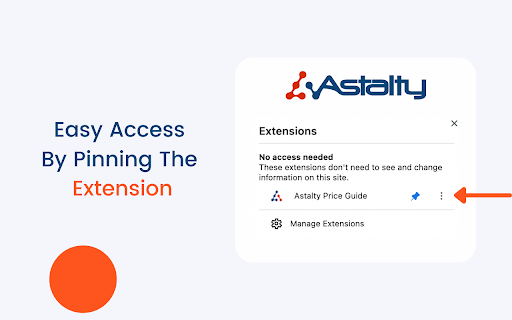
📍 Don't Forget, for easy access to Astalty For Chrome, complete the following;

1️⃣  Open Google Chrome.

2️⃣  Click the “Extensions” button (jig-saw icon) beside your profile pic.

3️⃣  The drop-down will list the Chrome extensions installed and enabled.

4️⃣  Beside each extension, you'll see a pushpin icon.

5️⃣  Now you can click and drag the icons to the order you wish.

After adding the extension as a pushpin, you will be able to select line items with a few clicks of a button.

We plan to implement many more features and improvements 📈
Technical
- Version
- 1.4.3
- Manifest
- V3
- Size
- 3.97MiB
- Min Chrome
- 88
- Languages
- 1
- Featured
- Yes
Metadata
- ID
- jgpbnjjkpfehnjdkaaldhnhbedjcpkia
- Developer ID
- u15ff36d31a5c003752d6720c9eaee404
- Developer Email
- [email protected]
- Created
- Jan 8, 2022
- Last Updated (Store)
- Nov 20, 2023
- Last Scraped
- May 28, 2026
- Website
- astalty.com.au
- Support URL
- https://astalty.com.au/contact
- Privacy Policy
- https://astalty.com.au/privacy-policy
Similar extensions
Alternatives to Astalty For Chrome, ranked by description similarity.

Spending Calculator For Zepto & Blinkit
Spending Calculator For Zepto & Blinkit: Track your grocery spending and save money.
2.0K
★ 4.0

TaskMaster Pro
Task manager with categories, priorities, dark mode, search, deadlines, and notifications. Keep your tasks organized and tracked.
7
★ 5.0

Quick Sticky Notes and Todo List
Quick Sticky Notes is the best chrome extension for taking notes and is the best chrome todo list extension.
64

Nifty: Tasks, Chat, Docs, Time
Nifty is a new wave productivity app to manage tasks, track time, collaborate on docs, and chat with your team -- all in one place.
1.0K
★ 4.5

Open Time Tracker
Professional time tracking extension with task management and reporting
7
★ 5.0

Easy Extensions Manager
Simplify extension management. Enable, disable, and uninstall with ease.
389
★ 4.0

Budget Tracker
Take control of your finances with Budget Tracker - the Chrome extension that empowers you to effortlessly track your expenses.
266
★ 3.3

TODOHUB
All your important Tasks, organized in one spot!
—
Data sourced from the Chrome Web Store · last verified May 28, 2026.