
Auto 2FA
Login through Duo Mobile in your browser
As of June 2026, Auto 2FA has 4,000 users and a 5.00/5 rating from 8 reviews in the Privacy & Security category.
Usersdown 33.3 percent−33.3%
4.0K
4,000
Ratingno change0%
5.00
8 reviews
Reviewsup 14.3 percent+14.3%
8
Version
1.6.5
Manifest V3
90-day change · In the last 90 days this extension lost 2.0K users, 1 version update.
History
8 snapshotsTracking since Apr 16, 2026.
View as table
| Date | Users | Rating | Reviews | Version |
|---|---|---|---|---|
| Apr 16, 2026 | 6.0K | 5.00 | 7 | 1.6.4 |
| Apr 27, 2026 | 6.0K | 5.00 | 7 | 1.6.4 |
| May 7, 2026 | 6.0K | 5.00 | 7 | 1.6.4 |
| May 11, 2026 | 7.0K | 5.00 | 8 | 1.6.5 |
| May 18, 2026 | 8.0K | 5.00 | 8 | 1.6.5 |
| May 23, 2026 | 9.0K | 5.00 | 8 | 1.6.5 |
| May 28, 2026 | 7.0K | 5.00 | 8 | 1.6.5 |
| Jun 6, 2026 | 6.0K | 5.00 | 8 | 1.6.5 |
| Now | 4.0K | 5.00 | 8 | 1.6.5 |
Changelog
- May 2, 2026description
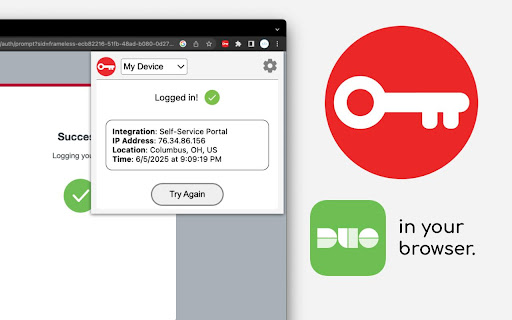
Logs you in through Duo Mobile. Supports storing multiple devices, approving Duo verified pushes, and logging in hands-free.

➤ How do I set it up?
Auto 2FA provides the instructions to generate a Duo activation QR code that it will automatically scan and then store as your new Android or iOS virtual tablet.

➤ Is this secure?
Use at your own risk. Extensions are protected by the modern security of your browser, but it ultimately relies on your security practices. Visit the GitHub repository for details.

➤ How do I uninstall?
Right click Auto 2FA and select remove. You'll need to revisit your organization's Duo Mobile devices page to remove it as a login device.

➤ Any technical details?
Checkout the repository for documentation and source code:
https://github.com/FreshSupaSulley/Auto-2FA

Auto 2FA is an independent project and is not recognized, endorsed, or affiliated with Duo Mobile or Cisco Technology. All product names, logos, and brands are property of their respective owners.
This project is no longer actively maintained. It might not work for you (I'm looking for a new owner! See the repo for details).

Features:
- Create multiple virtual devices
- Approve Duo verified pushes
- Login instantly when a login page is detected

➤ How do I set it up?
Auto 2FA provides the instructions to generate a Duo activation QR code that it will automatically scan and then store as your new Android or iOS virtual tablet.

➤ Is this secure?
Use at your own risk. Extensions are protected by the modern security of your browser, but it ultimately relies on your security practices. Visit the GitHub repository for details.

➤ How do I uninstall?
Right click Auto 2FA and select remove. You'll need to revisit your organization's Duo Mobile devices page to remove it as a login device.

➤ Any technical details?
Checkout the repository for documentation and source code:
https://github.com/FreshSupaSulley/Auto-2FA

Auto 2FA is an independent project and is not recognized, endorsed, or affiliated with Duo Mobile or Cisco Technology. All product names, logos, and brands are property of their respective owners.
Permissions & access
- Permissions
- storageactiveTabscripting
- Host access
- https://*.duosecurity.com/*
Screenshots


About
This project is no longer actively maintained. It might not work for you (I'm looking for a new owner! See the repo for details).

Features:
- Create multiple virtual devices
- Approve Duo verified pushes
- Login instantly when a login page is detected

➤ How do I set it up?
Auto 2FA provides the instructions to generate a Duo activation QR code that it will automatically scan and then store as your new Android or iOS virtual tablet.

➤ Is this secure?
Use at your own risk. Extensions are protected by the modern security of your browser, but it ultimately relies on your security practices. Visit the GitHub repository for details.

➤ How do I uninstall?
Right click Auto 2FA and select remove. You'll need to revisit your organization's Duo Mobile devices page to remove it as a login device.

➤ Any technical details?
Checkout the repository for documentation and source code:
https://github.com/FreshSupaSulley/Auto-2FA

Auto 2FA is an independent project and is not recognized, endorsed, or affiliated with Duo Mobile or Cisco Technology. All product names, logos, and brands are property of their respective owners.
Technical
- Version
- 1.6.5
- Manifest
- V3
- Size
- 793KiB
- Min Chrome
- 88
- Languages
- 1
- Featured
- No
Metadata
- ID
- bnfooenhhgcnhdkdjelgmmkpaemlnoek
- Developer ID
- u2c508d31b27c76e4325b3c9fd20e3081
- Developer Email
- [email protected]
- Created
- Oct 4, 2022
- Last Updated (Store)
- May 6, 2026
- Last Scraped
- Jun 22, 2026
- Website
- —
- Support URL
- https://github.com/FreshSupaSulley/Auto-2FA
- Privacy Policy
- —
Similar extensions
Alternatives to Auto 2FA, ranked by description similarity.
2FAS Auth - Two Factor Authentication
2FAS Browser Extension is simple, private, and secure: 1 click, 1 tap, and your token is automatically entered!
80.0K
★ 3.6

Akamai MFA
The Akamai MFA app for Chrome is the companion to the Akamai MFA mobile app.
The Akamai MFA Chrome extension makes it possible to…
6.0K
★ 4.0

Web2FA - Authenticator
Add 2FA security to your accounts and generate codes in Chrome with Web2FA Authenticator
10.0K
★ 3.4

Authenticator: Generate 2FA Codes in Browser
Generate 2FA codes instantly. Secure, encrypted, easy to use, and offline — an authenticator that stays in your browser.
3.0K
★ 4.2

Authenticator App
Provides secure two-factor authentication(2FA). Safeguard your digital life with ease.
10.0K
★ 2.6

2FA Authenticator Guard
Free 2FA on Browser! Multi-layered encryption secures data. Replaces Google Authenticator, no phone needed. Ultimate security focus.
10.0K
★ 3.8

Authenticator app
Authenticator app for two factor authentication. Scan authenticator QR codes & generate 2FA codes directly in Google Chrome browser.
20.0K
★ 4.6

2FA Authenticator
A free 2FA authentication extension that helps you easily obtain two-factor authentication codes.
2.0K
★ 3.7
Data sourced from the Chrome Web Store · last verified Jun 22, 2026.