DB Memo Pad
Your go-to memo manager. Quickly save your temporary thoughts using Local Storage.
As of June 2026, DB Memo Pad has 33 users and a 5.00/5 rating from 2 reviews in the Workflow & Planning category.
Usersup 22.2 percent+22.2%
33
33
Ratingno change0%
5.00
2 reviews
Reviewsno change0%
2
Version
1.0.0
Manifest V3
History
3 snapshotsTracking since Apr 23, 2026.
View as table
| Date | Users | Rating | Reviews | Version |
|---|---|---|---|---|
| Apr 23, 2026 | 27 | 5.00 | 2 | 1.0.0 |
| May 12, 2026 | 26 | 5.00 | 2 | 1.0.0 |
| Jun 7, 2026 | 35 | 5.00 | 2 | 1.0.0 |
| Now | 33 | 5.00 | 2 | 1.0.0 |
Permissions & access
- Permissions
- storage
- Host access
- None declared
Screenshots
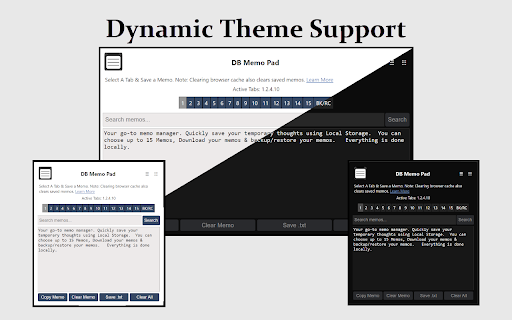
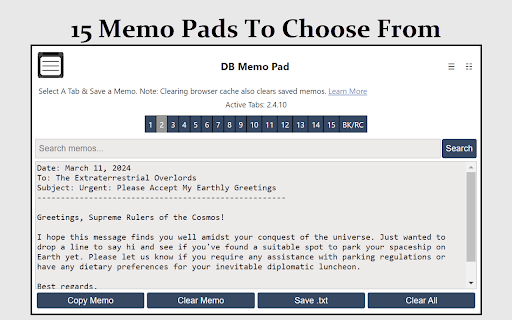

About
How Does it Work?
DB Memo Pad uses local storage to instantly save text entered in textarea inputs on your device.
1. Active Tabs: Displays the tabs in use among the 15 available, helping in managing your memos.
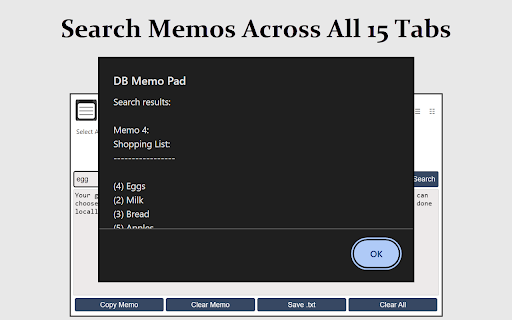
2. Search Memos: Quickly locate specific content across all memos with a search feature, presented in an alert popup.
3. Below the textarea input, find:
-- Copy Memo: Copies text from the active memo tab to the clipboard.
-- Clear Memo: Clears text from the active memo.
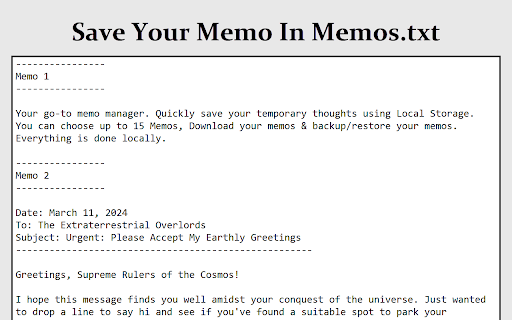
--  Save .txt: Saves all memos to a 'Memos.txt' file for local storage.
-- Clear All: Deletes all memos across every tab, irreversible action.
4. BK/RC Tab: Offers a backup and restore system for all memos. Additional buttons include:
-- Backup?: Fetches and displays all local storage Key/Values for DB Memo Pad in the textarea input.
-- Save Backup .txt?: Saves all local storage data to 'Memo-Codes.txt' for local storage.
-- Replace?: Restores memos from 'Memo-Codes.txt'. Simply copy text data from the file and paste it into the Backup Recovery Codes input, then press Replace.

Privacy
- This extension does not gather any personal information or browsing history from users.  0 Tracking, 0 data collection.
- Users can rest assured that their browsing activities remain private and are not monitored or shared with any third parties.
- The extension does not require any libraries linked outside of the extension aka "remote code".  Just requires the browser's local storage to save your settings.

Changlog/Bug Fixes:
https://destructiveburn.com/forum/public/d/22-db-memo-pad-changelog-news

More About the Extension here:
https://destructiveburn.com/forum/public/d/21-db-memo-pad-browser-extension
Technical
- Version
- 1.0.0
- Manifest
- V3
- Size
- 11.54KiB
- Min Chrome
- 88
- Languages
- 1
- Featured
- No
Metadata
- ID
- bllniknbdbkeihgebmkicdibmbcfglah
- Developer ID
- ud50efdac2fa701cf9b32fde6d336508e
- Developer Email
- [email protected]
- Created
- Mar 15, 2024
- Last Updated (Store)
- Mar 15, 2024
- Last Scraped
- Jun 7, 2026
- Website
- destructiveburn.com
- Privacy Policy
- —
Similar extensions
Alternatives to DB Memo Pad, ranked by description similarity.

MemoMe
Contextual & persistent web page memos
35

Note Everywhere
This is intuitive note application.
20.0K
★ 4.4

MemoTab - New Tab Notes
Turn your new tab into a sticky note board
1.0K
★ 4.9

Note Cards
Transform your notes into organized, color-coded cards with smart syntax recognition
9
★ 5.0

Memopad
A seamless, minimalistic tool for capturing tasks and ideas.
20
★ 5.0

SnapMemo - Quick Note-Taking
Quick, Simple Note-Taking Right in Your Browser. No sign-up required!
94
★ 5.0

MemoPad New Tab
Memopad New Tab makes it a Markdown editor instead of the default [New Tab] in Google Chrome.
42
★ 4.0

Site Memo
Leave and sync notes on specific URLs across devices.
2
★ 5.0
Data sourced from the Chrome Web Store · last verified Jun 7, 2026.