
MemoTab - New Tab Notes
Turn your new tab into a sticky note board
As of June 2026, MemoTab - New Tab Notes has 1,000 users and a 4.86/5 rating from 29 reviews in the Workflow & Planning category.
Usersno change0%
1.0K
1,000
Ratingup 1.0 percent+1.0%
4.86
29 reviews
Reviewsup 38.1 percent+38.1%
29
Version
2.9.8
Manifest V3
90-day change · In the last 90 days this extension 2 version updates, changed permissions.
History
8 snapshotsTracking since Apr 19, 2026.
View as table
| Date | Users | Rating | Reviews | Version |
|---|---|---|---|---|
| Apr 19, 2026 | 1.0K | 4.81 | 21 | 2.9.4 |
| May 4, 2026 | 1.0K | 4.81 | 21 | 2.9.4 |
| May 9, 2026 | 1.0K | 4.81 | 21 | 2.9.7 |
| May 12, 2026 | 2.0K | 4.83 | 23 | 2.9.7 |
| May 16, 2026 | 1.0K | 4.83 | 23 | 2.9.8 |
| May 20, 2026 | 1.0K | 4.84 | 25 | 2.9.8 |
| Jun 8, 2026 | 1.0K | 4.85 | 27 | 2.9.8 |
| Jun 14, 2026 | 1.0K | 4.86 | 28 | 2.9.8 |
| Now | 1.0K | 4.86 | 29 | 2.9.8 |
Changelog
- May 4, 2026description
MemoTab Notes replaces your default new tab page with a distraction-free, interactive dashboard designed to help you stay focused and organized. Whether you're 📝 taking notes, ✅ managing to-do lists, 📂 saving and grouping tabs, or 🌐 embedding your favorite tools, MemoTab offers a seamless, private experience entirely within your browser. ⭐ Core Features • 📝 Sticky notes for capturing quick ideas and reminders • ✅ To-do lists with interactive checkboxes • 🚀 Shortcuts for fast access to your most-used websites • 📂 Save and group your current tabs for later • 🌐 Embed tools like Pomodoro timers, drawing apps, calendars, and more • 🖼 Upload your own background image or choose from built-in background images • 🧘♀️ Clean, minimal interface for a distraction-free experience • 💾 Export and import your notes and tasks for easy backups • 🔌 Fully functional offline, no internet required 🔒 Private by Design MemoTab does not collect, store, or transmit any of your data. Everything stays on your device. There are: • No server requests • No login or authentication • No tracking All notes, tasks, and settings are saved locally in your browser. 👥 Who It's For MemoTab is ideal for anyone who wants a more focused, useful new tab experience, including: • 🎨 Creatives who need a visual, organized space • 🎓 Professionals and students looking to stay on track • 🧩 Users who rely on embedded tools like timers or whiteboards • ⚡ Anyone who values speed, simplicity, and privacy ⚡ Lightweight. Fast. Always Available. MemoTab loads instantly with every new tab and works entirely offline, with no external services or special permissions required.
Enable the persistence of your notes across all newly opened tabs.

Key Features:

🗂️ Multiple Boards Support – Switch between different boards for various projects or contexts.

✍️ Draggable and Resizable Notes – Move and scale your notes effortlessly

🎨 Customizable Note Colors – Color-code your notes to suit your workflow.

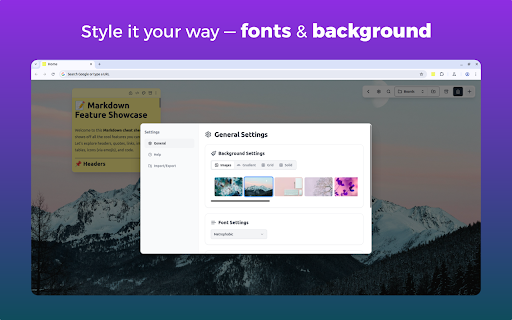
🕶️ Personalized Background Styles – Choose from dark & light grids or solid color backgrounds.

🔤 Tailored Font Styles – Apply custom fonts for a note-taking experience that fits your style.

🗃️ Archive Functionality – Keep your workspace tidy without losing past notes.

⌨️ Keyboard Shortcuts – Add new notes and navigate your board faster with handy shortcuts.

📁 Persistent Across Tabs – Notes stay in place no matter how many tabs you open.

📝 Markdown & Plaintext Support – Write notes in Markdown for rich formatting or stick to simple plaintext.

🔍 Search Within Notes and Boards – Instantly find the content you're looking for.

📤 Export and Import Notes – Backup your data or move your boards across devices effortlessly.
- May 4, 2026host_permissions
(empty)
https://memotab.space/*
Permissions & access
- Permissions
- storageunlimitedStoragesidePanel
- Host access
- https://memotab.space/*
Screenshots



About
Enable the persistence of your notes across all newly opened tabs.

Key Features:

🗂️ Multiple Boards Support – Switch between different boards for various projects or contexts.

✍️ Draggable and Resizable Notes – Move and scale your notes effortlessly

🎨 Customizable Note Colors – Color-code your notes to suit your workflow.

🕶️ Personalized Background Styles – Choose from dark & light grids or solid color backgrounds.

🔤 Tailored Font Styles – Apply custom fonts for a note-taking experience that fits your style.

🗃️ Archive Functionality – Keep your workspace tidy without losing past notes.

⌨️ Keyboard Shortcuts – Add new notes and navigate your board faster with handy shortcuts.

📁 Persistent Across Tabs – Notes stay in place no matter how many tabs you open.

📝 Markdown & Plaintext Support – Write notes in Markdown for rich formatting or stick to simple plaintext.

🔍 Search Within Notes and Boards – Instantly find the content you're looking for.

📤 Export and Import Notes – Backup your data or move your boards across devices effortlessly.
Technical
- Version
- 2.9.8
- Manifest
- V3
- Size
- 14.16MiB
- Min Chrome
- 88
- Languages
- 17
- Featured
- Yes
Metadata
- ID
- fikoeimhmcejdnhpahkljhjcijfdfaja
- Developer ID
- ua0ebb24a2c3fff968d61c1838bd042c5
- Developer Email
- [email protected]
- Created
- Oct 20, 2023
- Last Updated (Store)
- May 10, 2026
- Last Scraped
- Jun 14, 2026
- Website
- —
- Support URL
- —
- Privacy Policy
- https://memotab.space/PrivacyPolicy
Similar extensions
Alternatives to MemoTab - New Tab Notes, ranked by description similarity.

TabNotes: Per-Tab Notepad for Productivity
Take notes tied to each browser tab. Perfect for remote work, study, and freelancing.
13
★ 5.0

Quick Note Tab - Notepad, Planner and Habits Tracker
Transform your new tab into a focused space to write notes, plan tasks, and build better habits
539
★ 4.5

Tab Memory
Never forget why you opened a tab. Add notes, set reminders, stay organized.
2

Tabme — Tab & Bookmark Manager | Save, Organize & Sync Tabs
The easiest way to save, organize & sync your tabs.
10.0K
★ 4.5

Stickify
A beautiful, simple, and feature-rich sticky notes companion for your browser...
2

SnapMemo - Quick Note-Taking
Quick, Simple Note-Taking Right in Your Browser. No sign-up required!
94
★ 5.0

TabulaNote
A beautiful new tab page for your thoughts and notes.
11
★ 5.0

SmartTab Toolkit
Remember why you opened each tab. Quick notes per tab with modern UI.
3
★ 5.0
Data sourced from the Chrome Web Store · last verified Jun 14, 2026.