
WebMend – screenshot & annotation tool
Capture screenshots, annotate and save for yourself, or report an issue to the site owner and help improve the web.
As of June 2026, WebMend – screenshot & annotation tool has 243 users and a 4.00/5 rating from 1 reviews in the Productivity category.
Usersup 8000.0 percent+8000.0%
243
243
Ratingno change0%
4.00
1 reviews
Reviewsno change0%
1
Version
0.3.7
Manifest V3
90-day change · In the last 90 days this extension 2 version updates.
History
10 snapshotsTracking since Apr 6, 2026.
View as table
| Date | Users | Rating | Reviews | Version |
|---|---|---|---|---|
| Apr 6, 2026 | 3 | — | — | 0.3.2 |
| Apr 18, 2026 | 52 | — | — | 0.3.2 |
| Apr 25, 2026 | 58 | — | — | 0.3.5 |
| May 3, 2026 | 61 | — | — | 0.3.5 |
| May 9, 2026 | 61 | — | — | 0.3.7 |
| May 14, 2026 | 96 | — | — | 0.3.7 |
| May 20, 2026 | 94 | — | — | 0.3.7 |
| May 26, 2026 | 187 | 4.00 | 1 | 0.3.7 |
| Jun 2, 2026 | 253 | 4.00 | 1 | 0.3.7 |
| Jun 8, 2026 | 241 | 4.00 | 1 | 0.3.7 |
| Now | 243 | 4.00 | 1 | 0.3.7 |
Permissions & access
- Permissions
- activeTabstoragescripting
- Host access
- None declared
Screenshots


About
The screenshot tool that does more than save to your desktop.
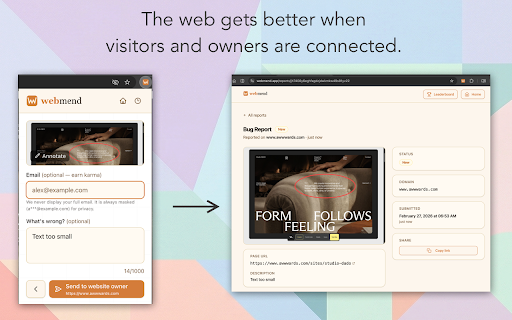
Webmend is a full-featured screenshot and annotation tool — and the only one that lets you send what you captured directly to the website owner as a structured issue report.
Use it however you like.

📸 Just need a screenshot?
Capture the full page, your visible area, or any selected region. Annotate with arrows, text, and shapes. Blur out sensitive information. Download as PNG. No account. No uploads. No friction.
It works on any website, runs offline, and gets out of your way.

🐛 Found an issue on a website?
Broken link, typo, layout bug, outdated information or just want to give some feedback — submit your annotated screenshot directly to the site owner with one click. Your report lands in their dashboard with the exact URL, viewport, timestamp, and your screenshot attached. No email required. No guessing if it reached anyone.
You're not just saving an image. You're filing a ticket.
Fix the web as you browse it

🏠 Own a website?
Claim your domain and start receiving quality reports from real visitors. Track issues from open to fixed in your dashboard.
Free for visitors. Workflow features for owners on the Plus plan.

Features everyone gets — free:
- Full-page & visible area capture
- Arrows, shapes, text, and highlight annotation
- Blur / redact sensitive info
- Download PNG
- Submit reports to site owners (no account needed)
- Works offline, nothing uploaded without your say-so
- Keyboard shortcut for quick capture
Technical
- Version
- 0.3.7
- Manifest
- V3
- Size
- 260KiB
- Min Chrome
- 88
- Languages
- 1
- Featured
- No
Metadata
- ID
- blfeopjadgdflmnibdobadhonmoenijj
- Developer ID
- ua5fb83a0281f4ba2448f439483907723
- Developer Email
- [email protected]
- Created
- Feb 27, 2026
- Last Updated (Store)
- May 2, 2026
- Last Scraped
- Jun 8, 2026
- Website
- webmend.app
- Support URL
- —
- Privacy Policy
- https://webmend.app/privacy
Similar extensions
Alternatives to WebMend – screenshot & annotation tool, ranked by description similarity.

Snapshot - Screenshot & Annotate
Capture, annotate and beautify screenshots with area selection, full page capture, annotations, browser frames and more.
54
★ 5.0

AnnoSnap
Annotez vos pages web : surlignage, notes, modifications et export PNG. Parfait pour la recherche et l'étude.
3

Screenshot Extension
Take a screenshot and save it to a location of your choice.
89

MarkScreen - Annotate Webpages & Screenshot
Annotate webpages with pen, arrows, text & blur. Capture clear screenshots for bug reports, feedback, and docs. No account needed.
12

SnapEdit
Capture and edit screenshots with a powerful built-in editor
5

Full Page Screenshot
Capture full page screenshots and edit with powerful image editor
7

Web Capture
Capture web pages - visible area, region selection, and full page capture
10
★ 5.0

Screenie — Screenshot & Annotate
Take a Screenie. Draw on it. Done. Capture, annotate with arrows & text, save as PNG.
—
Data sourced from the Chrome Web Store · last verified Jun 8, 2026.