
PageOne
Collects and organizes your browsing history into annotable, portable, topic-based tree lists in Markdown
As of June 2026, PageOne has 110 users and a 5.00/5 rating from 1 reviews in the Productivity category.
Usersup 0.9 percent+0.9%
110
110
Ratingno change0%
5.00
1 reviews
Reviewsno change0%
1
Version
1.4
Manifest V3
History
6 snapshotsTracking since Apr 18, 2026.
View as table
| Date | Users | Rating | Reviews | Version |
|---|---|---|---|---|
| Apr 18, 2026 | 109 | 5.00 | 1 | 1.4 |
| Apr 27, 2026 | 122 | 5.00 | 1 | 1.4 |
| May 7, 2026 | 117 | 5.00 | 1 | 1.4 |
| May 14, 2026 | 120 | 5.00 | 1 | 1.4 |
| May 23, 2026 | 116 | 5.00 | 1 | 1.4 |
| Jun 2, 2026 | 115 | 5.00 | 1 | 1.4 |
| Now | 110 | 5.00 | 1 | 1.4 |
Permissions & access
- Permissions
- alarmssidePanelstoragetabstabGroups
- Host access
- None declared
Screenshots


About
If you feel the same during web browsing:

- Piling lots of browser tabs and hesitate to close them?
- Easily get distracted by irrelevant links on a web page?


☆ What it does:

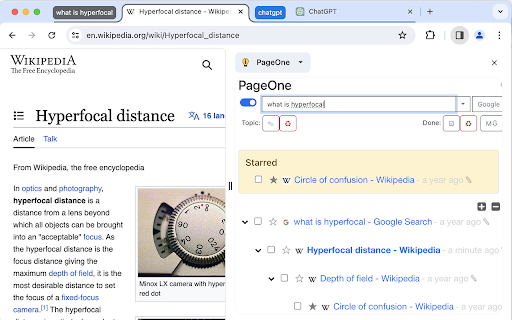
PageOne automatically collects and organizes your browsing history into tree lists, according to topics you set up.  You can then review, annotate and export them into text-based Markdown format.


☆ What it can help:

- To help you stay in a single tab -- Your browsing history is organized into a tree list for easy tracking and jumping among links.

- To help you get focused -- Reminds you the topic you set up before browsing/searching.

- Annotate links on the organized browsing history list -- and export them to free Joplin notebooks as markdown!


☆ How to use it:

1. Find PageOne light bulb icon on browser extension toolbar.
2. Click the icon and in the popup, input your topic or idea. Alternatively, open a new tab to show the same PageOne page.
3. Start searching/browsing under the topic by clicking the Google button.
4. Check back the browsing history tree anytime by clicking the light bulb icon. You can then add notes here or mark some history items as done.

Visit our website for tutorial videos: https://sites.google.com/view/hyperfocal/pageone/en


☆ All features:

1. Feel no worry browsing within a single page

You can easily review your browsing history as a popup page by clicking the extension icon (a lightbulb) on browser.

2. Smart history tree list collection

The browsing dependency are traced and well-organized into tree lists.

3. A list for a topic

Allows to easily set and switch between topics.
Let PageOne the default page to help you set a topic before browsing. (Or turn this off in Options pane).

4. Your search term as the topic

Use the Google button to set topic and search at the same time.


5. History list annotation

☑ Check as done. Consider a browsing list as a TODO list for review.
☆ Star and highlight a URL.
✎ Take whatever note you want.

6. Sync with the free note taking app (Joplin)

Freely edit your browsing history as a note in Markdown.
One topic, one note.
Allows both sync forward and backward!
Joplin link: https://joplinapp.org/

7. Use TabGroup to open multiple topics at the same time.

8. Dock as side-panel
Turn on/off side-panel view in options page.


☆ Release notes:
v1.1.4:
- Search topic through the main topic inputbox.
- Directly edit the tree lists in the Markdown view.

v1.2:
- With the new Chrome feature -- Side panel, PageOne can dock on the web browser. Just select PageOne from the drop-down list of the side panel.
- Integrate with Chrome's tab groups -- your topic name is group name. With this you can keep topics in opened tabs and switch among them quickly.

v1.3:
- Improve tracking for history tree construction.
- Add switch between pop-up or side-panel view.

v1.4
- Add filter box
- Option to set item expiring days
- Bug fixes
Technical
- Version
- 1.4
- Manifest
- V3
- Size
- 1003KiB
- Min Chrome
- 88
- Languages
- 1
- Featured
- Yes
Metadata
- ID
- bkmhabkoocegnikdcapcbfabpkjhghaf
- Developer ID
- u37bace61dbc04ed757ca08483030be44
- Developer Email
- [email protected]
- Created
- Mar 3, 2023
- Last Updated (Store)
- Dec 22, 2025
- Last Scraped
- Jun 2, 2026
- Privacy Policy
- https://sites.google.com/view/hyperfocal/terms
Similar extensions
Alternatives to PageOne, ranked by description similarity.

Marked - Save Bookmarks
Save bookmarks to Marked with one click from any webpage
4

Site Note
Easily create, save, and manage notes for specific websites and pages directly from your browser!
7

PagePebble - Sticky Notes for Webpages
Create sticky notes on any webpage with rich formatting and custom colors. Notes appear automatically when you revisit pages.
164
★ 5.0

Tab History
Keep track of current tab history and jump back to the page you want you to be on
16
★ 5.0

Tree Style Tab Manager
Organize Chrome tabs in a tree. Save & restore sessions, drag & drop, instant search, site exclusions, and recover closed tabs.
163
★ 5.0

One-Click-Jot
Jot down thoughts and ideas in seconds. Perfect for capturing quick notes while browsing or working.
106
★ 5.0

Page Notes
Attach notes to any webpage — they're right there when you come back. Syncs via your own Google Drive. No third-party servers.
10.0K
★ 4.6

tabMind - AI smart tree style tabs
Organize & visualize tabs, bookmarks in a smart AI-driven hierarchy. Organize tabs in tree based on its content not just who open it
288
★ 5.0
Data sourced from the Chrome Web Store · last verified Jun 2, 2026.