
Page Notes
Attach notes to any webpage — they're right there when you come back. Syncs via your own Google Drive. No third-party servers.
As of June 2026, Page Notes has 10,000 users and a 4.56/5 rating from 241 reviews in the Productivity category.
Usersno change0%
10.0K
10,000
Ratingno change0%
4.56
241 reviews
Reviewsup 1.7 percent+1.7%
241
Version
3.5.7
Manifest V3
90-day change · In the last 90 days this extension 2 version updates.
History
5 snapshotsTracking since Apr 1, 2026.
View as table
| Date | Users | Rating | Reviews | Version |
|---|---|---|---|---|
| Apr 1, 2026 | 10.0K | 4.56 | 237 | 3.5.5 |
| Apr 5, 2026 | 10.0K | 4.56 | 237 | 3.5.6 |
| Apr 16, 2026 | 10.0K | 4.56 | 238 | 3.5.6 |
| Apr 26, 2026 | 10.0K | 4.56 | 239 | 3.5.7 |
| May 18, 2026 | 10.0K | 4.56 | 240 | 3.5.7 |
| Now | 10.0K | 4.56 | 241 | 3.5.7 |
Changelog
- Apr 16, 2026short_description
Take notes for web pages and access them with a single click whenever you visit those web pages again. (Syncs to Google Drive)
Attach notes to any webpage — they're right there when you come back. Syncs via your own Google Drive. No third-party servers.
- Apr 5, 2026description
Page Notes – notes that live where you need them

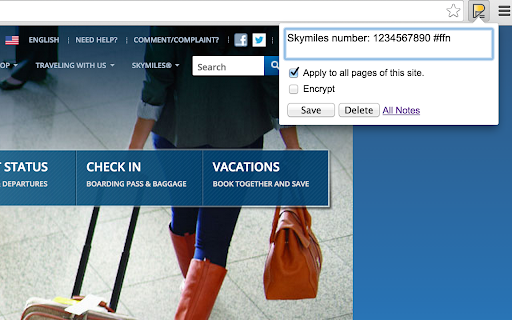
Ever forget a login ID, membership number, tracking ID, or a small detail you only need on a specific website?

Page Notes lets you attach notes directly to webpages.
When you revisit a page, your notes are right there—no searching, no switching tabs.

It’s lightweight, secure, and stays out of your way until you need it..

🚀🚀 Why Users Love Page Notes:

Your Data, Your Control: No 3rd party servers. Your notes stay in your browser or sync directly to your own Google Drive.

Zero Lock-in: Access your notes on mobile or any other device via our secure web app: https://pagenotes.app.

Military-Grade Privacy: Optional client-side encryption means even if someone accesses your Drive, they can't read your notes without your passphrase.

✨✨ Key Features:

📝 Context-Aware: Create notes for a specific URL (e.g., a specific article) or an entire Website (e.g., all pages on amazon.com).

🏷️ Stay Organized: Use #tags to categorize thoughts. Tag a note with #todo and see it in your global dashboard.

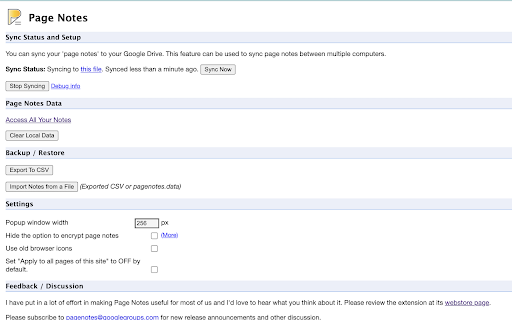
☁️ Seamless Sync: Keep all browsers (all Chromium based browsers and Firefox)  in sync automatically using Google Drive.

👀 Visual Cues: The extension icon changes color when you visit a page that has an existing note.

📱 Mobile Access: View and edit notes on the go via the web app:  pagenotes.app.

🙈 Privacy & Security: We believe in total privacy. We do not and can not access or store your data. We don't track your browsing history.

🔐Encryption: Option to encrypt notes with a custom passphrase (never stored).

🤝🤝 Support & Community:

📝Read more about the extension at:
https://medium.com/@manugarg/10-000-users-for-page-notes-1f75786c2a41

❓FAQs: See https://pagenotes.manugarg.com/faq/ for common questions users encounter.

🐜Bugs & Requests: Please use our GitHub Issue Tracker. This ensures we see your message and can reply (we cannot reply to Store Reviews!).

Firefox Users: Get the Add-on here. https://addons.mozilla.org/en-US/firefox/addon/mg-page-notes/

Privacy Policy: http://pagenotes.manugarg.com/privacy.html
Page Notes — notes that live where you need them

Attach a note to any web page. When you come back, it's right there — no searching, no switching tabs. Perfect for login hints, tracking IDs, project context, or anything you'd otherwise forget.

SMART & LIGHTWEIGHT
Create notes scoped to a specific URL (one article, one order page) or an entire domain (everything on amazon.com). Use #tags to organize notes across sites, and spot pages with notes instantly — the icon changes color when there's a note waiting.

YOUR DATA, YOUR RULES, NO LOCK-IN
Page Notes never sends your data to third-party servers. Notes live in your browser by default, or sync to your own Google Drive for cross-browser access. For sensitive notes, enable client-side encryption with a passphrase that's never stored anywhere.

WORKS EVERYWHERE
Syncs across Chrome, Edge, Brave, and all Chromium browsers — plus Firefox. View and edit notes on mobile via the web app at pagenotes.app.

LINKS & SUPPORT

• FAQ: pagenotes.manugarg.com/faq
• Bugs & feature requests: GitHub Issue Tracker (Store review replies don't work!)
• Firefox Add-on: addons.mozilla.org/firefox/addon/mg-page-notes
• Privacy Policy: pagenotes.manugarg.com/privacy.html

LEARN MORE

• Blog: https://medium.com/@manugarg/10-000-users-for-page-notes-1f75786c2a41
• Website: https://pagenotes.manugarg.com
- Apr 1, 2026description
Page Notes – notes that live where you need them

Ever forget a login ID, membership number, tracking ID, or a small detail you only need on a specific website?

Page Notes lets you attach notes directly to webpages.
When you revisit a page, your notes are right there—no searching, no switching tabs.

It’s lightweight, secure, and stays out of your way until you need it..

🚀🚀 Why Users Love Page Notes:

Your Data, Your Control: No 3rd party servers. Your notes stay in your browser or sync directly to your own Google Drive.

Zero Lock-in: Access your notes on mobile or any other device via our secure web app: https://pagenotes.app.

Military-Grade Privacy: Optional client-side encryption means even if someone accesses your Drive, they can't read your notes without your passphrase.

✨✨ Key Features:

📝 Context-Aware: Create notes for a specific URL (e.g., a specific article) or an entire Website (e.g., all pages on amazon.com).

🏷️ Stay Organized: Use #tags to categorize thoughts. Tag a note with #todo and see it in your global dashboard.

☁️ Seamless Sync: Keep all browsers (all Chromium based browsers and Firefox)  in sync automatically using Google Drive.

👀 Visual Cues: The extension icon changes color when you visit a page that has an existing note.

📱 Mobile Access: View and edit notes on the go via the web app:  pagenotes.app.

🙈 Privacy & Security: We believe in total privacy. We do not and can not access or store your data. We don't track your browsing history.

🔐Encryption: Option to encrypt notes with a custom passphrase (never stored).


🤝🤝 Support & Community:

📝Read more about the extension at:
https://medium.com/@manugarg/10-000-users-for-page-notes-1f75786c2a41

❓FAQs: See https://pagenotes.manugarg.com/faq/ for common questions users encounter.

🐜Bugs & Requests: Please use our GitHub Issue Tracker. This ensures we see your message and can reply (we cannot reply to Store Reviews!).

Firefox Users: Get the Add-on here. https://addons.mozilla.org/en-US/firefox/addon/mg-page-notes/

Privacy Policy: http://pagenotes.manugarg.com/privacy.html
Page Notes – notes that live where you need them

Ever forget a login ID, membership number, tracking ID, or a small detail you only need on a specific website?

Page Notes lets you attach notes directly to webpages.
When you revisit a page, your notes are right there—no searching, no switching tabs.

It’s lightweight, secure, and stays out of your way until you need it..

🚀🚀 Why Users Love Page Notes:

Your Data, Your Control: No 3rd party servers. Your notes stay in your browser or sync directly to your own Google Drive.

Zero Lock-in: Access your notes on mobile or any other device via our secure web app: https://pagenotes.app.

Military-Grade Privacy: Optional client-side encryption means even if someone accesses your Drive, they can't read your notes without your passphrase.

✨✨ Key Features:

📝 Context-Aware: Create notes for a specific URL (e.g., a specific article) or an entire Website (e.g., all pages on amazon.com).

🏷️ Stay Organized: Use #tags to categorize thoughts. Tag a note with #todo and see it in your global dashboard.

☁️ Seamless Sync: Keep all browsers (all Chromium based browsers and Firefox)  in sync automatically using Google Drive.

👀 Visual Cues: The extension icon changes color when you visit a page that has an existing note.

📱 Mobile Access: View and edit notes on the go via the web app:  pagenotes.app.

🙈 Privacy & Security: We believe in total privacy. We do not and can not access or store your data. We don't track your browsing history.

🔐Encryption: Option to encrypt notes with a custom passphrase (never stored).

🤝🤝 Support & Community:

📝Read more about the extension at:
https://medium.com/@manugarg/10-000-users-for-page-notes-1f75786c2a41

❓FAQs: See https://pagenotes.manugarg.com/faq/ for common questions users encounter.

🐜Bugs & Requests: Please use our GitHub Issue Tracker. This ensures we see your message and can reply (we cannot reply to Store Reviews!).

Firefox Users: Get the Add-on here. https://addons.mozilla.org/en-US/firefox/addon/mg-page-notes/

Privacy Policy: http://pagenotes.manugarg.com/privacy.html
Permissions & access
- Permissions
- alarmsidentityoffscreensidePanelstoragetabs
- Host access
- https://www.googleapis.com/, https://accounts.google.com/
Screenshots


About
Page Notes — notes that live where you need them

Attach a note to any web page. When you come back, it's right there — no searching, no switching tabs. Perfect for login hints, tracking IDs, project context, or anything you'd otherwise forget.

SMART & LIGHTWEIGHT
Create notes scoped to a specific URL (one article, one order page) or an entire domain (everything on amazon.com). Use #tags to organize notes across sites, and spot pages with notes instantly — the icon changes color when there's a note waiting.

YOUR DATA, YOUR RULES, NO LOCK-IN
Page Notes never sends your data to third-party servers. Notes live in your browser by default, or sync to your own Google Drive for cross-browser access. For sensitive notes, enable client-side encryption with a passphrase that's never stored anywhere.

WORKS EVERYWHERE
Syncs across Chrome, Edge, Brave, and all Chromium browsers — plus Firefox. View and edit notes on mobile via the web app at pagenotes.app.

LINKS & SUPPORT

• FAQ: pagenotes.manugarg.com/faq
• Bugs & feature requests: GitHub Issue Tracker (Store review replies don't work!)
• Firefox Add-on: addons.mozilla.org/firefox/addon/mg-page-notes
• Privacy Policy: pagenotes.manugarg.com/privacy.html

LEARN MORE

• Blog: https://medium.com/@manugarg/10-000-users-for-page-notes-1f75786c2a41
• Website: https://pagenotes.manugarg.com
Technical
- Version
- 3.5.7
- Manifest
- V3
- Size
- 1.39MiB
- Min Chrome
- 88
- Languages
- 1
- Featured
- Yes
Metadata
- ID
- omjdheidbhoghpfdnndkgoelfiogjfla
- Developer ID
- u773746a3c38eb3dc1c58dc8d0538d26a
- Developer Email
- [email protected]
- Created
- Sep 14, 2011
- Last Updated (Store)
- Apr 14, 2026
- Last Scraped
- Jun 21, 2026
- Privacy Policy
- https://pagenotes.manugarg.com/privacy.html
Similar extensions
Alternatives to Page Notes, ranked by description similarity.

Page Notes
Store and retrieve meta information for each website.
5

Page Notes Live
A simple notepad that remembers your notes for every website.
14

PagePatch - Sticky Notes for the Web
Add sticky notes to any element on any website. Your notes stay exactly where you stick them, every time you visit.
11
★ 4.0

PagePebble - Sticky Notes for Webpages
Create sticky notes on any webpage with rich formatting and custom colors. Notes appear automatically when you revisit pages.
164
★ 5.0

Nopes
Notes On Pages ('Nopes') is an easy to use, simple extension that lets you add, minimize, and close sticky notes on web pages.
2
★ 5.0

WebPage Notes
Take notes for specific web pages and domains
31

Site Note
Easily create, save, and manage notes for specific websites and pages directly from your browser!
7

Page Notes Pro
Save notes for pages. Unlock full features with a license key.
2
Data sourced from the Chrome Web Store · last verified Jun 21, 2026.