
Photo Editor Online
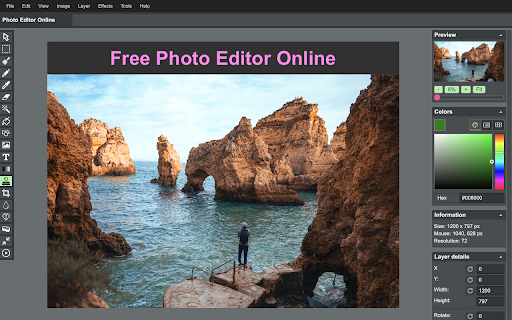
Online image editor lets you create, edit images, graphic design using HTML5 technologies. No need download or have obsolete flash.
As of June 2026, Photo Editor Online has 8,000 users and a 4.39/5 rating from 18 reviews in the art category.
Usersno change0%
8.0K
8,000
Ratingno change0%
4.39
18 reviews
Reviewsno change0%
18
Version
1.2
Manifest V3
History
1 snapshotsTracking since Apr 23, 2026.
View as table
| Date | Users | Rating | Reviews | Version |
|---|---|---|---|---|
| Apr 23, 2026 | 8.0K | 4.39 | 18 | 1.2 |
| Now | 8.0K | 4.39 | 18 | 1.2 |
Permissions & access
- Permissions
- activeTabcontextMenus
- Host access
- None declared
Screenshots
About
➤ Features
🔹Files: open images, directories, URL, data URL, drag and drop, save, print.
🔹Edit: Undo, cut, copy, paste, selection, paste from clipboard.
🔹Image: information, EXIF, trim, zoom, resize (Hermite resample, default resize), rotate, flip, color corrections (brightness, contrast, hue, saturation, luminance), auto adjust colors, grid, histogram, negative.
🔹Layers: multiple layers system, differences, merge, flatten, Transparency support.
🔹Tools: pencil, brush, magic wand, erase, fill, color picker, letters, crop, blur, sharpen, desaturate, clone, borders, sprites, key-points, color zoom, replace color, restore alpha, content fill.

1. Basic: resize, crop, flip, image adjustments, apply filters, add stickers, support layers, paths, multiple files and pixel art.
2. Layer Styles: drop shadow, color and gradient overlays.
3. Transform: rotate, scale, move.
4. Text: insert and edit your text. Many beautiful fonts.
5. Pen: create shapes or paths by bezier curve.
6. Painting: brush, pencil, eraser tools.
7. Selection: copy, cut, delete, fill, and stroke.
8. Flood Fill/Gradient: fill area with single color or gradient.
9. Eyedropper: sample colors from image.
10. Tuning: blur, sharpen, and smudge.
11. Works with Google Drive.

- Edit photos
- Crop images
- Rotate images
- Add watermarks
- Reduce image file size
- Change image dimensions
- Convert to image
- Convert images to documents

➤ Privacy Policy

By design, your data stays at all times on your Google account, never saved in our database. Your data aren’t shared with anyone, including the add-on owner.
We complies with privacy laws (especially GDPR & California Privacy Act) to protect your data.
Technical
- Version
- 1.2
- Manifest
- V3
- Size
- 251KiB
- Min Chrome
- 88
- Languages
- 54
- Featured
- Yes
Metadata
- ID
- bjpnbgcclgjolakojhmefhebcgppmlka
- Developer ID
- uc39f11ad9fbfe95185f8544c47e8e264
- Developer Email
- [email protected]
- Created
- Dec 5, 2023
- Last Updated (Store)
- Jul 30, 2024
- Last Scraped
- Jun 7, 2026
- Support URL
- https://www.livepolls.app/support
- Privacy Policy
- https://www.livepolls.app/photo_editor_online/privacy
Similar extensions
Alternatives to Photo Editor Online, ranked by description similarity.
resizemy.photos
Resize or crop any photo or image from any website or upload your own image
9.0K
★ 4.0

Photo Editor With Drive
Photo Editor offers a variety of effects for your photos including Webcam Capture, Save to Drive, Rotate, Crop, Flip, and more.
10.0K
★ 3.5

Photo Editor
Make ordinary photos look wonderful without Photoshop skills. Funny photo effects and filters.
5.0K
★ 2.9

Photo Editor
free online photo editor makes your photos beautiful with easy and powerful editing tools !
31
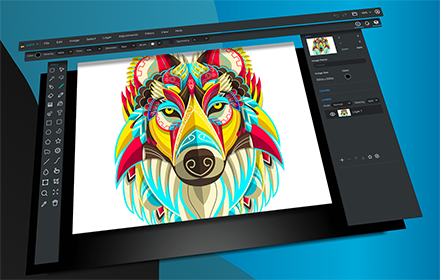
Sumopaint - Online Image Editor
Sumopaint is a full featured painting and image editing application.
500.0K
★ 3.5

Image Resizer
🖼️ Resize images, crop images, and compress photos online using Image Resizer. Perfect for social media, web, and bulk resizing.
4.0K
★ 4.8

Image Flow
Edit and download images in your preferred format
33
★ 1.0

fixPhoto - photo editor
Quick photo editing tools in popup window. cropping, resize, compress, filter image.paywall-free exports
445
★ 5.0
Data sourced from the Chrome Web Store · last verified Jun 7, 2026.