
fixPhoto - photo editor
Quick photo editing tools in popup window. cropping, resize, compress, filter image.paywall-free exports
As of May 2026, fixPhoto - photo editor has 445 users and a 5.00/5 rating from 1 reviews in the art category.
Usersup 11.3 percent+11.3%
445
445
Ratingno change0%
5.00
1 reviews
Reviewsno change0%
1
Version
0.0.51
Manifest V3
History
2 snapshotsTracking since Apr 25, 2026.
View as table
| Date | Users | Rating | Reviews | Version |
|---|---|---|---|---|
| Apr 25, 2026 | 400 | 5.00 | 1 | 0.0.51 |
| May 22, 2026 | 435 | 5.00 | 1 | 0.0.51 |
| Now | 445 | 5.00 | 1 | 0.0.51 |
Permissions & access
- Permissions
- storagecontextMenus
- Host access
- None declared
Screenshots


About
📢 Quick photo editing tools in popup window

📌 Why you should consider this:

✪ Complete photo editor in popup window.
✪ Grab an image from websites, edit and then replace it.
✪ Annotate & Edit before taking a screenshot.
✪ Edit screenshot with full-featured editor.
✪ Auto-save in picked local folder.
✪ Pure & clean code that powers fastest performance.
✪ No third-party libraries are used.
✪ No tracking.
📌 == Features ==

✅ All-in-one photo editing tools

⇒ Crop
⇒ Resize
⇒ Adjustments
⇒ Effects
⇒ Text
⇒ Frame
⇒ Watermark
⇒ Compress
⇒ Image format converter

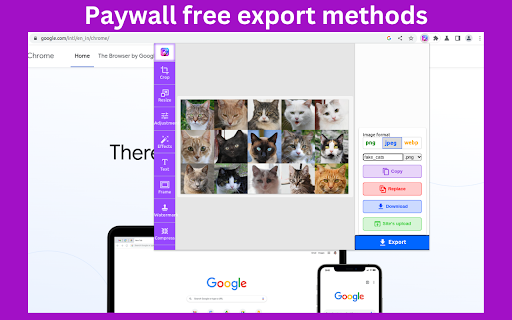
✅ Grab image from website Grab any image and uploaded image file on websites for editing.

✅ Paywall-free export methods

copy : copy image in clipboard
Replace: Replace edited image with original image.
Download : Download image to disk.
Site's upload: Upload edited image to website.

✅ Main use cases

If website doesn't accept over limit size, then compress image with photoAstra. After compression, photoAstra replaces current image with a compressed image.

If your image's resolution doesn't match with website requirement, then resize image with photoAstra. After resizing, photoAstra replaces current image with resized image.

If you want to add watermark and want to protect your image from copied before publish on internet. then add your company watermark with photoAstra watermark tool

If you want to insert text , shadow, border in image

⚠️ Note:One gotcha
After picking image from os file explorer, popup window close in stable chrome (only work in chrome dev).  Chrome said that they launched this api since chrome 99 but it is not available in stable version.
Please copy and paste image or re-open popup window manually.
Technical
- Version
- 0.0.51
- Manifest
- V3
- Size
- 84.62KiB
- Min Chrome
- 104
- Languages
- 1
- Featured
- Yes
Metadata
- ID
- fmdahcefjjbplpmfkgfhbdgfaommgpif
- Developer ID
- u6bf81225d87b1f09b31997a35b22146d
- Developer Email
- [email protected]
- Created
- Feb 21, 2023
- Last Updated (Store)
- Jun 11, 2024
- Last Scraped
- May 22, 2026
- Website
- fixphoto.tools
- Support URL
- —
- Privacy Policy
- https://brahmastra.vercel.app/privacy
Similar extensions
Alternatives to fixPhoto - photo editor, ranked by description similarity.

Image Resizer
🖼️ Resize images, crop images, and compress photos online using Image Resizer. Perfect for social media, web, and bulk resizing.
4.0K
★ 4.8

Stuvio AI Image Tools
Edit, resize, crop & download any image on the web. Generate AI videos from any image with Stuvio.
2
★ 1.0

FotoAdapt
Photo editor with color filters, picker, background removal, transform tools, crop rotate and flip.
6

AI Photo Editor
Use AI Photo Editor app as an AI picture editor and image changer with prompt to edit photo and change text in image
662
★ 5.0

Fast Photo Cropper: No Servers, Just Privacy
Crop photos in any aspect ratio, privately.
44

Kartina - Image Viewer & Editor
All-in-one image controller: hover to edit, crop, annotate, rotate, zoom, download, copy or share any picture directly on the page.
3
Live Photo Editor Online
Edit photos from any web page
1.0K
★ 5.0

AI Background Generator
Use AI Background Generator — edit photo background, change picture background or add new one with background replacer tool
452
★ 5.0
Data sourced from the Chrome Web Store · last verified May 22, 2026.