Badge Clock: simple toolbar clock
Keep an eye on the time, even with taskbar hidden, with this animated digital clock in your browser toolbar.
As of June 2026, Badge Clock: simple toolbar clock has 1,000 users and a 4.57/5 rating from 7 reviews in the Productivity category.
Usersno change0%
1.0K
1,000
Ratingno change0%
4.57
7 reviews
Reviewsno change0%
7
Version
0.0.8
Manifest V3
History
2 snapshotsTracking since Apr 23, 2026.
View as table
| Date | Users | Rating | Reviews | Version |
|---|---|---|---|---|
| Apr 23, 2026 | 1.0K | 4.57 | 7 | 0.0.8 |
| May 12, 2026 | 1.0K | 4.57 | 7 | 0.0.8 |
| Now | 1.0K | 4.57 | 7 | 0.0.8 |
Permissions & access
- Permissions
- storagealarms
- Host access
- None declared
Screenshots


About
👀 What's new: this update is docs only. Like Badge Clock? Also check out our newest clock, Icon Clock. It uses the icon, instead of the badge, to display time. See it at https://chromewebstore.google.com/detail/icon-clock-tidiest-toolba/jemimfaflibimklmebhllpmhmbihpjma

👀 What is Badge Clock?
A badge is the element in a chrome extension which adds a number overlay onto the extension's icon in the toolbar. Badges are typically used to show unread email count, etc. Here, the badge is really the only functional element of the extension, providing a digital clock.

👀 Why would you need it?
If you use Chrome on Mac in full screen, or use Windows Taskbar or Mac dock in auto-hide mode, you might not be able to see the OS clock. Badge Clock keeps simple digital time in your direct line of sight, in any mode in which taskbar is still visible. And uses very few resources to do it!

👀 How do you use it?
1. After installation, pin the extension.
2. Drag it to where you like it in the toolbar.
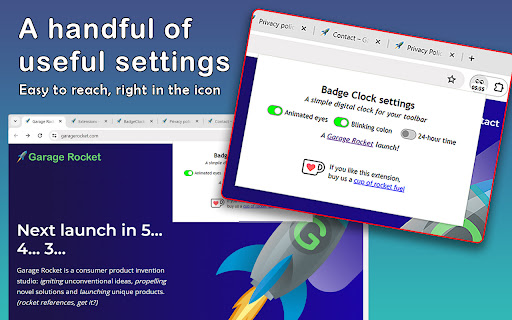
3. Click on the extension's icon to set your preferences.
4. Toggle Animated Eyes off if you find them distracting.
5. Toggle Colon off if you see clipping on Mac.
6. Toggle 24-hour time on if you don't like AM/PM style.

👀 Is this extension safe?
This extension does not ask for unnecessary permissions. It doesn't track you. It doesn't save any information about you. You can right click on the extension icon in your toolbar, to see exactly what information it can read from your browser. You can read our detailed terms of use and privacy policy here: https://garagerocket.com/terms/privacy-extensions/

👀 Why are the edges of the numbers cut off on Mac?
Chrome for Mac has a font weight and padding bug that prevents 4.5 chars display. If the clipping bothers you, try turning off 24-hr time, and perhaps turning off the colon, too.

👀 What is the use license for this extension?
Copyright 2024 Garage Rocket, all rights reserved. Use and enjoy, but please don't copy or redistribute.

👀 How can I get more info about the extension?
FAQ, privacy policy, terms of use, the ability to donate to support development: https://garagerocket.com/extensions/badgeclock

👀 What if I find a bug or have a feature request?
We are grateful for ideas and suggestions! If you run into any issues, please leave a bug report in lieu of a negative review. We use Chrome Web Store's built-in support portal, which is at the bottom of this store listing, in a section called Support. Or paste this link: https://chromewebstore.google.com/detail/bjpipplkhaijhapdnecfbemhfbihhaia/support

👀 What's on the roadmap?
--Add a couple of different animated icons, for people that don't like the glancing eyes.
--Add the option to remove icon entirely in use, and just have a badge.
--Add badge and text coloring options.

👀 What's changed in this release?
0.0.7: Corrected FAQ and privacy notifications on Chrome Web Store to reflect that this extension does no tracking of any kind, ever!
0.0.6: added no-colon option to work around text clipping on Mac.
0.0.5: fixed a bug where, occasionally on laptop resume from sleep or other long periods of inactivity, clock is stopped/stuck.
0.0.3: updated in-store documentation and screenshots, adding license in readme.
0.0.2: initial public release.
Technical
- Version
- 0.0.8
- Manifest
- V3
- Size
- 44.54KiB
- Min Chrome
- 120
- Languages
- 1
- Featured
- No
Metadata
- ID
- bjpipplkhaijhapdnecfbemhfbihhaia
- Developer ID
- u01506cad7150f1d5216c91cd47184536
- Developer Email
- [email protected]
- Created
- Feb 20, 2024
- Last Updated (Store)
- Feb 16, 2025
- Last Scraped
- Jun 8, 2026
- Website
- garagerocket.com
- Privacy Policy
- https://garagerocket.com/terms/privacy-extensions/
Similar extensions
Alternatives to Badge Clock: simple toolbar clock, ranked by description similarity.

Icon Clock: tidiest toolbar time!
An elegant little address bar clock with digital and analog faces, font choices, dark mode, time zones. This update: new fonts!
2.0K
★ 5.0

New Tab Clock
Displays a digital clock and date on new tab pages.
73
★ 3.5

BadgeTicker
BadgeTicker - Real-Time Stock Market Ticker & Side Panel
79
★ 5.0

Analog Clock
A simple analog clock popup extension.
7

Time Zone Converter & World Clock
manifest.json description
201
★ 5.0

Tick Tab Clock
Tick Tab Clock extension will help you keep track of the time while enjoying a soothing new tab design.
2.0K
★ 5.0

Top Rocket: back to top and reading progress on every web page!
A useful reading progress indicator and a convenient back-to-top button with fun animations, overlaid onto every page you visit!
31
★ 5.0

panotime
Transform your new tab page into a beautiful world clock dashboard - the elegant way to track time across multiple time zones.
32
★ 4.7
Data sourced from the Chrome Web Store · last verified Jun 8, 2026.