
Tick Tab Clock
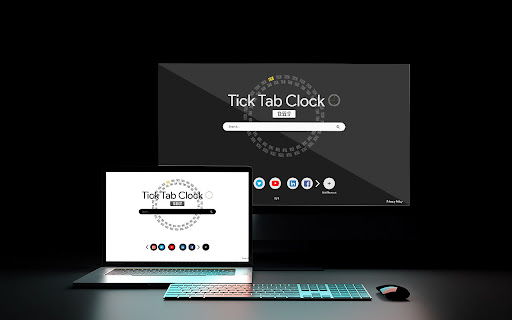
Tick Tab Clock extension will help you keep track of the time while enjoying a soothing new tab design.
As of May 2026, Tick Tab Clock has 2,000 users and a 4.95/5 rating from 20 reviews in the Productivity category.
Usersup 100.0 percent+100.0%
2.0K
2,000
Ratingno change0%
4.95
20 reviews
Reviewsno change0%
20
Version
1.0.2
Manifest V3
90-day change · In the last 90 days this extension gained 1.0K users.
History
1 snapshotsTracking since Apr 24, 2026.
View as table
| Date | Users | Rating | Reviews | Version |
|---|---|---|---|---|
| Apr 24, 2026 | 1.0K | 4.95 | 20 | 1.0.2 |
| Now | 2.0K | 4.95 | 20 | 1.0.2 |
Permissions & access
- Permissions
- storage
- Host access
- *://ticktabclock.net/*
Screenshots



About
By selecting “Add to Chrome”, You accept and agree to install the Tick Tab Clock Extension and set Chrome New Tab to the service’s default, as well as the Terms of Service and Privacy Policy. Microsoft Bing will fuel the New Tab search.

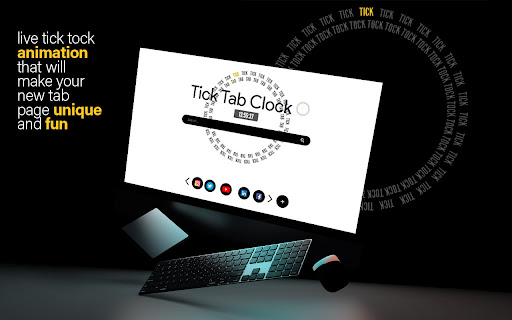
Tick Tab Clock is the perfect extension for anyone who wants to improve their productivity and focus. With a beautiful design on every new tab, as well as a clock in the middle, you can keep track of time and stay focused on your work.

The main goal of this extension is to help its users to regain calmness and focus with carefully designed wallpaper and animation. A beautifully designed clock will not also help you with concentration but will also help you to keep track of time. Tick Tab Clock is an extension that is perfect for anyone who wants to improve their productivity and focus.  🕛

By installing this extension you can design your new tab on your own by changing the theme by selecting dark or bright one. However you like, it is up to you!

You can also use the Search Bar we implemented in the middle of the screen. It is easy to use and there is no change you can miss it!

By using all of these simple but useful features you can really gain more focus and concentration throughout a day and that is why we think this is a must-have extension.

To learn more, visit our website:
Homepage: https://ticktabclock.net/index.html

Check our Privacy Policies here:
PP: https://ticktabclock.net/privacy-policy.html
EULA: https://ticktabclock.net/EULA.html

In case you are not happy with this extension, you can easily uninstall it by right clicking the extension icon on the menu bar and clicking "remove from Chrome".

Contact us for more information:
Contact: https://ticktabclock.net/contact.html
Technical
- Version
- 1.0.2
- Manifest
- V3
- Size
- 90.82KiB
- Min Chrome
- 88
- Languages
- 1
- Featured
- Yes
Metadata
- ID
- cpfaonnjbclplimogcpmchejcbhgooke
- Developer ID
- u6386cebd0f61ba829544faace62120c4
- Developer Email
- [email protected]
- Created
- Jun 29, 2022
- Last Updated (Store)
- Jan 20, 2023
- Last Scraped
- May 19, 2026
- Website
- ticktabclock.net
- Support URL
- https://ticktabclock.net/contact.html
- Privacy Policy
- http://ticktabclock.net/privacy-policy.html
Similar extensions
Alternatives to Tick Tab Clock, ranked by description similarity.
Light Tab
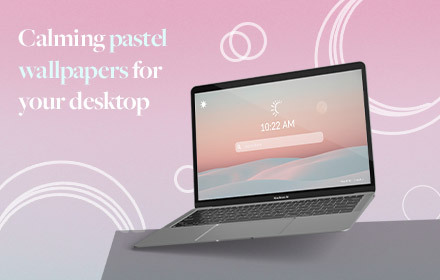
Light tab- a spectrum of soft pastel wallpapers that will look pretty on your background and contribute to a calmness while working.
10.0K
★ 4.4

My world clock
Get some major cities time on your Chrome New Tab!
2.0K
★ 4.6

Focus Newtab - Elevate Your Focus Experience
Use the Focus Newtab extension to search directly from a new tab.
499
★ 5.0
Time Management
Manage Your Time More Effectively– have a timer to track each task you have and be able to search using Yahoo search engine
135
★ 5.0

Tiny Clock in Tab
Display date and time in your browser tab title. Lightweight, offline, no tracking.
—
★ 5.0

InBalance - minimal task tracker
Use the InBalance Tab themed extension to search directly from a new tab.
789
★ 5.0

New Tab Clock
Displays a digital clock and date on new tab pages.
73
★ 3.5

Snap Search New Tab
Custom new tab page with a search bar, notes, and todo list
9
Data sourced from the Chrome Web Store · last verified May 19, 2026.