
New Tab Clock
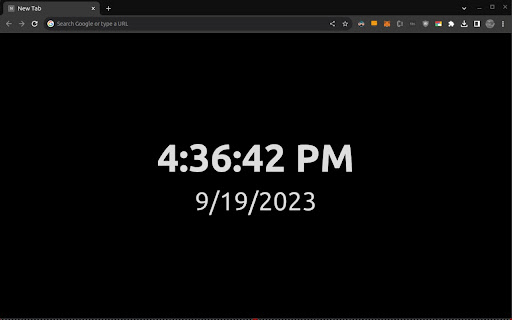
Displays a digital clock and date on new tab pages.
As of June 2026, New Tab Clock has 73 users and a 3.50/5 rating from 2 reviews in the Productivity category.
Usersup 23.7 percent+23.7%
73
73
Ratingno change0%
3.50
2 reviews
Reviewsno change0%
2
Version
1.4.0
Manifest V3
History
8 snapshotsTracking since Apr 1, 2026.
View as table
| Date | Users | Rating | Reviews | Version |
|---|---|---|---|---|
| Apr 1, 2026 | 59 | 3.50 | 2 | 1.4.0 |
| Apr 17, 2026 | 58 | 3.50 | 2 | 1.4.0 |
| Apr 26, 2026 | 63 | 3.50 | 2 | 1.4.0 |
| May 7, 2026 | 64 | 3.50 | 2 | 1.4.0 |
| May 13, 2026 | 68 | 3.50 | 2 | 1.4.0 |
| May 22, 2026 | 77 | 3.50 | 2 | 1.4.0 |
| Jun 1, 2026 | 72 | 3.50 | 2 | 1.4.0 |
| Jun 10, 2026 | 74 | 3.50 | 2 | 1.4.0 |
| Now | 73 | 3.50 | 2 | 1.4.0 |
Permissions & access
- Permissions
- storage
- Host access
- None declared
Screenshots
About
# Chrome Web Store Description - New Tab Clock

## [1.4.0] - 2026-01-03
### Added
- Background image upload with cropping functionality and live preview for personalized new tab backgrounds
- Onboarding modal to guide new users through setup
- Enhanced options page with improved styling and controls
- Dynamic URL updates that refresh automatically when changed in options
- Extension icons in multiple sizes for better display

### Improved
- Mobile layout fixes for better responsiveness
- Dynamic slider values and relative hover colors
- Keyboard accessibility for modals
- URL input validation (changed to 'url' type)
- Modal animations and user experience

### Fixed
- Duplicate event listeners
- Race condition in size slider listener
- Background and font color application issues
- Removed redundant storage calls

## [1.3.1] - 2024-09-16
## Improved
- Added support for dynamic system theme config (black/light) including the favicon.

## [1.3.0] - 2023-11-15

### Improved
- Optimized memory management in `script.js` to prevent potential memory leaks by efficiently handling intervals.

## [1.2.0] - 2023-10-17

### Added
- Dynamic favicon that updates every minute to display time.
- URL container to display saved URLs on the new tab.
- Extended options in `manifest.json` including options page, background script, and required permissions.
- Various styling updates for better UX including hover effects.
- Enhanced the clock to display colors (red, yellow, green) at appropriate time for a fun touch.

### Fixed
- Resolved z-index and background color issues for better visibility and customization.

## [1.1.0] - 2023-10-09

### Added

- Smooth transition effect for clock updates in `style.css`.
- Functionality to update the tab title with the current time in `script.js`.

## [1.0.0] - 2023-09-20

### Added

- Initial release with basic clock functionality.

# New Tab Clock

New Tab Clock: Your Ultimate Dashboard for Time, Date, and Quick-Access URLs
Why New Tab Clock?
Tired of the standard new tab screen offering little utility? New Tab Clock supercharges your new tab page into a dynamic dashboard. Now, not only can you keep track of time and date, but you can also quickly access your favorite URLs, customize your background with images, and even watch the time tick by on your favicon!

What's New in New Tab Clock?
Upon installing and opening a new tab, you'll experience:

Dynamic Favicon: Your favicon now displays the current time and updates every minute.
Quick-Access URLs: A new section for your most visited URLs, fully customizable with dynamic updates.
Custom Background Images: Upload and crop your own background images for a personalized experience.
Enhanced Customization: Modify background color, font, hover effects, and now background images right from the options page.
Onboarding Experience: New users get a helpful modal guide to set up their perfect dashboard.
Core Features
Minimalistic Design: Focus on what's essential—time, date, and quick links.
Adaptive Font Sizing: Text scales with your window size for optimum visibility.
High Contrast: Easily readable text in any lighting condition.
No Intrusive Permissions: Your privacy remains intact; only local storage is used.
Who Should Install New Tab Clock?
Professionals: Manage time effectively while multitasking across browser tabs.
Students: Stay focused on your studies with minimal distractions.
Minimalists: Experience a clean, clutter-free UI.
Everyone Else: Isn't knowing the time and date universally useful?
How to Install
Click on the "Add to Chrome" button.
Confirm the installation prompt.
Open a new tab to see New Tab Clock in action!
FAQ
Is it free?
Absolutely, no hidden costs.

Can I customize it?
Yes, from fonts and colors to URLs and background images, you can make it your own.

Does it work offline?
100% functional without an internet connection.

Conclusion
New Tab Clock is more than just a clock; it's a step toward a focused and productive browsing experience. With new features like custom background images, dynamic URL updates, and an enhanced onboarding experience, it's the best version yet. Install now and elevate your browsing today!
Technical
- Version
- 1.4.0
- Manifest
- V3
- Size
- 29.71KiB
- Min Chrome
- 88
- Languages
- 1
- Featured
- No
Metadata
- ID
- jolmfkcegldneaehnpnmfgjnfelokcdd
- Developer ID
- u3637a6affc5840ccef4deb400f688cff
- Developer Email
- [email protected]
- Created
- Sep 20, 2023
- Last Updated (Store)
- Jan 5, 2026
- Last Scraped
- Jun 10, 2026
- Website
- luispulido.com
- Privacy Policy
- —
Similar extensions
Alternatives to New Tab Clock, ranked by description similarity.

panotime
Transform your new tab page into a beautiful world clock dashboard - the elegant way to track time across multiple time zones.
32
★ 4.7

Tiny Clock in Tab
Display date and time in your browser tab title. Lightweight, offline, no tracking.
—
★ 5.0

Material World Clocks
Beautiful Material Design world clocks on your new tab. Add multiple time zones, customize colors, and choose display types.
6

Horizon Tab
A beautiful new tab extension with random wallpapers and quotes or clock display.
7
★ 5.0
My world clock
Get some major cities time on your Chrome New Tab!
2.0K
★ 4.6

FastTab
FastTab - A customizable new tab page with widgets for enhanced productivity
4

Tick Tab Clock
Tick Tab Clock extension will help you keep track of the time while enjoying a soothing new tab design.
2.0K
★ 5.0

New Tab
Simple, yet customizable new tab with time, date, weather, and bookmarks — all with flexible appearance options.
2
Data sourced from the Chrome Web Store · last verified Jun 10, 2026.