
Wordzzz — Learn languages while surf & stream
Boost your language learning with Wordzzz
As of May 2026, Wordzzz — Learn languages while surf & stream has 502 users and a 4.50/5 rating from 10 reviews in the Education category.
Usersup 1.0 percent+1.0%
502
502
Ratingno change0%
4.50
10 reviews
Reviewsno change0%
10
Version
3.0.1
Manifest V3
History
3 snapshotsTracking since Apr 1, 2026.
View as table
| Date | Users | Rating | Reviews | Version |
|---|---|---|---|---|
| Apr 1, 2026 | 497 | 4.50 | 10 | 3.0.1 |
| Apr 29, 2026 | 516 | 4.50 | 10 | 3.0.1 |
| May 26, 2026 | 494 | 4.50 | 10 | 3.0.1 |
| Now | 502 | 4.50 | 10 | 3.0.1 |
Permissions & access
- Permissions
- activeTabstoragecontextMenuscookies
- Host access
- *://localhost/, *://*.wordzzz.app/
Screenshots


About
Unlock Your Language Potential with Wordzzz for Chrome

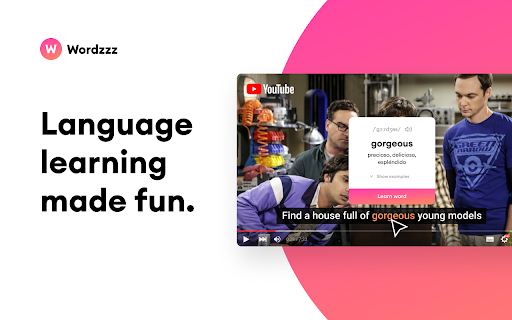
The Wordzzz extension is your ultimate language learning companion. It seamlessly analyzes subtitles within your YouTube and Netflix videos, allowing you to effortlessly enhance your language skills. Simply hover over any word, and the video pauses, giving you the opportunity to click on the word and view its translation instantly. You can also translate words while browsing by double-clicking them.

All translated words sync between all your devices, so you can expand your vocabulary wherever you are. Learn new words with our effective card system. When you start practicing, hover over a card to see the translation of the new word. This effective method helps you remember new words and check their translations on the go.

Sign in to our web platform to see your saved words and explore new learning possibilities.

★ TRANSLATE WORDS & TEXT WHILE BROWSING

Double click or select any word or sentence to translate it instantly


★ SAVE NEW WORDS TO YOUR VOCABULARY

Save words while browsing or watching your favourite videos


★ PRACTICE YOUR VOCABULARY

Learn new words with the most effective card system

★ SYNC BETWEEN ALL YOUR DEVICES
Easily sync words between all your accounts & devices


★ EASILY SWITCH LANGUAGES

Switch between the most popular language pairs


★ DARK MODE FOR READABILITY

Reduce your eye strain with the automatic dark mode


★ HOW TO USE WORDZZZ

- Download Wordzzz extension from Chrome store
- Whenever you see a new word or phrase, click on it to get its meaning
- Add it to your vocabulary to practice later

- Go to the main extension window and start practising


★ QUESTIONS, FEEDBACK: Having problems with this extension? If the suggestions above didn't work, please fill out a problem report: https://chrome.google.com/webstore/support/
Technical
- Version
- 3.0.1
- Manifest
- V3
- Size
- 2.17MiB
- Min Chrome
- 88
- Languages
- 8
- Featured
- Yes
Metadata
- ID
- bgfobkngnaldjlpdinojijockhfjheho
- Developer ID
- ud5b9f8a9c27ee9e3ecba473c6e04b5fa
- Developer Email
- [email protected]
- Created
- Oct 7, 2022
- Last Updated (Store)
- Nov 15, 2023
- Last Scraped
- May 26, 2026
- Website
- https://wordzzz.app/
- Support URL
- https://wordzzz.app
- Privacy Policy
- https://wordzzz.app/privacy-app.html
Similar extensions
Alternatives to Wordzzz — Learn languages while surf & stream, ranked by description similarity.

Vocably: Translate and Learn with Flashcards
AI dictionary. Translate on any website or YouTube. Learn your translations on mobile. Expand your vocabulary.
2.0K
★ 5.0

Lingosive: YouTube & Netflix & HBO Immersive AI Dual Subtitles
YouTube, Netflix, HBO Max, Prime & Disney+: Get immersive translate & dual subtitles. Master languages with Lingosive's AI tools.
5.0K
★ 4.5

Subtitle Learning Assistant
Capture subtitles while watching foreign videos, click to translate, and build your vocabulary
30

AnyLang - Learn languages consuming original content
Learn English, German, French and more languages watching TV shows on Netflix, videos on YouTube or reading news websites
888
★ 5.0

Captionz - YouTube Dual Subtitles & A-B Repeat
YouTube Dual Subtitles, A-B Looping and community notes for language learners.
58

LWR Interactive Subtitles (beta)
Premium translation tool for Netflix.
6
Translate Netflix Subtitles
Subtitle Translator for Netflix, YouTube, Coursera, Udemy, Amazon Prime Video, and more platforms.
9.0K
★ 4.0

LeWord
Save and learn words from web pages and video subtitles
—
Data sourced from the Chrome Web Store · last verified May 26, 2026.