
Bookmark Downloader
Bookmark Downloader
As of May 2026, Bookmark Downloader has 129 users in the Workflow & Planning category.
Usersup 9.3 percent+9.3%
129
129
Ratingno change0%
—
— reviews
Reviewsno change0%
—
Version
1.0
Manifest V3
History
3 snapshotsTracking since Apr 1, 2026.
View as table
| Date | Users | Rating | Reviews | Version |
|---|---|---|---|---|
| Apr 1, 2026 | 118 | — | — | 1.0 |
| May 2, 2026 | 127 | — | — | 1.0 |
| May 31, 2026 | 114 | — | — | 1.0 |
| Now | 129 | — | — | 1.0 |
Permissions & access
- Permissions
- bookmarks
- Host access
- <all_urls>
Screenshots

About
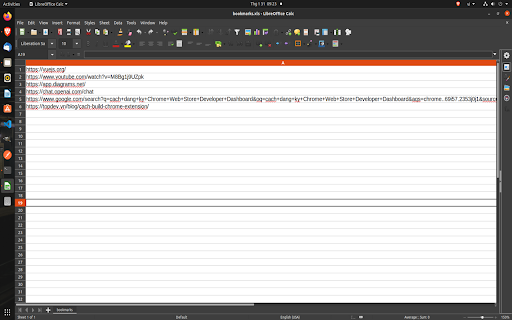
Download bookmark links as an excel file
Bookmarking important links for future reference can be a time-saving and efficient way to organize information. However, having to access these links from multiple devices or platforms can be a challenge. Luckily, there is a solution to this problem – a Chrome extension that helps you download your bookmark links.

This type of extension allows users to easily export their bookmarks from the Chrome browser as a file. The file can then be imported into another browser or device, or simply stored for safekeeping. This way, users can access their bookmarks from anywhere without having to manually transfer them or log in to a different device.

The process of downloading bookmark links is simple. Users simply need to install the extension, select the bookmarks they wish to download, and then save the file to their computer or device. The file format is XLS.

Some Chrome extensions that help to download bookmark links even offer additional features, such as the ability to organize and categorize bookmarks, merge multiple bookmark files, and even backup and restore bookmarks automatically. This added functionality can greatly enhance the user experience and provide peace of mind in the event of a browser crash or other data loss.

In conclusion, a Chrome extension that helps to download bookmark links can be a valuable tool for anyone who uses the Chrome browser. Whether you are looking to access your bookmarks from multiple devices, protect your data, or simply organize your links, this type of extension can provide a simple and efficient solution.
Technical
- Version
- 1.0
- Manifest
- V3
- Size
- 63.5KiB
- Min Chrome
- 88
- Languages
- 1
- Featured
- No
Metadata
- ID
- bdmahmokjnlkliplnfoalmaeecknpckj
- Developer ID
- u824782644a43ef6d5e37dc42ee5fa012
- Developer Email
- [email protected]
- Created
- Jan 31, 2023
- Last Updated (Store)
- Feb 1, 2023
- Last Scraped
- May 31, 2026
- Website
- —
- Support URL
- —
- Privacy Policy
- —
Similar extensions
Alternatives to Bookmark Downloader, ranked by description similarity.

Export Bookmarks Chrome
Easily manage, transfer, copy and back up your saved websites with the Export Bookmarks Chrome extension!
2.0K
★ 4.9

Bookmark manager
Optimize your browsing with Bookmark Manager extension. Easily organize and manage bookmarks for a seamless browsing experience.
1.0K
★ 2.9

Chrome Bookmarked Website Downloader
Chrome Bookmarked Website Downloader is an extension that allows users to download all the websites they have bookmarked.
226
★ 1.0

Link Manager
Link Manager is a clean and user friendly Chrome extension that helps you save, organize, and access your favorite links all from a…
20
★ 5.0

Custom Links New Tab
A new tab extension enables putting custom links on your new tab to improve your workflow. Backup, restore, and share links.
58
★ 5.0

CarryLinks
Easily synchronize and manage your bookmarks on all browsers, devices, and systems.
711
★ 4.6

Gather Links
Quickly gather important links directly in your browser!
74
★ 5.0

Page Link Collect
Page Link Collect is a versatile Chrome extension designed to enhance your web browsing experience by effortlessly collecting all…
367
★ 5.0
Data sourced from the Chrome Web Store · last verified May 31, 2026.