
Chrome Bookmarked Website Downloader
Chrome Bookmarked Website Downloader is an extension that allows users to download all the websites they have bookmarked.
As of June 2026, Chrome Bookmarked Website Downloader has 226 users and a 1.00/5 rating from 2 reviews in the Workflow & Planning category.
Usersdown 8.1 percent−8.1%
226
226
Ratingno change0%
1.00
2 reviews
Reviewsno change0%
2
Version
2.2.4
Manifest V3
History
11 snapshotsTracking since Apr 1, 2026.
View as table
| Date | Users | Rating | Reviews | Version |
|---|---|---|---|---|
| Apr 1, 2026 | 246 | 1.00 | 2 | 2.2.4 |
| Apr 16, 2026 | 243 | 1.00 | 2 | 2.2.4 |
| Apr 22, 2026 | 250 | 1.00 | 2 | 2.2.4 |
| Apr 27, 2026 | 253 | 1.00 | 2 | 2.2.4 |
| May 4, 2026 | 244 | 1.00 | 2 | 2.2.4 |
| May 10, 2026 | 246 | 1.00 | 2 | 2.2.4 |
| May 15, 2026 | 232 | 1.00 | 2 | 2.2.4 |
| May 21, 2026 | 229 | 1.00 | 2 | 2.2.4 |
| May 27, 2026 | 238 | 1.00 | 2 | 2.2.4 |
| Jun 3, 2026 | 237 | 1.00 | 2 | 2.2.4 |
| Jun 9, 2026 | 233 | 1.00 | 2 | 2.2.4 |
| Now | 226 | 1.00 | 2 | 2.2.4 |
Permissions & access
- Permissions
- downloadsbookmarksstorage
- Host access
- None declared
Screenshots

About
Our Chrome extension provides a powerful tool to manage your bookmarks and download content for offline use. The extension makes use of Chrome's bookmarks and downloads APIs, along with local storage, to offer a seamless experience for users.

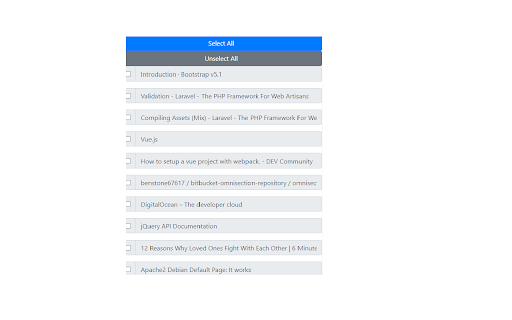
Upon loading, the extension traverses your bookmark tree, dynamically generating a list of bookmarks. Each bookmark is displayed as a checkbox entry within a user-friendly interface. Bookmarks that have been downloaded are checked and disabled for easy reference, while the rest remain available for selection.

The extension goes the extra mile by remembering which bookmarks have been downloaded, even across sessions, by saving this data in Chrome's local storage. It ensures that each bookmark is unique, so you don't have to worry about duplicate downloads.

The UI includes a 'Select All' and 'Unselect All' function for the checkboxes, giving you a convenient way to manage which bookmarks you want to download. Upon clicking the 'Get Bookmarks' button, the extension starts downloading the selected bookmarks.

This extension not only works for existing bookmarks but is also smart enough to listen for new ones. Using Chrome's bookmark creation event listener, the extension automatically downloads any newly added bookmarks. It also adds the new bookmark to the list of downloaded URLs in the local storage.

In the spirit of openness, we've included a 'Donate' button. By clicking it, you'll be redirected to our PayPal donation page. This way, you can help support the ongoing development of this extension, contributing to further improvements and new features.

With a keen focus on enhancing your productivity, this extension transforms the way you handle and consume your bookmarked content, ensuring you always have access to vital resources even when offline. It's a must-have tool for any heavy internet user who relies on bookmarks to manage their digital reading list.

This Chrome extension isn't just about managing bookmarks, but it's also about taking your browsing offline.

Fundamentally, this extension functions as a "Save Page As" feature but does this for multiple pages in one go. When you opt to download your bookmarks, the extension doesn't just save a link to the bookmarked page. Instead, it actively retrieves the entire webpage content and downloads it to your local storage. This essentially allows you to view the full content of your bookmarked pages even when you're offline or when the original page becomes unavailable online.

Think of this as having a local library of your bookmarked pages, each page preserved just the way it was when you downloaded it. This makes the extension a powerful tool for research, archival purposes, or simply ensuring you always have access to your favorite content.

And here's the brilliant part: you can choose to download your entire bookmarks library, or even just a few selected bookmarks. Moreover, the extension is designed to remember which pages have already been downloaded. So if you add more bookmarks over time and want to download them, the extension will only download the new ones, avoiding any unnecessary duplicates.

The extension also automatically downloads any newly created bookmarks. Whenever you add a bookmark in Chrome, the extension triggers a download of that page's content, making it readily available for offline viewing.
Technical
- Version
- 2.2.4
- Manifest
- V3
- Size
- 74.56KiB
- Min Chrome
- 88
- Languages
- 1
- Featured
- No
Metadata
- ID
- mfhhjeflfjjihgibjpdfkbmbeabbdgnb
- Developer ID
- ua50f0c6c0b1a183aea269d0a8ef6950a
- Developer Email
- [email protected]
- Created
- Feb 24, 2022
- Last Updated (Store)
- Mar 21, 2026
- Last Scraped
- Jun 9, 2026
- Website
- —
- Support URL
- —
- Privacy Policy
- —
Similar extensions
Alternatives to Chrome Bookmarked Website Downloader, ranked by description similarity.

Bookmark manager
Optimize your browsing with Bookmark Manager extension. Easily organize and manage bookmarks for a seamless browsing experience.
1.0K
★ 2.9

Link Adder
This extension will send a link of current page to LinkAdder.com
12
★ 5.0
Bookmarks Plus 2025 - Save to Multiple Folders, Tags, Emoji 😀 ...
Bookmarks Plus is a powerful enhancement to Chrome/Edge's native bookmark manager. Ready to Use & Free.
521
★ 5.0

Bookmark Enhancer
Enhance your bookmarks with notes, tags, search, and reminders
4
★ 5.0

Cloudmark - Collaborative Bookmark Manager
Cloudmark is a collaborative bookmark manager that allows you to save and organize your bookmarks in the cloud.
40
★ 5.0

proBookmarkly Smart Visual Preview Bookmark Manager for Power Users
This extension helps you organize, preview, search, and open bookmarks efficiently — whether you manage dozens or thousands of links
13
★ 5.0

Tab Saver
Tab Saver: Organize and Save Tabs, export bookmarks chrome. Tab manager to backup and organize sessions, save chrome tabs for later
137
★ 5.0

Bookmark Cleaner Pro - Duplicate Remover & Manager
Clean, organize, deduplicate bookmarks. Optional AI organizer (Anthropic, OpenAI, Gemini free). 100% local privacy.
176
★ 5.0
Data sourced from the Chrome Web Store · last verified Jun 9, 2026.