
Export Bookmarks Chrome
Easily manage, transfer, copy and back up your saved websites with the Export Bookmarks Chrome extension!
As of June 2026, Export Bookmarks Chrome has 2,000 users and a 4.94/5 rating from 33 reviews in the Workflow & Planning category.
Usersno change0%
2.0K
2,000
Ratingup 2.1 percent+2.1%
4.94
33 reviews
Reviewsup 3.1 percent+3.1%
33
Version
1.1.0
Manifest V3
History
3 snapshotsTracking since Apr 1, 2026.
View as table
| Date | Users | Rating | Reviews | Version |
|---|---|---|---|---|
| Apr 1, 2026 | 2.0K | 4.84 | 32 | 1.1.0 |
| May 3, 2026 | 2.0K | 4.97 | 31 | 1.1.0 |
| Jun 1, 2026 | 10.0K | 4.94 | 33 | 1.1.0 |
| Now | 2.0K | 4.94 | 33 | 1.1.0 |
Permissions & access
- Permissions
- bookmarksfavicon
- Host access
- None declared
Screenshots

About
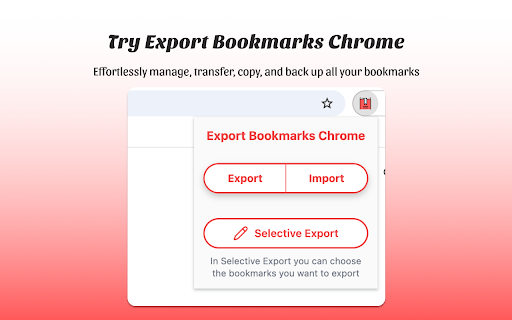
🥱 Are you tired of losing track of your favorite websites? Export Bookmarks Chrome is here to save the day! With our extension, you can: 📂 Easily export and import your bookmarks between different devices and browsers 🔄 Quickly transfer your favorites to another Chrome account ✨ Streamline your browsing experience and eliminate the hassle of transferring each saved link manually 🚀 How to use Export Bookmarks Chrome: 1️⃣ Install the Extension: Add this extension to your Chrome browser. 2️⃣ Export and save: Click the extension icon, choose favorites you want to transfer and select "Export Bookmarks". After that save the exported file to your computer. 3️⃣ Import: Click the extension icon and select "Import Bookmarks." 4️⃣ Select Your File: Choose the saved file and follow on-screen instructions to complete the process. Voilà! Сhrome bookmarks transfer is complete. 🌟 Key Features: 💨 Effortless Export: Quickly export your saved websites to the format which is suitable for import in any browser. This feature allows you to manage your links more effectively and ensures that you can easily share or store your collection in a format that suits your needs. 🔄 Seamless Import: Save you time, effort and enjoy the convenience of importing bookmarks from popular web browsers such as Chrome, Firefox, Edge, Vivaldi, and many others 🛡️ Backup Your Data: Protect your valuable bookmarks with regular backups. 💫 Customize Your Exported Bookmarks: Choose which google bookmarks to export with a simple selection and keep your work, personal, or favorite links organized. Need to transfer just a few folders? No problem! This tool is designed for those who need flexibility, with options to export favorites from Chrome without exporting everything. 💥Why choose us? 🧠 Simple and Intuitive: Enjoy a user-friendly interface designed for hassle-free navigation, making it easy for users of all skill levels to manage their bookmarks effortlessly. 🚀 Efficient and Reliable: Enjoy high-speed performance, efficient data management, and the security of knowing your favorites are safe from data loss and protected by robust encryption. 🤝 Multi-Browser Compatibility: With seamless compatibility across various browsers, Export Bookmarks Chrome empowers you to manage your links across multiple platforms without trouble. 📈 Enhanced Productivity: Save valuable time and boost efficiency with streamlined management features, allowing you to organize, access, and share your favorite links like never before. 💬 Frequently Asked Questions ❓ How to export bookmarks from chrome? 💡 It's easy! Just click the extension icon, pick the bookmarks you want to move, select "Export Bookmarks". ❓ How to transfer chrome favorites? 💡 Click the extension icon, pick the links you want to transfer, select "Export Bookmarks," and save the file, after that you can upload chrome bookmarks to any browser. ❓ How do I import my bookmarks? 💡 Сlick on the extension icon, navigate to "Import Bookmarks," and select the file containing your saved bookmarks. Just follow the on-screen instructions for a seamless experience. ❓ Is my data safe? 💡 Absolutely! Your data is secure with industry-standard encryption measures, ensuring your favorites are always protected. ❓ How to exports bookmarks from chrome to safari? 💡 Export your Safari links as an HTML file, then use our extension to import them directly into Chrome. ❓ I have some ideas and feedback for Export Bookmarks extention can I share them with the developers? 💡 Absolutely! Our team welcomes input from our users. Feel free to send us your suggestions, ideas, or feedback - we truly value your insights. 🚀 Never lose a link again! Download Export Bookmarks Chrome today and enjoy a faster, simpler way to manage and access your essential websites. From exporting to importing to syncing across devices, our extension brings together all the tools you need for quick, reliable, and secure access to your saved links. 👋 Say goodbye to manually transferring links - get started with Export Favorites Chrome and transform your browsing experience!
Technical
- Version
- 1.1.0
- Manifest
- V3
- Size
- 749KiB
- Min Chrome
- 88
- Languages
- 52
- Featured
- No
Metadata
- ID
- hgnaomdnlfcdnfengcjmcpbpolddooom
- Developer ID
- ue0e2164b7d98565a2d30b87c7ca9efad
- Developer Email
- [email protected]
- Created
- Nov 18, 2024
- Last Updated (Store)
- Nov 26, 2024
- Last Scraped
- Jun 1, 2026
- Website
- —
- Support URL
- —
Similar extensions
Alternatives to Export Bookmarks Chrome, ranked by description similarity.

Bookmark manager
Optimize your browsing with Bookmark Manager extension. Easily organize and manage bookmarks for a seamless browsing experience.
1.0K
★ 2.9

Tab Saver
Tab Saver: Organize and Save Tabs, export bookmarks chrome. Tab manager to backup and organize sessions, save chrome tabs for later
137
★ 5.0

Custom Links New Tab
A new tab extension enables putting custom links on your new tab to improve your workflow. Backup, restore, and share links.
58
★ 5.0

Bookmark Session Manager
Easily backup, organize, and manage your Chrome bookmarks
34
★ 3.0

Bookmark Downloader
Bookmark Downloader
129

CarryLinks
Easily synchronize and manage your bookmarks on all browsers, devices, and systems.
711
★ 4.6

Marquer - Bookmark Sharer
Export and import bookmark collections to share with friends
30
★ 5.0

Cloudmark - Collaborative Bookmark Manager
Cloudmark is a collaborative bookmark manager that allows you to save and organize your bookmarks in the cloud.
40
★ 5.0
Data sourced from the Chrome Web Store · last verified Jun 1, 2026.