
TabuLater - Save Open Tabs With One Click
The quickest way to get right back to where you left off.
As of May 2026, TabuLater - Save Open Tabs With One Click has 710 users and a 3.80/5 rating from 10 reviews in the Workflow & Planning category.
Usersdown 2.7 percent−2.7%
710
710
Ratingno change0%
3.80
10 reviews
Reviewsno change0%
10
Version
2.0.5
Manifest V3
History
5 snapshotsTracking since Apr 1, 2026.
View as table
| Date | Users | Rating | Reviews | Version |
|---|---|---|---|---|
| Apr 1, 2026 | 730 | 3.80 | 10 | 2.0.5 |
| Apr 21, 2026 | 702 | 3.80 | 10 | 2.0.5 |
| May 6, 2026 | 727 | 3.80 | 10 | 2.0.5 |
| May 18, 2026 | 716 | 3.80 | 10 | 2.0.5 |
| May 31, 2026 | 724 | 3.80 | 10 | 2.0.5 |
| Now | 710 | 3.80 | 10 | 2.0.5 |
Permissions & access
- Permissions
- tabsstorage
- Host access
- None declared
Screenshots


About
***New in the latest build: name your snaps for better organization***

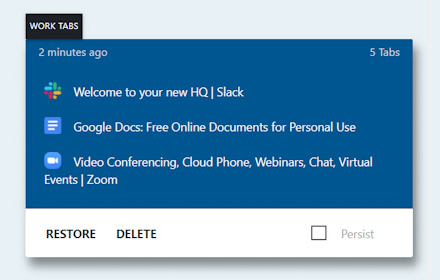
TabuLater is the easiest way to quickly save your tabs and return to Chrome right where you left off. Simply take a snapshot of your open tabs and they'll be saved to re-open one tab at a time, all in a new window, or all in the same window.

Working on multiple projects? Save CPU by taking a snapshot of your tabs with TabuLater and work faster, one project at a time.

Always start your day with the same set of tabs? Create a snapshot with TabuLater that you can easily return to later with one click.

No matter how you work or play on Chrome, TabuLater helps you keep your tabs organized. Please leave a review and let us know if you run into any issues. Enjoy!
Technical
- Version
- 2.0.5
- Manifest
- V3
- Size
- 2.01MiB
- Min Chrome
- 88
- Languages
- 1
- Featured
- Yes
Metadata
- ID
- bcmbdjphemaclhjbkaejcaffeddkmjco
- Developer ID
- u731a4132c852c9a70dee5115b9d02124
- Developer Email
- [email protected]
- Created
- Dec 20, 2016
- Last Updated (Store)
- Aug 18, 2025
- Last Scraped
- May 31, 2026
- Website
- —
- Support URL
- [email protected]
- Privacy Policy
- —
Similar extensions
Alternatives to TabuLater - Save Open Tabs With One Click, ranked by description similarity.

Gibbon Tabs
Gibbon Tabs
197
★ 5.0

Tablazy
Smart tab management - Save, organize, and manage your browser tabs with daily snapshots and custom groups
6

Auto Tab Snapshot
Snapshot all open tabs on a schedule and restore them later.
19
★ 5.0

Tabby
Save, manage, and restore tab sessions. Organize your workspace by saving groups of tabs and reopening them anytime with one click.
11
★ 3.0
Save Chrome Tabs For Later
Set aside your currently open tabs to quickly reopen them later.
10.0K
★ 3.9

Tabme — Tab & Bookmark Manager | Save, Organize & Sync Tabs
The easiest way to save, organize & sync your tabs.
10.0K
★ 4.5

TabSnap
Copy URLs of all open tabs to clipboard
91

Tabby : Your personal tabs manager
Quickly manage all the tabs across different windows with simplicity!
50
★ 3.7
Data sourced from the Chrome Web Store · last verified May 31, 2026.