
Tabby
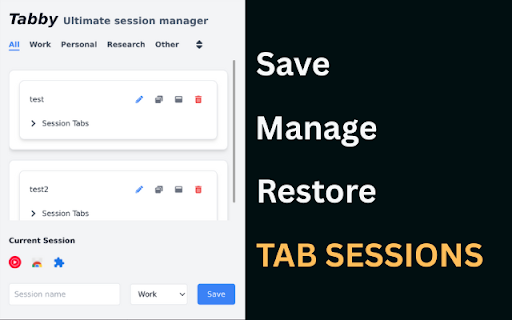
Save, manage, and restore tab sessions. Organize your workspace by saving groups of tabs and reopening them anytime with one click.
As of June 2026, Tabby has 11 users and a 3.00/5 rating from 2 reviews in the Workflow & Planning category.
Usersup 10.0 percent+10.0%
11
11
Ratingno change0%
3.00
2 reviews
Reviewsno change0%
2
Version
1.0
Manifest V3
History
3 snapshotsTracking since Apr 19, 2026.
View as table
| Date | Users | Rating | Reviews | Version |
|---|---|---|---|---|
| Apr 19, 2026 | 10 | 3.00 | 2 | 1.0 |
| May 13, 2026 | 9 | 3.00 | 2 | 1.0 |
| May 25, 2026 | 10 | 3.00 | 2 | 1.0 |
| Now | 11 | 3.00 | 2 | 1.0 |
Permissions & access
- Permissions
- tabsstoragefavicon
- Host access
- None declared
Screenshots


About
🐱 Tabby — Save, Organize, and Restore Your Browser Tabs Effortlessly

Tabby is your all-in-one tab session manager for Chrome that helps you save, organize, and reopen groups of tabs with a single click. Whether you are working, researching, studying, or shopping online, Tabby makes it simple to keep your browser organized and your workflow smooth.

🌟 Features

✅ Save Sessions Instantly

Capture all your open browser tabs in one click and save them as a session. Name your session to make it easy to find later. Never worry about losing important tabs or browser windows again.

✅ Organize with Categories

Group your saved sessions into custom categories, such as Work, Personal, Research, or Shopping. Keep your tabs neatly organized so you can focus on what matters.

✅ Sort Sessions Easily

Quickly sort your sessions by:

• Time Added

• Most Recent Usage

Find the session you need faster and pick up right where you left off.

✅ Open Sessions Your Way

• Choose how you want to restore your saved tabs:

• Open in the Current Window for seamless integration into your existing workspace

• Open in a New Window to start a fresh browsing session

✅ Edit and Manage Tabs

Expand any saved session to view all the tabs it contains. You can:

• Edit tab URLs and names

• Add new tabs to a session

• Remove tabs you no longer need

• Rename your sessions anytime

✅ View and Manage Current Tabs

See all tabs currently open in your browser window, right inside the Tabby popup. You can close individual tabs instantly without switching windows.

✅ Minimal and Intuitive Design

Tabby is designed to be clean, fast, and user-friendly. The interface is simple yet powerful, giving you complete control over your browser tabs without any clutter.

💼 Who is Tabby for?

Tabby is perfect for:

• Students who want to save research sessions for different classes

• Developers who work across multiple projects and need to manage tab groups

• Marketers and content creators who collect resources and inspiration

• Anyone who wants to keep their Chrome tabs organized and avoid tab overload

🔑 Why Choose Tabby?

• Boost productivity by organizing tabs and reducing distractions

• Save time by reopening complete tab sessions with one click

• Stay organized with categories, sorting, and session management

• Reduce memory usage by closing tabs you don’t need now and restoring them later

• Keep your browsing history organized and accessible

🚀 How to Get Started

• Install Tabby from the Chrome Web Store.

• Click the Tabby icon in your Chrome toolbar.

• Start saving your open tabs into named sessions.

• Organize sessions into categories and sort them as you prefer.

• Reopen sessions anytime in your current window or a new one.

• Enjoy a tidy, productive browsing experience!

✨ Upcoming Features

• We are constantly improving Tabby and plan to introduce:

• Session auto-save so you never lose a browsing session

• Cloud sync to access your saved sessions on any device

• Session import/export for easy backups

• Custom themes and icons

• Keyboard shortcuts for even faster workflows

Stay tuned for updates!

🛡️ Privacy & Permissions

Tabby respects your privacy. We only request permissions necessary to:

• Access your tabs so you can save and restore them

• Store your session data locally on your device

• Display favicons and tab titles for easier identification

• Your session data is never shared or sent anywhere outside your browser.

💬 Support & Feedback

We’d love to hear from you!
If you have questions, suggestions, or feedback, please reach out via the support link on this page.

Tabby — Keep your tabs under control and supercharge your productivity.

Install Tabby today and transform the way you manage your Chrome tabs!
Technical
- Version
- 1.0
- Manifest
- V3
- Size
- 100KiB
- Min Chrome
- 88
- Languages
- 1
- Featured
- No
Metadata
- ID
- aklgkpocaoeipgjpmmkldakjbphjbjjc
- Developer ID
- u935d5189290a90e7e74002fa3757f306
- Developer Email
- [email protected]
- Created
- Jul 7, 2025
- Last Updated (Store)
- Jul 7, 2025
- Last Scraped
- Jun 7, 2026
- Website
- —
- Support URL
- —
Similar extensions
Alternatives to Tabby, ranked by description similarity.

Tab Session Manager - Save & Restore Tabs
Save, manage and restore browser tab sessions. Never lose tabs again! Free with auto-save, collections & export.
145
★ 5.0

Tab Manager
Your tab manager: save, restore, organize, search, switch, close browser tabs & sessions easy. All tab in one saver management tool
1.0K
★ 5.0

Tab Session Manager
Group tabs and reopen sessions with a single click.
160
★ 4.2

Tabby: Minimalist & Automated Tab Manager
Take control of your browsing with Tabby - a fully automated, minimalist tab manager that organizes your tabs as you browse. No…
7
★ 5.0

Tab Saver
Tab Saver: Organize and Save Tabs, export bookmarks chrome. Tab manager to backup and organize sessions, save chrome tabs for later
137
★ 5.0

TabVault
Save and organize all your tabs into named collections. Restore anytime. Private, clutter-free, and built to keep you in flow.
2

Smart Tab Manager
Organize tabs with custom groups, save sessions, and instantly search & switch between tabs.
3

Tabme — Tab & Bookmark Manager | Save, Organize & Sync Tabs
The easiest way to save, organize & sync your tabs.
10.0K
★ 4.5
Data sourced from the Chrome Web Store · last verified Jun 7, 2026.