
What Font - find font
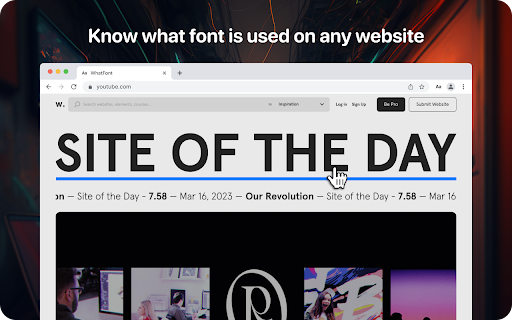
Lets you know what font is used on any website
As of May 2026, What Font - find font has 7,000 users and a 3.75/5 rating from 4 reviews in the Developer Tools category.
Usersup 16.7 percent+16.7%
7.0K
7,000
Ratingno change0%
3.75
4 reviews
Reviewsno change0%
4
Version
1.0.0
Manifest V3
90-day change · In the last 90 days this extension gained 1.0K users.
History
2 snapshotsTracking since Apr 1, 2026.
View as table
| Date | Users | Rating | Reviews | Version |
|---|---|---|---|---|
| Apr 1, 2026 | 6.0K | 3.75 | 4 | 1.0.0 |
| Apr 30, 2026 | 7.0K | 3.75 | 4 | 1.0.0 |
| Now | 7.0K | 3.75 | 4 | 1.0.0 |
Permissions & access
- Permissions
- scriptingstorageunlimitedStorageactiveTab
- Host access
- *://*/*
Screenshots
About
Lets you know what font is used on any website

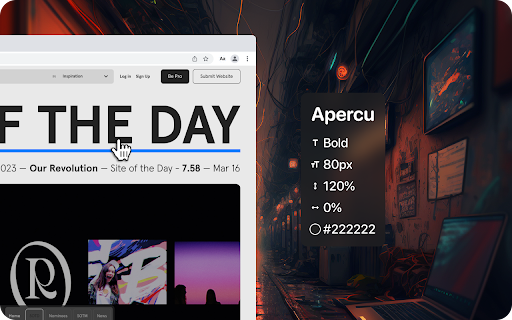
Using the WhatFont extension, you can find out the following details: font family, style, weight, size, line height, color which is used on any site. Just find the text you need, activate the WhatFont extension and all the necessary information will appear on your monitor.

The WhatFont extension for Google Chrome is a powerful tool that allows users to quickly and easily identify the fonts used on any website and enables users to identify the font style, size, color, and italics used on a website by simply hovering over the text.

How To Use:
1. Activate extension WhatFont  by clicking on its icon in the right-top
2. For information click on the font
3. To disable the functionality - click "Exit What Font" on the right-top of the browser.

WhatFont is especially useful for designers, developers, and anyone who works with typography. It provides an easy and efficient way to identify the fonts used on a website, which can be a valuable resource for creating your own designs. Additionally, this extension can help you improve your understanding of typography, allowing you to make informed decisions about font choices.

In summary, WhatFont is an essential tool for anyone who wants to identify the font details used on a website. Its simple and intuitive interface makes it easy to use, and its comprehensive font information is sure to be helpful for designers and developers alike.
Technical
- Version
- 1.0.0
- Manifest
- V3
- Size
- 89.51KiB
- Min Chrome
- 88
- Languages
- 52
- Featured
- Yes
Metadata
- ID
- banojpgedjnmhklbggjekijlfckjodlh
- Developer ID
- u1394370e4105ce97b6cc235fdc4bd540
- Developer Email
- [email protected]
- Created
- Mar 27, 2023
- Last Updated (Store)
- Mar 27, 2023
- Last Scraped
- May 28, 2026
- Website
- —
- Support URL
- —
- Privacy Policy
- https://sites.google.com/view/what-fond-privacy-policy
Similar extensions
Alternatives to What Font - find font, ranked by description similarity.

What the Font
Instantly reveals the font-family of any text element on hover, making it easy to identify and explore fonts used across the web.
39
★ 5.0

Find Font and Download
Find Font: Identifies Fonts on Any Website + Downloads Fonts
129
★ 5.0

Font Finder - Typography Inspector
Highlight text to see font details instantly. Perfect for designers and developers!
8
Font Identifier by WhatFontIs
Identify any Webfont or font (commercial or free) from any website.
10.0K
★ 3.5

FindFont - Font Identifier
Identify fonts from selected text on webpages
66
★ 5.0

WhatFont
WhatFont: Identify fonts on any page and image in seconds!
597
★ 5.0

Font Inspector
Font Inspector — Instantly Identify Fonts on Any Website
760
★ 4.0
Font Finder
Font finder for images, texts and websites to check Font Family, size, height
10.0K
★ 4.3
Data sourced from the Chrome Web Store · last verified May 28, 2026.