
Find Font and Download
Find Font: Identifies Fonts on Any Website + Downloads Fonts
As of May 2026, Find Font and Download has 129 users and a 5.00/5 rating from 1 reviews in the Developer Tools category.
Usersup 43.3 percent+43.3%
129
129
Ratingno change0%
5.00
1 reviews
Reviewsno change0%
1
Version
0.46
Manifest V3
History
3 snapshotsTracking since Apr 1, 2026.
View as table
| Date | Users | Rating | Reviews | Version |
|---|---|---|---|---|
| Apr 1, 2026 | 90 | 5.00 | 1 | 0.46 |
| May 1, 2026 | 95 | 5.00 | 1 | 0.46 |
| May 29, 2026 | 100 | 5.00 | 1 | 0.46 |
| Now | 129 | 5.00 | 1 | 0.46 |
Permissions & access
- Permissions
- storage
- Host access
- https://www.google-analytics.com/*
Screenshots

About
🔍 Find Font – Identify Fonts on Any Website + Download Fonts!

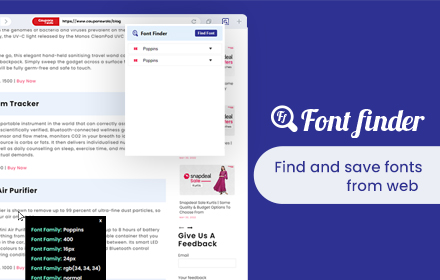
Find Font is a powerful Google Chrome extension that lets you instantly identify any font used on any website! Simply select the text, and the extension will reveal the font name, style, size, and more. Plus, you can get a direct link to download the font right from the extension!

Find Font does not provide a download option for default system fonts and fonts that are protected from downloading by their creators or website owners.

🚀 Key Features:
✅ Identify fonts on any website – just select a text and instantly get the font details.
✅ Detailed font information – see the font name, style, size, weight, and line height.
✅ Download fonts easily – get a direct link to download the font if available. Grab fonts from any site: figma fonts, google fonts and so on
✅ User-friendly interface – activate the extension, click on the text, and get font data.
✅ Works on all websites – compatible with all web pages, including complex web applications.
✅ Great for designers & developers – speed up your workflow by finding fonts in seconds. find out what fonts are used in Figma, Sketch, Youtube or any site you want
✅ Fast & lightweight – a minimal, efficient extension that won’t slow down your browser.

🎯 How to Use Find Font?
1️⃣ Install the extension.
2️⃣ Select any text to instantly identify the font.
3️⃣ Click on the Copy button to copy detailed typography properties to clipboard.
4️⃣ Click direct link to download the font if available.

🎨 Who is this extension for?
📌 Designers – discover inspiring fonts effortlessly.
📌 Developers – inspect font CSS properties instantly.
📌 Marketers & Content Creators – analyze competitor typography strategies.
📌 Freelancers – enhance project quality with minimal effort.

Font Finder is an essential tool for anyone working with text and design! Install now and start identifying fonts instantly!

🔗 Download Find Font now and discover which fonts are used on your favorite websites!
Technical
- Version
- 0.46
- Manifest
- V3
- Size
- 33.91KiB
- Min Chrome
- 88
- Languages
- 1
- Featured
- No
Metadata
- ID
- klcicmhbjgginpllfofipfaalonfocbf
- Developer ID
- u52f43cb60c8da63d2dad101c9adb4d55
- Developer Email
- [email protected]
- Created
- Mar 3, 2025
- Last Updated (Store)
- Mar 9, 2025
- Last Scraped
- May 29, 2026
- Website
- keepdev.com
- Support URL
- —
- Privacy Policy
- https://keepdev.com/privacy-extensions.html
Similar extensions
Alternatives to Find Font and Download, ranked by description similarity.

FindFont - Font Identifier
Identify fonts from selected text on webpages
66
★ 5.0

Font Finder - Typography Inspector
Highlight text to see font details instantly. Perfect for designers and developers!
8

Font Finder
Easy font identifier, meet Font Finder! This extension helps you find the font you’re looking for and analyze text styles instantly.
1.0K
★ 4.5

FontFinder
FontFinder is a powerful font identifier and detector for any webpage.
1.0K
★ 4.9

Font Detector – What font is this?
Font Detector is a fast and free font finder tool that helps you identify any font on a webpage instantly. What font is used here?
473
★ 5.0

Font Inspector
Font Inspector — Instantly Identify Fonts on Any Website
760
★ 4.0
Font Finder
Font finder for images, texts and websites to check Font Family, size, height
10.0K
★ 4.3

This font
Identify font and copy its CSS style with one click.
133
Data sourced from the Chrome Web Store · last verified May 29, 2026.