
Network Information
Useful information about your system's connection including, type, speed, and rtt.
As of May 2026, Network Information has 2,000 users and a 3.25/5 rating from 4 reviews in the Productivity category.
Usersup 100.0 percent+100.0%
2.0K
2,000
Ratingno change0%
3.25
4 reviews
Reviewsno change0%
4
Version
0.1.4
Manifest V3
90-day change · In the last 90 days this extension gained 1.0K users.
History
2 snapshotsTracking since Apr 21, 2026.
View as table
| Date | Users | Rating | Reviews | Version |
|---|---|---|---|---|
| Apr 21, 2026 | 1.0K | 3.25 | 4 | 0.1.4 |
| May 30, 2026 | 1.0K | 3.25 | 4 | 0.1.4 |
| Now | 2.0K | 3.25 | 4 | 0.1.4 |
Permissions & access
- Permissions
- storage
- Host access
- None declared
Screenshots
About
Network Information is an extension that provides information about your system's connection.

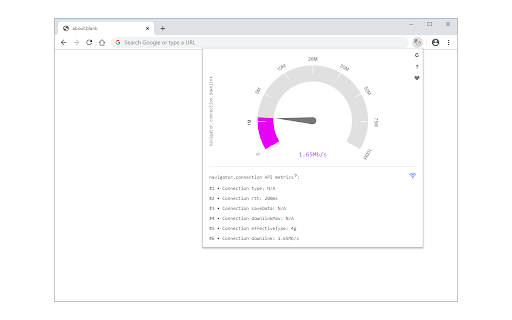
It is working based on a new JavaScript API called "navigator.connection". When you open the toolbar popup UI, there is a big speed gauge at the top center which shows the "downlink" speed for your browser. This speed refers to the estimated bandwidth in megabits per second (not related to the current internet speed). Other metrics for the network information API are connection type and round trip time (rtt). There is a reload button at the top right corner of the screen which is for reloading the app UI. The next button is for resetting the app to factory settings. The third button on the right toolbar is for switching the interface theme to dark. There is also a wifi icon at the middle right section of the screen which shows the online or offline status of your browser.

If you found a bug to report, or have a feature request in mind, please fill out the bug report form on the add-on's homepage (https://mybrowseraddon.com/network-information.html).
Technical
- Version
- 0.1.4
- Manifest
- V3
- Size
- 46.31KiB
- Min Chrome
- 88
- Languages
- 1
- Featured
- Yes
Metadata
- ID
- aplgkncdgdlldhcghahpnlkokohpinfg
- Developer ID
- ud622040a07dfd01f85a8ff1591da667e
- Developer Email
- [email protected]
- Created
- Dec 10, 2019
- Last Updated (Store)
- Sep 2, 2025
- Last Scraped
- May 30, 2026
- Website
- —
- Privacy Policy
- https://mybrowseraddon.com/privacy-policy/keller.html
Similar extensions
Alternatives to Network Information, ranked by description similarity.

EasyPing Extensions
Check your current network status
5

Internet Connection Monitor
Test and monitor internet connection. Log every outage, even when Wi-Fi or Ethernet says the connection is fine.
200.0K
★ 4.4

Offline Mode
Disconnect your browser from the internet with offline mode.
5.0K
★ 3.5

IP & Browser Info
Shows external IP, IPv6, browser, and OS
11

NetMet: Internet Performance Check Tool
Evaluate internet performance NETwork METrics with this web measurement tool.
67
★ 5.0

Internet Speed Test Badge (Real Time)
Live Internet Speed badge + popup speed test that measures your current download throughput.
434
★ 4.3

Internet Status Checker
Shows internet connection status, lets you check your connection speed, and provides device and network information
45
★ 5.0

Lightning Speed Test
Monitor internet speed in the background and perform instant latency and download checks.
9
Data sourced from the Chrome Web Store · last verified May 30, 2026.