
Internet Connection Monitor
Test and monitor internet connection. Log every outage, even when Wi-Fi or Ethernet says the connection is fine.
As of June 2026, Internet Connection Monitor has 200,000 users and a 4.44/5 rating from 209 reviews in the Productivity category.
Usersno change0%
200.0K
200,000
Ratingno change0%
4.44
209 reviews
Reviewsup 2.5 percent+2.5%
209
Version
6.2.1
Manifest V3
90-day change · In the last 90 days this extension 1 version update, changed permissions.
History
5 snapshotsTracking since Apr 16, 2026.
View as table
| Date | Users | Rating | Reviews | Version |
|---|---|---|---|---|
| Apr 16, 2026 | 200.0K | 4.44 | 204 | 6.1.0 |
| Apr 25, 2026 | 200.0K | 4.44 | 204 | 6.1.0 |
| Jun 4, 2026 | 200.0K | 4.44 | 205 | 6.1.0 |
| Jun 16, 2026 | 200.0K | 4.45 | 206 | 6.1.0 |
| Jun 24, 2026 | 200.0K | 4.45 | 207 | 6.2.1 |
| Now | 200.0K | 4.44 | 209 | 6.2.1 |
Changelog
- Jun 16, 2026description
📡 Internet Connection Monitor aka ICM for Google Chrome

🎯 ICM IS THE BEST FOR
⭐️ Recording and analyzing outages of Internet connection
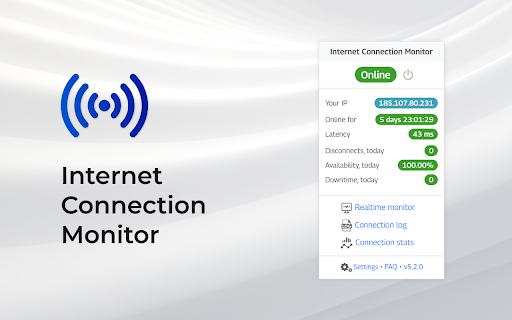
⭐️ Displaying your public IP
⭐️ Measuring latency (ping)
⭐️ Verifying ISP/provider issues
⭐️ Verifying some router/modem/hardware issues

💻 FEATURES
✅ Precise connectivity test with configurable testing interval
✅ Customizable ping URL
✅ Latency (ping) measurement
✅ Show public IP address
✅ Detect when Internet doesn't work over operating Wi-Fi or Ethernet
✅ Disconnects, availability and downtime stats
✅ Play sound when connection goes online or offline
✅ Events log with CSV and PDF export
✅ Realtime connectivity and latency monitoring
✅ Light and dark themes support
✅ Adjustable icons and sounds

🚀 NEW IN ICM v6.1
➕ Backup and restore connection log to JSON
➕ Icon overlay with latency, disconnects and availability
➕ Insights for disconnects and availability against hour-of-day and day-of-week
➕ Refreshed the UI look and feel and made some minor UX improvements

👓 FAQ 🌎 https://internetmon.org/#faq
Q: Where is the extension icon?
A: At some point Google Chrome changed the way extensions are displayed. You need to click on the puzzle icon to the right of the address bar and then pin Internet Connection Monitor

Q: How to request a new feature or report an issue?
A: Go to https://internetmon.org/support and start a new discussion

Q: What exactly can be monitored?
A: The extension monitors the Internet connection and reports 3 statuses:
  🟢 Online: Internet connected
  🟠 Connection issues or "No Internet connection. Wi-Fi/LAN OK": if Chrome itself cannot properly determine whether Internet connection is down while you're connected to LAN (Wi-Fi/Ethernet) - this status will popup. Most likely, your LAN (Wi-Fi/Ethernet) is connected, but there is no Internet connection behind it. In most cases, it is ISP/provider issue
  🔴 Offline or "No Internet connection": Internet disconnected. LAN (Wi-Fi/Ethernet) may work or not, but Internet itself is unavailable

Q: How does the extension test the connectivity?
A: The extension uses a combination of Chrome internal API and pinging servers via HTTP(s) URL. It does not expose any open ports or something else that could compromise user's security

Q: Can I set a custom ping URL?
A: Yes, you can. Besides a predefined list of URLs, you can set a custom ping URL to test the connectivity. You can change the ping URL in the extension Settings popup

Q: What is the testing interval?
A: You can set the testing interval to check the connectivity every 1, 2, 3 or 5 seconds

Q: Does this extension have access to my browsing history, etc?
A: It does NOT. Moreover, it does not require any permissions at all

Q: Does this extension record my IP address or something else?
A: It does NOT. The extension uses https://www.ipify.org API to get the public IP address. Read the Privacy Policy to get a better perspective on your data's privacy: https://internetmon.org/privacy-policy.html

Q: Can this extension measure Internet speed?
A: It cannot. Please, use Speedtest by Ookla 🌎 https://chrome.google.com/webstore/detail/speedtest-by-ookla/pgjjikdiikihdfpoppgaidccahalehjh?hl=en

Q: Will it work if Chrome is closed?
A: Not, it will not. You need to have a Chrome window open to track your connection log. It's relatively easy to add Chrome to autostart on Windows, Mac or Linux

Q: Will it work if computer is in sleep?
A: Yes, it should work, but the mechanism of tracking the disconnects while the computer is in sleep has not been thoroughly tested. Macs, for example, wake up every couple minutes and ICM checks the connection. But do not rely on precise measurement during the computer sleep, keep the computer running. Alternatively, use Realtime monitor feature inside ICM to check what's going on. Access it via main extension popup

Q: Can you use it on Microsoft EDGE, Brave, Arc or other Chromium-based browsers?
A: Yes, you can. It works on all Chromium-based browsers which support running of Chrome extensions

Q: Is there a Firefox extension?
A: Currently, only Google Chrome and Microsoft EDGE are supported. There is a feature request 🌎 https://internetmon.org/firefox to implement the Firefox version. Vote for it if you want to speed up the development

Q: Can you give an advice on how to improve Internet connection overall?
A: Read the article about the 3 primary reasons of Internet connection issues 🌎 https://internetmon.org/3-primary-reasons-of-poor-internet-connection.html

Q: ICM shows Offline even when Internet is connected. How to fix?
A: Most likely it is caused by another extension or software (anti viruses, ad blockers, malware scanners, etc) blocking the monitoring. For example, Malwarebytes Browser Guard blocks all ICM connections to Google. Read how to fix 🌎 https://internetmon.org/offline-fix

✨ Icons by svgrepo.com
🔊 Sounds by pixabay.com
🕊️ Stay up-to-date: https://twitter.com/icm_hq
🐞 Support hub: https://internetmon.org/support
📡 Internet Connection Monitor aka ICM for Google Chrome

🎯 ICM IS THE BEST FOR
⭐️ Recording and analyzing outages of Internet connection
⭐️ Displaying your public IP
⭐️ Measuring latency (ping)
⭐️ Verifying ISP/provider issues
⭐️ Verifying some router/modem/hardware issues

💻 FEATURES
✅ Precise connectivity test with configurable testing interval
✅ Customizable ping URL
✅ Latency (ping) measurement
✅ Show public IP address
✅ Detect when Internet doesn't work over operating Wi-Fi or Ethernet
✅ Disconnects, availability and downtime stats
✅ Play sound when connection goes online or offline
✅ Events log with CSV and PDF export
✅ Realtime connectivity and latency monitoring
✅ Light and dark themes support
✅ Adjustable icons and sounds

🚀 NEW IN ICM v6.2
➕ New "No data" status — sleep/shutdown gaps are excluded from availability & downtime
➕ Added public IP address to the connection log
➕ More accurate latency in real-time monitoring
➕ Faster, smoother UI with large logs (6,000+ entries)

👓 FAQ 🌎 https://internetmon.org/#faq
Q: Where is the extension icon?
A: At some point Google Chrome changed the way extensions are displayed. You need to click on the puzzle icon to the right of the address bar and then pin Internet Connection Monitor

Q: How to request a new feature or report an issue?
A: Go to https://internetmon.org/support and start a new discussion

Q: What exactly can be monitored?
A: The extension monitors the Internet connection and reports 4 statuses:
  🟢 Online: Internet connected
  🟠 Connection issues or "No Internet connection. Wi-Fi/LAN OK": if Chrome itself cannot properly determine whether Internet connection is down while you're connected to LAN (Wi-Fi/Ethernet) - this status will popup. Most likely, your LAN (Wi-Fi/Ethernet) is connected, but there is no Internet connection behind it. In most cases, it is ISP/provider issue
  🔴 Offline or "No Internet connection": Internet disconnected. LAN (Wi-Fi/Ethernet) may work or not, but Internet itself is unavailable
  ⚫ No data or "No data (monitor was off)": the computer was asleep or shut down, or monitoring was turned off. These gaps are excluded from availability and downtime statistics, so they never count against your uptime

Q: How does the extension test the connectivity?
A: The extension uses a combination of Chrome internal API and pinging servers via HTTP(s) URL. It does not expose any open ports or something else that could compromise user's security

Q: Can I set a custom ping URL?
A: Yes, you can. Besides a predefined list of URLs, you can set a custom ping URL to test the connectivity. You can change the ping URL in the extension Settings popup

Q: What is the testing interval?
A: You can set the testing interval to check the connectivity every 1, 2, 3 or 5 seconds

Q: Does this extension have access to my browsing history, etc?
A: It does NOT. Moreover, it does not require any permissions at all

Q: Does this extension record my IP address or something else?
A: It does NOT. The extension uses https://www.ipify.org API to get the public IP address. Read the Privacy Policy to get a better perspective on your data's privacy: https://internetmon.org/privacy-policy.html

Q: Can this extension measure Internet speed?
A: Not yet. There is a feature request to add it - vote for it if you'd like to see it implemented 🌎 https://internetmon.org/speedtest

Q: Will it work if Chrome is closed?
A: Not, it will not. You need to have a Chrome window open to track your connection log. It's relatively easy to add Chrome to autostart on Windows, Mac or Linux

Q: Will it work if computer is in sleep?
A: When your computer goes to sleep or shuts down, ICM can't test the connection, so it marks that time as a separate "No data" status instead of recording false downtime. "No data" is excluded from availability and downtime statistics, so sleep never skews your uptime. When the computer wakes, monitoring resumes automatically. For continuous, precise measurement keep the computer awake, or watch live with the Realtime monitor inside ICM (open it from the main extension popup)

Q: Can you use it on Microsoft EDGE, Brave, Arc or other Chromium-based browsers?
A: Yes, you can. It works on all Chromium-based browsers which support running of Chrome extensions

Q: Is there a Firefox extension?
A: Currently, only Google Chrome and Microsoft EDGE are supported. There is a feature request 🌎 https://internetmon.org/firefox to implement the Firefox version. Vote for it if you want to speed up the development

Q: Can you give an advice on how to improve Internet connection overall?
A: Read the article about the 3 primary reasons of Internet connection issues 🌎 https://internetmon.org/3-primary-reasons-of-poor-internet-connection.html

Q: ICM shows Offline even when Internet is connected. How to fix?
A: Most likely it is caused by another extension or software (anti viruses, ad blockers, malware scanners, etc) blocking the monitoring. For example, Malwarebytes Browser Guard blocks all ICM connections to Google. Read how to fix 🌎 https://internetmon.org/offline-fix

✨ Icons by svgrepo.com
🔊 Sounds by pixabay.com
🕊️ Stay up-to-date: https://twitter.com/icm_hq
🐞 Support hub: https://internetmon.org/support
- Jun 16, 2026short_description
Monitor and test Internet connectivity. Detect and log when Internet doesn't work even with operating LAN (Wi-Fi or Ethernet)
Test and monitor internet connection. Log every outage, even when Wi-Fi or Ethernet says the connection is fine.
- Jun 16, 2026permissions
offscreen, storage, unlimitedStorage
offscreen, storage, unlimitedStorage, alarms
Permissions & access
- Permissions
- offscreenstorageunlimitedStoragealarms
- Host access
- None declared
Screenshots


About
📡 Internet Connection Monitor aka ICM for Google Chrome

🎯 ICM IS THE BEST FOR
⭐️ Recording and analyzing outages of Internet connection
⭐️ Displaying your public IP
⭐️ Measuring latency (ping)
⭐️ Verifying ISP/provider issues
⭐️ Verifying some router/modem/hardware issues

💻 FEATURES
✅ Precise connectivity test with configurable testing interval
✅ Customizable ping URL
✅ Latency (ping) measurement
✅ Show public IP address
✅ Detect when Internet doesn't work over operating Wi-Fi or Ethernet
✅ Disconnects, availability and downtime stats
✅ Play sound when connection goes online or offline
✅ Events log with CSV and PDF export
✅ Realtime connectivity and latency monitoring
✅ Light and dark themes support
✅ Adjustable icons and sounds

🚀 NEW IN ICM v6.2
➕ New "No data" status — sleep/shutdown gaps are excluded from availability & downtime
➕ Added public IP address to the connection log
➕ More accurate latency in real-time monitoring
➕ Faster, smoother UI with large logs (6,000+ entries)

👓 FAQ 🌎 https://internetmon.org/#faq
Q: Where is the extension icon?
A: At some point Google Chrome changed the way extensions are displayed. You need to click on the puzzle icon to the right of the address bar and then pin Internet Connection Monitor

Q: How to request a new feature or report an issue?
A: Go to https://internetmon.org/support and start a new discussion

Q: What exactly can be monitored?
A: The extension monitors the Internet connection and reports 4 statuses:
  🟢 Online: Internet connected
  🟠 Connection issues or "No Internet connection. Wi-Fi/LAN OK": if Chrome itself cannot properly determine whether Internet connection is down while you're connected to LAN (Wi-Fi/Ethernet) - this status will popup. Most likely, your LAN (Wi-Fi/Ethernet) is connected, but there is no Internet connection behind it. In most cases, it is ISP/provider issue
  🔴 Offline or "No Internet connection": Internet disconnected. LAN (Wi-Fi/Ethernet) may work or not, but Internet itself is unavailable
  ⚫ No data or "No data (monitor was off)": the computer was asleep or shut down, or monitoring was turned off. These gaps are excluded from availability and downtime statistics, so they never count against your uptime

Q: How does the extension test the connectivity?
A: The extension uses a combination of Chrome internal API and pinging servers via HTTP(s) URL. It does not expose any open ports or something else that could compromise user's security

Q: Can I set a custom ping URL?
A: Yes, you can. Besides a predefined list of URLs, you can set a custom ping URL to test the connectivity. You can change the ping URL in the extension Settings popup

Q: What is the testing interval?
A: You can set the testing interval to check the connectivity every 1, 2, 3 or 5 seconds

Q: Does this extension have access to my browsing history, etc?
A: It does NOT. Moreover, it does not require any permissions at all

Q: Does this extension record my IP address or something else?
A: It does NOT. The extension uses https://www.ipify.org API to get the public IP address. Read the Privacy Policy to get a better perspective on your data's privacy: https://internetmon.org/privacy-policy.html

Q: Can this extension measure Internet speed?
A: Not yet. There is a feature request to add it - vote for it if you'd like to see it implemented 🌎 https://internetmon.org/speedtest

Q: Will it work if Chrome is closed?
A: Not, it will not. You need to have a Chrome window open to track your connection log. It's relatively easy to add Chrome to autostart on Windows, Mac or Linux

Q: Will it work if computer is in sleep?
A: When your computer goes to sleep or shuts down, ICM can't test the connection, so it marks that time as a separate "No data" status instead of recording false downtime. "No data" is excluded from availability and downtime statistics, so sleep never skews your uptime. When the computer wakes, monitoring resumes automatically. For continuous, precise measurement keep the computer awake, or watch live with the Realtime monitor inside ICM (open it from the main extension popup)

Q: Can you use it on Microsoft EDGE, Brave, Arc or other Chromium-based browsers?
A: Yes, you can. It works on all Chromium-based browsers which support running of Chrome extensions

Q: Is there a Firefox extension?
A: Currently, only Google Chrome and Microsoft EDGE are supported. There is a feature request 🌎 https://internetmon.org/firefox to implement the Firefox version. Vote for it if you want to speed up the development

Q: Can you give an advice on how to improve Internet connection overall?
A: Read the article about the 3 primary reasons of Internet connection issues 🌎 https://internetmon.org/3-primary-reasons-of-poor-internet-connection.html

Q: ICM shows Offline even when Internet is connected. How to fix?
A: Most likely it is caused by another extension or software (anti viruses, ad blockers, malware scanners, etc) blocking the monitoring. For example, Malwarebytes Browser Guard blocks all ICM connections to Google. Read how to fix 🌎 https://internetmon.org/offline-fix

✨ Icons by svgrepo.com
🔊 Sounds by pixabay.com
🕊️ Stay up-to-date: https://twitter.com/icm_hq
🐞 Support hub: https://internetmon.org/support
Technical
- Version
- 6.2.1
- Manifest
- V3
- Size
- 2.13MiB
- Min Chrome
- 116
- Languages
- 7
- Featured
- Yes
Metadata
- ID
- hgccfdagfbilbdbkgmfdmmdfmjjoakfo
- Developer ID
- ufc6e35b63b8defcf19a081c2f13635c7
- Developer Email
- [email protected]
- Created
- Jan 19, 2014
- Last Updated (Store)
- Jun 10, 2026
- Last Scraped
- Jun 24, 2026
- Website
- internetmon.org
- Privacy Policy
- https://internetmon.org/privacy-policy.html
Similar extensions
Alternatives to Internet Connection Monitor, ranked by description similarity.

Network Monitor
Use Network Monitor for real-time connection tests, internet quality tests, and detailed network performance insights.
6.0K
★ 4.5

Internet Status Checker
Shows internet connection status, lets you check your connection speed, and provides device and network information
45
★ 5.0

Real-Time Internet Speed Monitor
Advanced real-time internet speed monitoring with adaptive testing, speed history, and accurate measurements.
1.0K
★ 4.1

IP Info Viewer
View your IP address in multiple formats with detailed network information and educational flashcards
—

Internet Speed Test Badge (Real Time)
Live Internet Speed badge + popup speed test that measures your current download throughput.
434
★ 4.3

Ping Test
Use Ping Test - ping tester for check internet, network, wifi. With it you’ll know how to check your ping in your browser very fast.
119
★ 5.0

Internet Speed Test
Test ping, download and upload speed in your browser, detect VPN/proxy, then copy or save a PNG result.
666
★ 5.0

SpeedMeter – Internet Speed Test
One‑click internet speed test with animated circular meter and optional floating popup.
35
Data sourced from the Chrome Web Store · last verified Jun 24, 2026.