
NetMet: Internet Performance Check Tool
Evaluate internet performance NETwork METrics with this web measurement tool.
As of May 2026, NetMet: Internet Performance Check Tool has 67 users and a 5.00/5 rating from 1 reviews in the Productivity category.
Usersup 15.5 percent+15.5%
67
67
Ratingno change0%
5.00
1 reviews
Reviewsno change0%
1
Version
2.2
Manifest V3
History
1 snapshotsTracking since May 21, 2026.
View as table
| Date | Users | Rating | Reviews | Version |
|---|---|---|---|---|
| May 21, 2026 | 58 | 5.00 | 1 | 2.2 |
| Now | 67 | 5.00 | 1 | 2.2 |
Permissions & access
- Permissions
- webRequeststoragealarmstabsbrowsingData
- Host access
- https://unpkg.com/, https://cdn.skypack.dev/, https://code.highcharts.com/, https://www.w3.org/, https://medium.com/, https://discord.com/, https://www.who.int/, https://www.shopify.com/, https://www.addtoany.com/, https://www.digitalocean.com/, https://www.worldbank.org/, https://coinmarketcap.com/, https://www.datadoghq.com/, https://www.checkpoint.com/, https://smallpdf.com/, https://www.trustpilot.com/, https://www.merriam-webster.com/, https://www.time.com/, https://www.latimes.com/, https://www.pbs.org/, https://www.loc.gov/, https://www.caliente.mx/, https://creativecommons.org/, https://www.hostgator.com.br/, https://www.ig.com.br/, https://olhardigital.com.br/, https://www.meteored.com.ar/, https://nubank.com.br/, https://www.placardefutebol.com.br/, https://european-union.europa.eu/, https://www.politico.eu/, https://www.tagesspiegel.de/, https://www.thesun.co.uk/, https://www.t-online.de/, https://www.repubblica.it/, https://hochi.news/, https://www.hmetro.com.my/, https://line.me/en/, https://www.timenews.co.id/, https://www.biglobe.ne.jp/, https://www.thestar.com.my/, https://www.unimelb.edu.au/, https://www.griffith.edu.au/, https://hipages.com.au/, https://www.nsw.gov.au/, https://www.unsw.edu.au/, https://www.telstra.com.au/, https://www.ietf.org/, https://about.gitlab.com/, https://surfshark.com/, https://www.geeksforgeeks.org/, https://www.warnerbros.com/, https://brave.com/, https://www.regjeringen.no/, https://www.skatteetaten.no/, https://www.prisjakt.no/, https://www.vinmonopolet.no/, https://www.tek.no/, https://www.xxl.no/
Screenshots



About
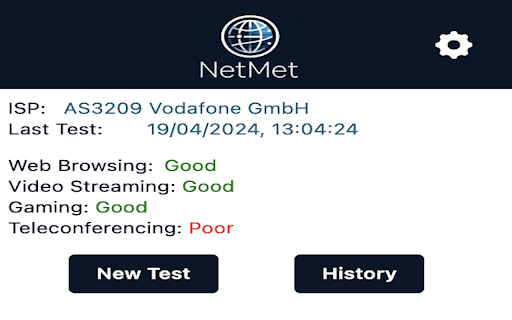
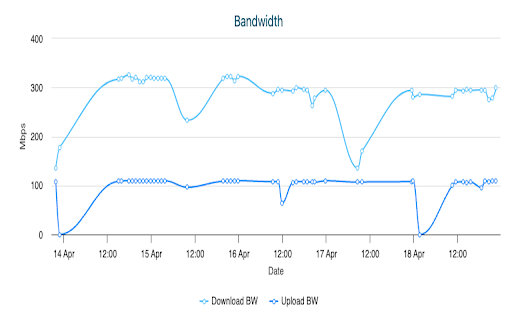
NetMet is a chrome extension/plugin capable of deciphering your internet performance. Monitor your network connection and evaluate web application level metrics.This plugin can be installed in any of your chromium based browsers (Google Chrome, Opera, Brave, Edge, etc.). It can observe various web browsing metrics based on the CDN server locations you are connecting to for some of the top websites in your region. Measuring internet speeds has never been easier, with M-Lab speed test already integrated into the plugin. With just one click of a button a 1-minute test gives you all these details which helps to troubleshoot any network issues you're facing. A video streaming test provides you details on how your network connection might relate to watching videos online. A feature to view past historical measurement data based on which networks you carried out measurements in, is also available, to get a quick overview.


What does the tool measure?
NetMet measures your overall network and web application performance by using the following test suites.
1.End-to-end goodput, latency and bufferbloat (powered by Google Speedtest - MLab)
2. Web browsing performance by connecting to landing websites hosted by popular CDN providers.
3. Video Streaming performance over DASH (Video on Demand)

Based on all collected measurements from your network, NetMet will calculate a score for suitability of various applications.

How the test works?
1.Install the extension
2.Popup window displayed periodically (periodic time can be custom set from settings inside the extension)
3.Test execution starts automatically on popup display
4.On test start, user IP, ISP and City details are retrieved using public REST APIs from "ip-api"
5.A new minimised browser window opens up for fetching top 20 websites in your region
6.For every website, a background script extracts performance metrics using the browser APIs
7.After fetching the 20 websites, the browser window is closed automatically
8.The web browsing measurement metrics are displayed to the user as graph visualizations on the popup window
9.The IP, ISP and City details & web browsing performance metrics are compiled into a JSON file and sent to our object storage server hosted in TUM campus network
10.A M-lab speed test for downlink and uplink are executed
11.Simultaneously, the speed test download speed and upload speed metrics are displayed at real-time to the user on the popup window
12.At the end of the speed test the packet loss and latency details are also displayed to the user
13.Performance metrics are retrieved using M-lab's API for the uplink and downlink speed test during execution
14.The speed test performance metrics are compiled into a JSON file and sent to our object storage server hosted in TUM campus network
15. After the speed test, a video streaming test over DASH is performed, and relevant metrics are captured using DASH.js API.
16. The video streaming metrics are compiled into a JSON file and sent to our object storage server hosted in TUM campus network
17.The extension waits till the next periodic popup event, and continues from step 3

Frequent measurements help us to assess the quality of your connection and various bottlenecks affecting it. NetMet uses Chrome Developer APIs for running the test and gathering measurement data as mentioned above. The web browsing metrics are captured using browser's Performance API, specifically Resource Timing. The speed test integrated into the extension to measure uplink and downlink performance is the M-Lab speed test.

The measurement data (like, DNS Lookup, Server Connect Time, Upload speed etc.) is collected for research purposes. Only user data which is captured is your IP address and City details. No other sensitive user information like web browsing history or user location is captured. Additionally, for the integrated M-Lab speed test. Please go through M-Lab's Acceptable Use Policy.

We hope that our data collection helps us to understand the Internet better. We are an academic institution and will try to publish all our findings to a wider audience. However, we will never publish parts of our dataset which clearly identifies you or your company. Please go through our data collection policies here. We do not capture any sensitive user data. For any concerns please contact us through email.
Technical
- Version
- 2.2
- Manifest
- V3
- Size
- 1.81MiB
- Min Chrome
- 88
- Languages
- 1
- Featured
- No
Metadata
- ID
- oaljpapbocgcgdmpbigllilolfgebhnl
- Developer ID
- u2676313062fa2238ea780bac524a0783
- Developer Email
- [email protected]
- Created
- Mar 20, 2024
- Last Updated (Store)
- Feb 4, 2025
- Last Scraped
- May 21, 2026
- Website
- —
- Support URL
- —
Similar extensions
Alternatives to NetMet: Internet Performance Check Tool, ranked by description similarity.
NetMeter Web
Web Data Consumption Monitor Extension: Stay Informed About Site Bandwidth Usage
4.0K
★ 4.4

Net Guardian
See your true Internet speed in real time based on real browsing — no test downloads or speed tests required.
6
★ 5.0

Network Monitor
Use Network Monitor for real-time connection tests, internet quality tests, and detailed network performance insights.
6.0K
★ 4.5

Internet Speed Test Badge (Real Time)
Live Internet Speed badge + popup speed test that measures your current download throughput.
434
★ 4.3

NetMeter Cache & Data Cleaner
Monitor and deep-clean site-specific storage, cookies, and cache data in real-time.
46
★ 5.0

Internet Speed Test
Test ping, download and upload speed in your browser, detect VPN/proxy, then copy or save a PNG result.
666
★ 5.0

Internet Speed Test
Test your internet connection speed directly from your browser
67

SpeedPulse
Test your internet speed instantly with SpeedPulse - the professional, accurate network analyzer in your browser!
10
★ 5.0
Data sourced from the Chrome Web Store · last verified May 21, 2026.