
Dual Windows (Updated)
Dual monitor in one machine. 💻
As of May 2026, Dual Windows (Updated) has 573 users and a 5.00/5 rating from 3 reviews in the Workflow & Planning category.
Usersdown 5.6 percent−5.6%
573
573
Ratingno change0%
5.00
3 reviews
Reviewsno change0%
3
Version
1.0.0
Manifest V3
History
2 snapshotsTracking since Apr 25, 2026.
View as table
| Date | Users | Rating | Reviews | Version |
|---|---|---|---|---|
| Apr 25, 2026 | 607 | 5.00 | 3 | 1.0.0 |
| May 21, 2026 | 594 | 5.00 | 3 | 1.0.0 |
| Now | 573 | 5.00 | 3 | 1.0.0 |
Permissions & access
- Permissions
- windowssystem.display
- Host access
- None declared
Screenshots

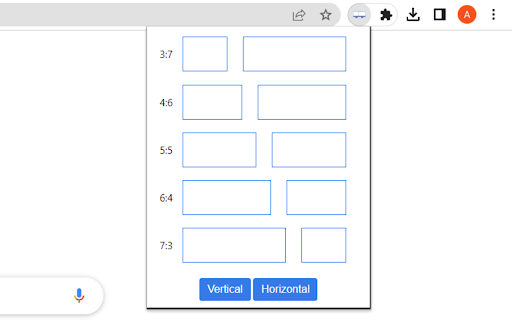
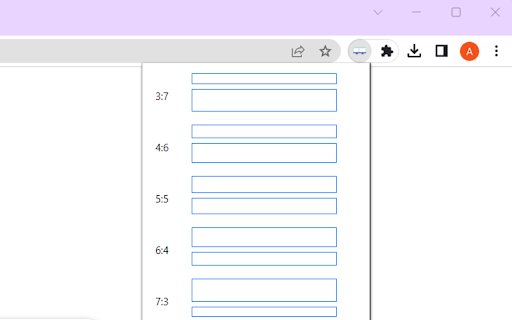
About
⬇️Easy to set up ⬇️:

1. Install and pin 📌 the extension to Chrome.
2. Click on the extension, and choose the format you want the tabs to show.
3. Customize the dual window format using horizontal/vertical options.

✨ Features ✨

1. Split, resize, and/or merge the browser windows.
2. Pressing the middle key on the split window button will duplicate the current page on another window.
3. Bookmark 🔖 management. Relaunch your favorite site in a new tab 🗂 and windows will get split in the recorded ratio.

Use this extension to simulate a dual monitor for your machine. 💻
Technical
- Version
- 1.0.0
- Manifest
- V3
- Size
- 8.69KiB
- Min Chrome
- 88
- Languages
- 1
- Featured
- Yes
Metadata
- ID
- npnmdlaheifodkaaopfimkkdmkdhlhhg
- Developer ID
- udd59bfa46af45c33e21dbfded965ac5c
- Developer Email
- [email protected]
- Created
- Mar 13, 2023
- Last Updated (Store)
- Mar 13, 2023
- Last Scraped
- May 21, 2026
- Website
- —
- Support URL
- —
Similar extensions
Alternatives to Dual Windows (Updated), ranked by description similarity.

SplitView — Split Screen & Side by Side Tabs for Multi Window Browsing
Split screen extension — tile browser windows side by side in one click. 6 layouts, multi-monitor, keyboard shortcuts, instant undo.
653
★ 5.0

Tab Splitter
Split your browser tab into two panes
—
★ 1.0

Tab Merger Splitter
Merge and split tabs using keyboard shortcuts
148
★ 3.0
Dualless for Google Chrome™
Just a simple click to arrange your browsers side by side. Multiple monitors supported.
60.0K
★ 4.1

Tab Split
Forces each browser start page to open in a new browser window across multiple monitors.
3.0K
★ 1.0

Vertical Tabs - Tabybara
Display and manage your tabs vertically in side panel.
360
★ 4.9

Join Windows
Joins two or more windows into single window. Popups are also merged into the window as they are created. More options available....
330
★ 4.2

Tab History
View the recently visited tabs
267
★ 3.0
Data sourced from the Chrome Web Store · last verified May 21, 2026.