
markforge
Markforge — Convert web pages to Markdown
As of June 2026, markforge has 37 users in the Productivity category.
Usersup 362.5 percent+362.5%
37
37
Ratingno change0%
—
— reviews
Reviewsno change0%
—
Version
1.0.0
Manifest V3
History
9 snapshotsTracking since Apr 11, 2026.
View as table
| Date | Users | Rating | Reviews | Version |
|---|---|---|---|---|
| Apr 11, 2026 | 8 | — | — | 1.0.0 |
| Apr 21, 2026 | 13 | — | — | 1.0.0 |
| Apr 26, 2026 | 16 | — | — | 1.0.0 |
| May 3, 2026 | 19 | — | — | 1.0.0 |
| May 9, 2026 | 22 | — | — | 1.0.0 |
| May 14, 2026 | 24 | — | — | 1.0.0 |
| May 20, 2026 | 27 | — | — | 1.0.0 |
| May 30, 2026 | 30 | — | — | 1.0.0 |
| Jun 8, 2026 | 38 | — | — | 1.0.0 |
| Now | 37 | — | — | 1.0.0 |
Permissions & access
- Permissions
- activeTabscriptingdownloadsstorage
- Host access
- <all_urls>
Screenshots
About
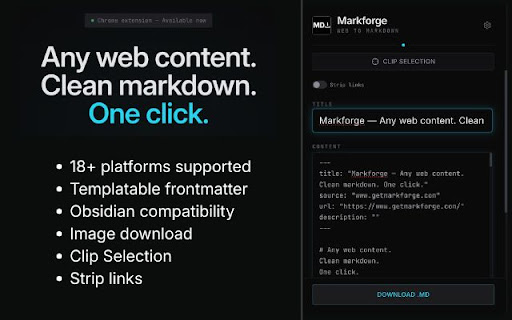
Turn any webpage into clean Markdown. 20 site-specific extractors. Images, frontmatter, Obsidian-ready. One click. No account needed.

Stop copy-pasting into Obsidian and spending 10 minutes cleaning up broken formatting. Markforge converts any webpage to clean, structured Markdown in one click, with proper headings, images saved locally, and YAML frontmatter generated automatically.

Unlike generic web clippers, Markforge has a dedicated extractor for each supported site. Reddit threads don't look like YouTube transcripts, and ChatGPT conversations don't look like Wikipedia articles. Each site gets its own extraction logic, tuned to produce the cleanest possible Markdown output.


SUPPORTED SITES (18+)

Social & Forums
  Reddit — posts + comments with threaded nesting
  Twitter/X — full threads and long-form articles
  LinkedIn — posts and Pulse articles
  Hacker News — posts with comment trees

AI Conversations
  ChatGPT — full conversation export with user/assistant turns
  Claude — conversation threads with deduplication
  Google Gemini — interleaved queries and responses
  Grok — complete chat history

Knowledge & Research
  Wikipedia — clean article extraction, multi-language
  arXiv — papers with authors, abstract, DOI, references
  ResearchGate — publications with figures and citations
  Stack Overflow — questions, accepted answers, votes

Publishing
  Medium — articles with paywall detection
  Substack — newsletters with embedded content
  GitHub — code files (raw) and README/repo pages

Email & Search
  Gmail — emails with participant directory
  Google Search — search results with snippets

Any other website — intelligent fallback extractor that finds the main content automatically.


KEY FEATURES

Clean Markdown Output
Every extraction produces properly formatted Markdown: ATX headings, fenced code blocks, inline links, clean list markers. No leftover HTML, no broken formatting, no UI artifacts.

Local Image Download
Images are fetched and saved alongside your Markdown file in an /images folder. No broken links, no reliance on remote servers. Works even with CORS-protected images through an intelligent 3-step fallback system.

YAML Frontmatter
Automatically generates frontmatter with title, author, date, source URL, description, and tags. Fully customizable template — add, remove, or reorder any field.

Obsidian Integration
Native wikilink syntax for images (![[image.png]]), customizable frontmatter, and direct file saving to your vault folder.

Clip Selection Mode
Don't need the full page? Activate clip mode, click any element on the page, and Markforge extracts just that section.

Filename Templates
Customize your filenames with variables: {title}, {author}, {date}, {site}, {domain}. Every file is named exactly how you want it.

Strategy Options
Toggle site-specific features per platform — include Reddit comments, Twitter replies, Stack Overflow answers, YouTube timestamps, or Gmail quoted text.

Content Filtering
Strip tracking parameters from URLs, remove elements by CSS selector, filter small images. Keep only what matters.

Token Counter
Built-in character, word, and token counter — useful when preparing content for LLM context windows.


HOW IT WORKS

1. Navigate to any webpage
2. Click the Markforge icon (or press Alt+M)
3. Review and edit the Markdown in the popup
4. Download as .md with images, or copy to clipboard


PRIVACY & TRUST

No account required. No server. No data collection. Everything runs locally in your browser. Your content never leaves your machine.

Permissions explained:
- activeTab: to read the current page content
- scripting: to run the site-specific extractor in the page
- downloads: to save Markdown files and images
- storage: to remember your settings
Technical
- Version
- 1.0.0
- Manifest
- V3
- Size
- 1.18MiB
- Min Chrome
- 88
- Languages
- 1
- Featured
- No
Metadata
- ID
- ampfhoodhfnibmgmeoohjhopgibohcak
- Developer ID
- u934b2caef3d273e00a52da1607dee03e
- Developer Email
- [email protected]
- Created
- Feb 19, 2026
- Last Updated (Store)
- Feb 19, 2026
- Last Scraped
- Jun 8, 2026
- Website
- —
- Support URL
- —
- Privacy Policy
- https://www.getmarkforge.com/privacy
Similar extensions
Alternatives to markforge, ranked by description similarity.

Clipdown
Clip any webpage as clean Markdown — for Obsidian, Logseq, Notion, and pasting context into ChatGPT, Claude & Gemini.
18

ExtractMD
Extract and copy content as Markdown from any webpage. Built-in support for YouTube, Hacker News, and articles.
29

Markdown It
Copy any webpage as Markdown with a single click
29
★ 5.0

Webpage to Markdown
Convert any webpage to clean markdown with one click. Extract article content and download or copy as markdown.
74
★ 5.0

Markdown Extractor
Extract web content to clean Markdown with one click. Side panel for easy access.
61
★ 5.0
Decant — Send any page to Claude, ChatGPT & Gemini
Extract any web page & send to Claude, ChatGPT or Gemini in one click. Clean Markdown, JSON, MCP bridge for AI agents & developers.
26
★ 5.0

Get Markdown
Convert web pages to Markdown format with reader mode extraction and preview
277
★ 5.0

PagePiper
Convert web pages to clean markdown and copy to clipboard
2
★ 5.0
Data sourced from the Chrome Web Store · last verified Jun 8, 2026.