
Get Markdown
Convert web pages to Markdown format with reader mode extraction and preview
As of June 2026, Get Markdown has 277 users and a 5.00/5 rating from 1 reviews in the Productivity category.
Usersup 84.7 percent+84.7%
277
277
Ratingno change0%
5.00
1 reviews
Reviewsno change0%
1
Version
1.1.0
Manifest V3
History
6 snapshotsTracking since Apr 1, 2026.
View as table
| Date | Users | Rating | Reviews | Version |
|---|---|---|---|---|
| Apr 1, 2026 | 150 | 5.00 | 1 | 1.1.0 |
| Apr 19, 2026 | 159 | 5.00 | 1 | 1.1.0 |
| Apr 29, 2026 | 174 | 5.00 | 1 | 1.1.0 |
| May 8, 2026 | 214 | 5.00 | 1 | 1.1.0 |
| May 21, 2026 | 252 | 5.00 | 1 | 1.1.0 |
| Jun 3, 2026 | 263 | 5.00 | 1 | 1.1.0 |
| Now | 277 | 5.00 | 1 | 1.1.0 |
Permissions & access
- Permissions
- activeTabscriptingdownloadsclipboardWritestorage
- Host access
- None declared
Screenshots
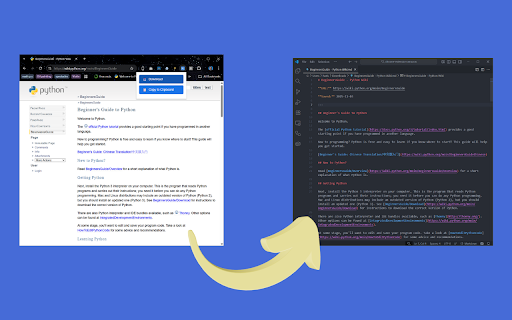
About
Transform any web article into beautifully formatted Markdown with a single click. Get Markdown uses your browser's Readability technology to extract the main content from web pages, removing ads, navigation, and clutter.

**✨ Key Features:**

• **Reader Mode Extraction** - Intelligently identifies and extracts the main article content, filtering out ads, sidebars, and navigation
• **Clean Markdown Formatting** - Preserves tables, code blocks, lists, headings, and text formatting
• **One-Click Download** - Simply click the toolbar icon to save the current page as a .md file
• **Rich Metadata** - Automatically includes article title, author, source, URL, and save date
• **Smart Filenames** - Generates clean, readable filenames from page titles

**📝 Perfect For:**

~ Vibe coders, when you have supply extra context from a web page to your AI coding agent like Gemini CLI, Claude Code, Codex, etc.
• Researchers and students archiving articles
• Content creators building reference libraries
• Developers documenting technical guides
• Note-takers using Markdown-based systems (Obsidian, Notion, etc.)
• Anyone who wants clean, portable text versions of web content

**🚀 How It Works:**

1. Navigate to any article, blog post, or web page
2. Click the extension icon in your toolbar
3. The page is automatically converted to Markdown and downloaded
4. Open the .md file in your favorite text editor or Markdown app

**🎯 What Gets Extracted:**

✓ Article title and headings
✓ Paragraphs with proper formatting
✓ Tables with alignment preserved
✓ Code blocks with syntax highlighting indicators
✓ Links and images
✓ Lists (ordered and unordered)
✓ Blockquotes
✓ Author byline and publication info

**⚙️ Technical Details:**

- Uses Readability library
- Converts HTML to Markdown with Turndown
- Works on most article and blog sites
- Respects content structure and formatting
- No data sent to external servers - all processing happens locally in your browser

**🔒 Privacy:**

Your data stays on your device. This extension doesn't collect, transmit, or store any personal information or browsing data. Content is processed entirely within your browser.

**💡 Tips:**

- Works best on article pages, blog posts, and documentation sites
- Wait for pages to fully load before clicking the icon
- Some content-protected sites may not extract properly
- JavaScript-heavy sites may require scrolling to load all content first

**📋 Output Format Example:**

```
# Article Title
**By:** Author Name
**Source:** Website Name
**URL:** https://example.com/article
**Saved:** 2025-10-29
---

Article content in clean Markdown format...
```
Technical
- Version
- 1.1.0
- Manifest
- V3
- Size
- 27.71KiB
- Min Chrome
- 88
- Languages
- 1
- Featured
- No
Metadata
- ID
- fkecbfbndmnajomdcemkigcecoigalcm
- Developer ID
- ue525d1e7559fa3832b258ab1e8c93580
- Developer Email
- [email protected]
- Created
- Nov 5, 2025
- Last Updated (Store)
- Nov 8, 2025
- Last Scraped
- Jun 3, 2026
- Website
- —
- Support URL
- —
- Privacy Policy
- —
Similar extensions
Alternatives to Get Markdown, ranked by description similarity.

Markdown It
Copy any webpage as Markdown with a single click
29
★ 5.0

Markdown Extractor
Extract web content to clean Markdown with one click. Side panel for easy access.
61
★ 5.0

Web to Markdown
Save any web page as a Markdown file with one click
15

Webpage to Markdown
Convert any webpage to clean markdown with one click. Extract article content and download or copy as markdown.
74
★ 5.0

Click to Markdown
Toggle inspector mode to click any element and copy its content as Markdown
7

Copy as Markdown
Copy selected text as Markdown or Redmine Wiki format while preserving formatting
10

HTML to Markdown Converter
Convert HTML content to Markdown format with advanced formatting support
4.0K
★ 5.0

URL 2 Markdown
Convert the current page into clean Markdown. Copy to clipboard or download a .md file.
58
Data sourced from the Chrome Web Store · last verified Jun 3, 2026.